Getting started
Getting started
13
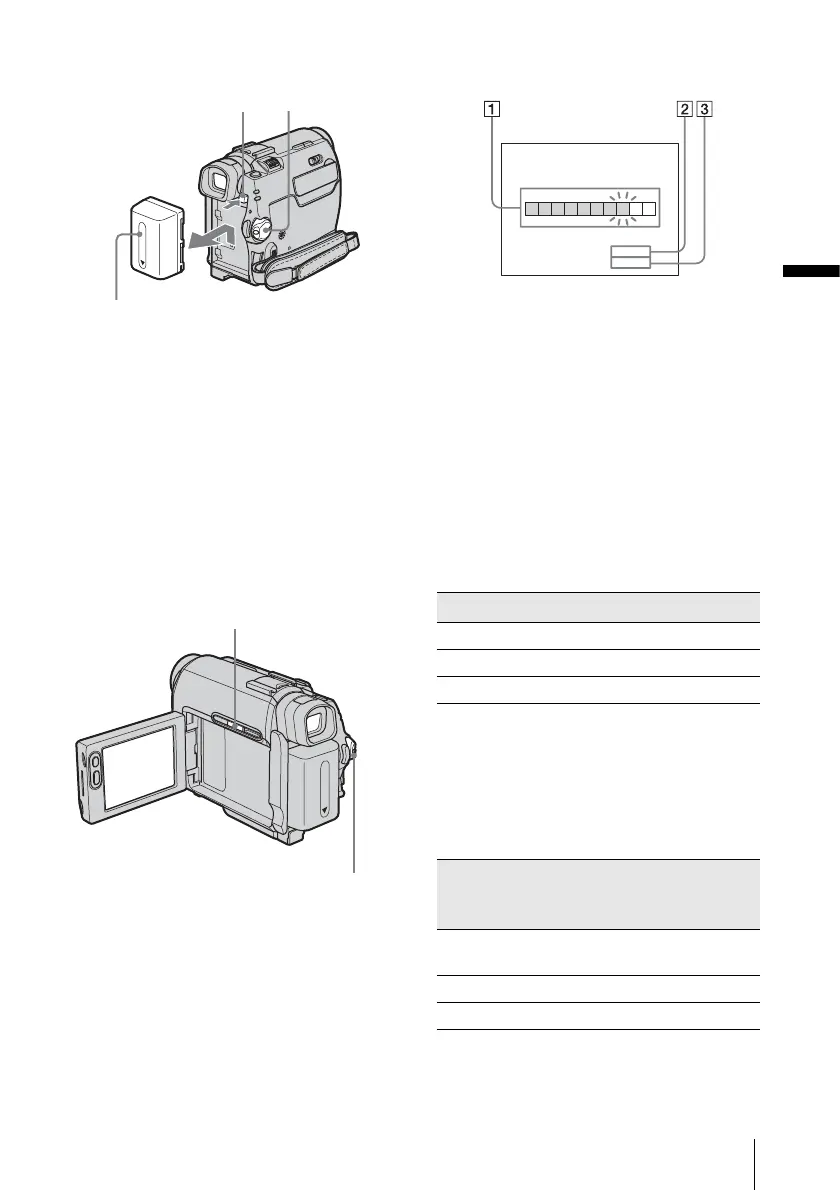
To remove the battery pack
1
Set the POWER switch to OFF (CHG).
2 Slide the battery pack out in the direction
of the arrow while pressing the BATT
(battery) release button down.
b Note
• If you do not use the battery pack for a long time, use
up the battery pack completely before storing it. See
page 83 about storage of the battery pack.
To check the remaining battery – Battery
Info
You can check the battery’s current charge level
and its current remaining recording time both
during charging or when the power is turned off.
1 Set the POWER switch to OFF (CHG).
2 Open the LCD panel.
3 Press DSPL/BATT INFO.
The battery information appears for about 7
seconds.
Keep the button pressed to view it for about
20 seconds.
A Battery charge level: Displays
approximate remaining amount of
power left in the battery pack.
B Approximate possible recording time
using the LCD panel.
C Approximate possible recording time
using the viewfinder.
Charging time
Approximate number of minutes required when
you fully charge a fully discharged battery pack
at 25°C (77°F). (10 – 30°C (50 – 86°F)
recommended.)
Recording time when recording with the
LCD screen on
Approximate number of minutes available
when you use a fully charged battery pack at
25°C (77°F).
When LCD BACKLIGHT is set to ON
BATT (battery)
release button
POWER
switch
Battery pack
POWER switch
DSPL/BATT INFO
Battery pack
NP-FP50 (supplied) 125
NP-FP70 155
NP-FP90 220
Battery pack Continuous
recording
time
Typical*
recording
time
NP-FP50
(supplied)
110 60
NP-FP70 235 125
NP-FP90 415 225
BATTERY INFO
BATTERY CHARGE LEVEL
REC TIME AVAILABLE
LCD SCREEN
VIEWFINDER
:
:
88
100
min
min
0% 50%
100%
,continued








 To Next Page