Recording
Recording
21
Recording
Recording movies
Before recording, follow steps 1 to 7 in
“Getting started” (p. 11 - p. 20).
When you are recording, movies will be
recorded along with stereo sound.
z Tip
• Performing Easy Handycam operation, even first
time users can record easily. For details, see page 25.
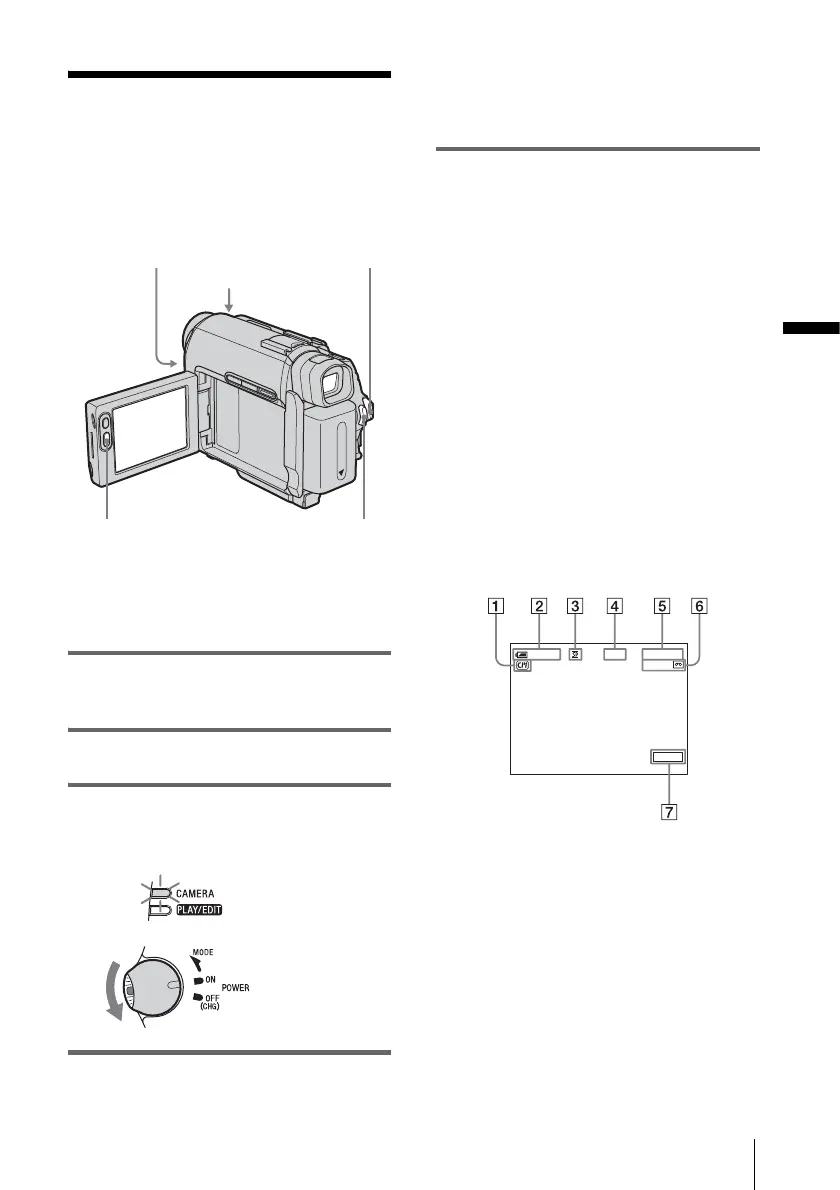
1 Set the LENS COVER switch to
OPEN.
2 Open the LCD panel.
3 Slide the POWER switch until the
CAMERA lamp lights up.
Your camcorder is set to the standby mode.
4 Press REC START/STOP.
Recording starts. [REC] appears on the
LCD screen and the Camera recording lamp
lights up.
Press REC START/STOP again to stop
recording.
To turn the power off
Slide the POWER switch up to OFF (CHG),
then set the LENS COVER switch to CLOSE.
z Tips
• If you do not use your camcorder for a long time,
remove the cassette and store it.
• You can also record movies by pressing REC
START/STOP beside the LCD screen. It is useful
for recording from a low angle or recording yourself
in mirror mode.
• To press REC START/STOP beside the LCD
screen, support the LCD panel with your hand.
• If you install a large capacity battery pack (NP-
FP70/FP90) on your camcorder, we recommend
recording with the LCD screen.
Indicators displayed during recording
The indicators will not be recorded on the tape.
Date/time and the camera settings data (p. 37)
will not be displayed during recording.
A Indicators for Cassette Memory cassettes
B Remaining battery
The indicated time may not be correct
depending on the environment of use.
When you opened or closed the LCD panel,
it takes about 1 minute to display the correct
remaining battery time.
C Recording mode (SP or LP)
D Recording status ([STBY] (standby) or
[REC] (recording))
REC START/STO
Camera recording lamp
LENS COVER switch
REC START/STOP
POWER switch
Slide the POWER
switch while
pressing the green
button.
0:00:00REC60min
60min
FN
,continued








 To Next Page