Getting started
18
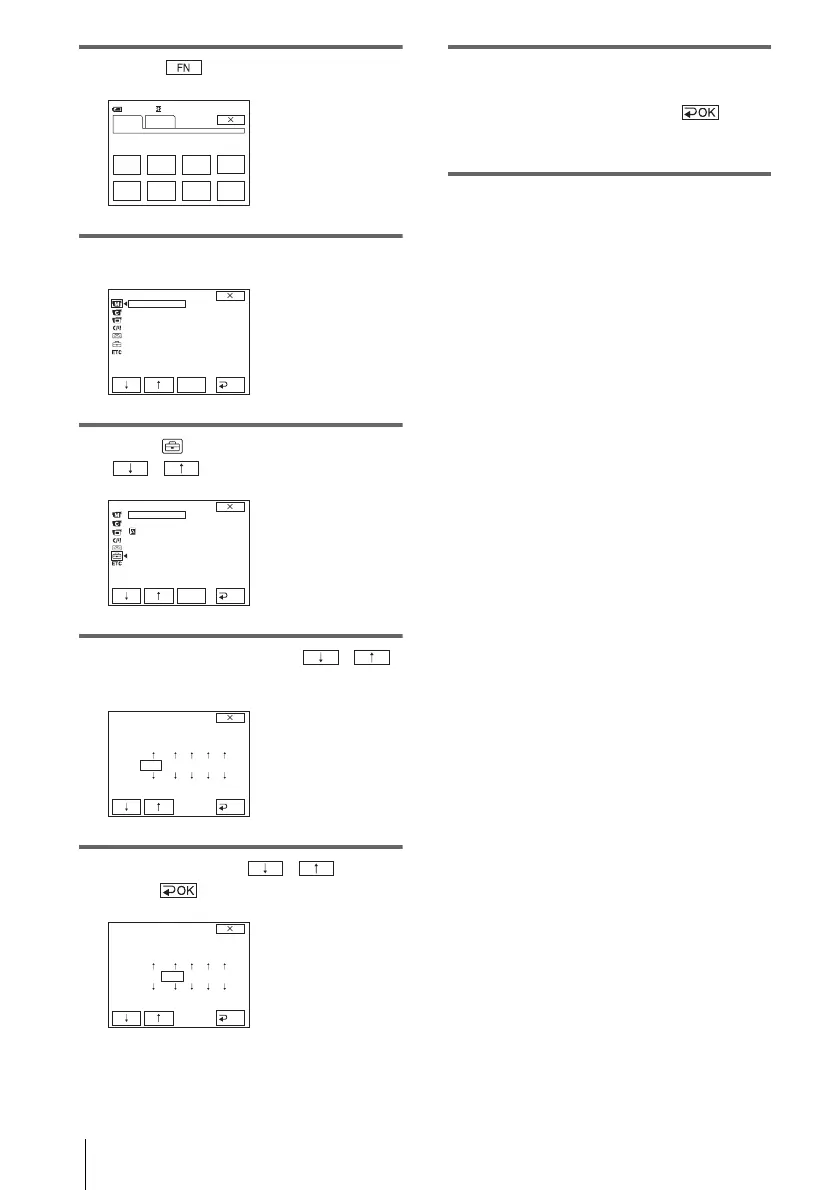
3 Touch to display PAGE1.
4 Touch MENU.
5 Select (SETUP MENU) with
/ , then touch EXEC.
6 Select CLOCK SET with / ,
then touch EXEC.
7 Set Y (year) with / , then
touch .
You can set any year up to the year 2079.
8 Set M (month), D (day), H (hour) and
M (minute) in the same way as was
done in step 7, then touch .
For midnight, set it to 12:00AM. For
midday, set it to 12:00PM.
0:00:00
SPOT
FOCUS
FOCUS WHT
BAL
MENU FADER END
SCH
EXPO–
SURE
SPOT
METER
PAGE1 PAGE2
60min
MANUAL SET
PROGRAM AE
P EFFECT
FLASH
MODE
FLASH
LVL
AUTO
SHTR
EXEC
RET.
SETUP MENU
CLOCK SET
USB STREAM
LANGUAGE
DEMO MODE
EXEC
RET.
--
:
--
:
--
CLOCK SET
YMDHM
OK
2004
JAN
112
:
00
AM
CLOCK SET
OK
YMDH
M
2004
JAN
112
:
00
AM








 To Next Page