Messaging settings
To change your message notification settings
1 From your Home screen, tap , then find and tap .
2 Tap , then tap Settings.
3 To set a notification sound, tap Notification tone and select an option.
4 For other notification settings, check or uncheck the relevant checkboxes.
To activate delivery reporting for outgoing messages
1 From your Home screen, tap , then find and tap .
2 Tap , then tap Settings > Notification settings.
3 Mark the Delivery report checkbox.
Instant messaging and video chat
You can use the Google Hangouts™ instant messaging and video chat application on
your device to chat with friends who also use the application on computers, Android™
devices and other devices. You can turn any conversation into a video call with several
friends, and you can send messages to friends even when they are offline. You can also
view and share photos easily.
Before you start using Hangouts™, make sure that you have a working Internet
connection and a Google™ account. Go to http://support.google.com/hangouts and
click the "Hangouts on your Android" link to get more detailed information about how to
use this application.
The video call function only works on devices with a front camera.
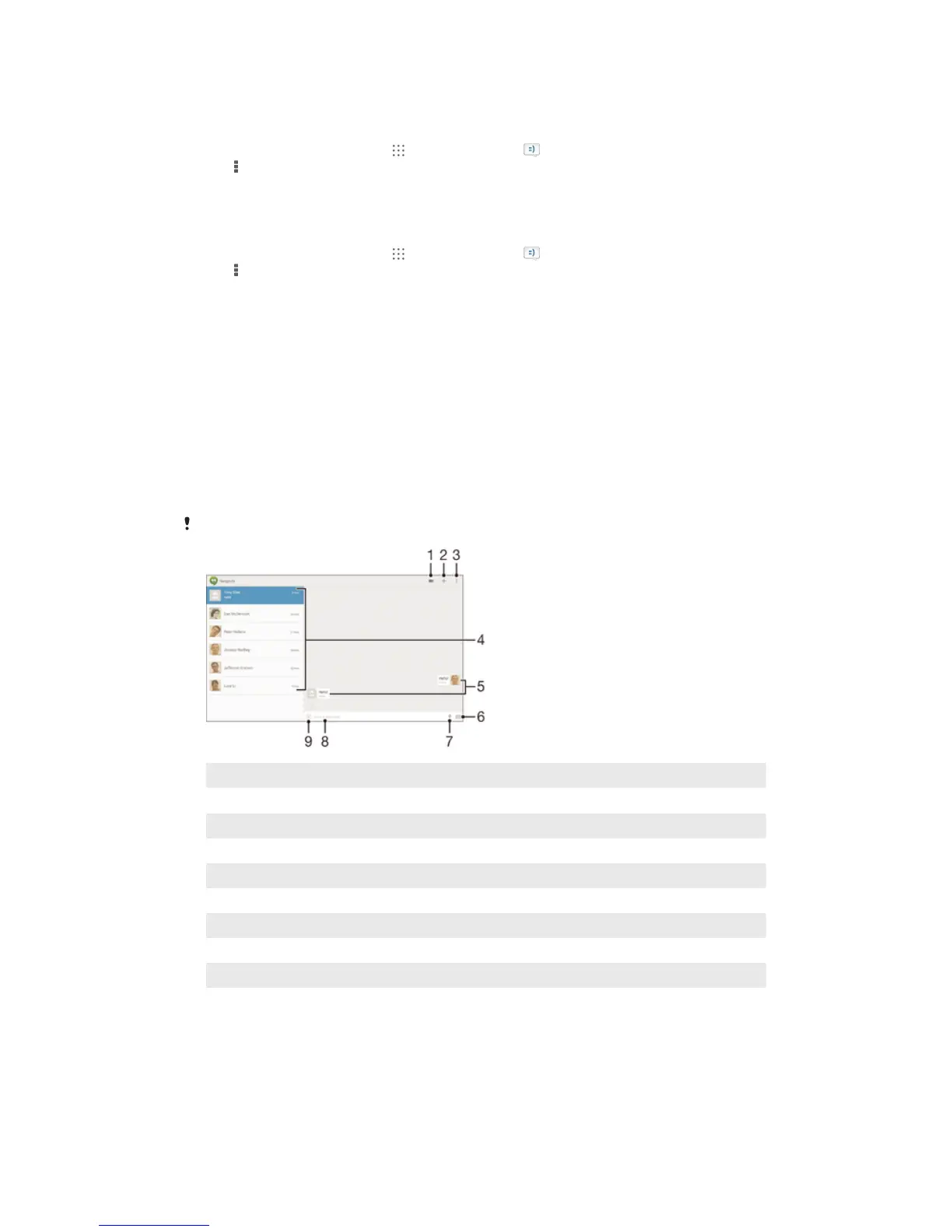
1 Start a video call
2 Add a new contact
3 View more options
4 List of contacts
5 Sent and received messages
6 Take a photo and attach it or attach a photo saved on your device
7 Attach a location
8 Tap to enter text
9 Select symbols and smileys
47
This is an Internet version of this publication. © Print only for private use.














 To Next Page