13 Speaker B (same as 4)
14 Port for charger/USB cable
15 Hole for attaching the charger port cover
16 SIM card slot
17 Memory card slot
18 Speaker A (same as 3)
19 NFC™ detection area
Assembly
A protective plastic sheet is attached to the screen. You should peel off this sheet before
using the touchscreen. Otherwise, the touchscreen might not function properly.
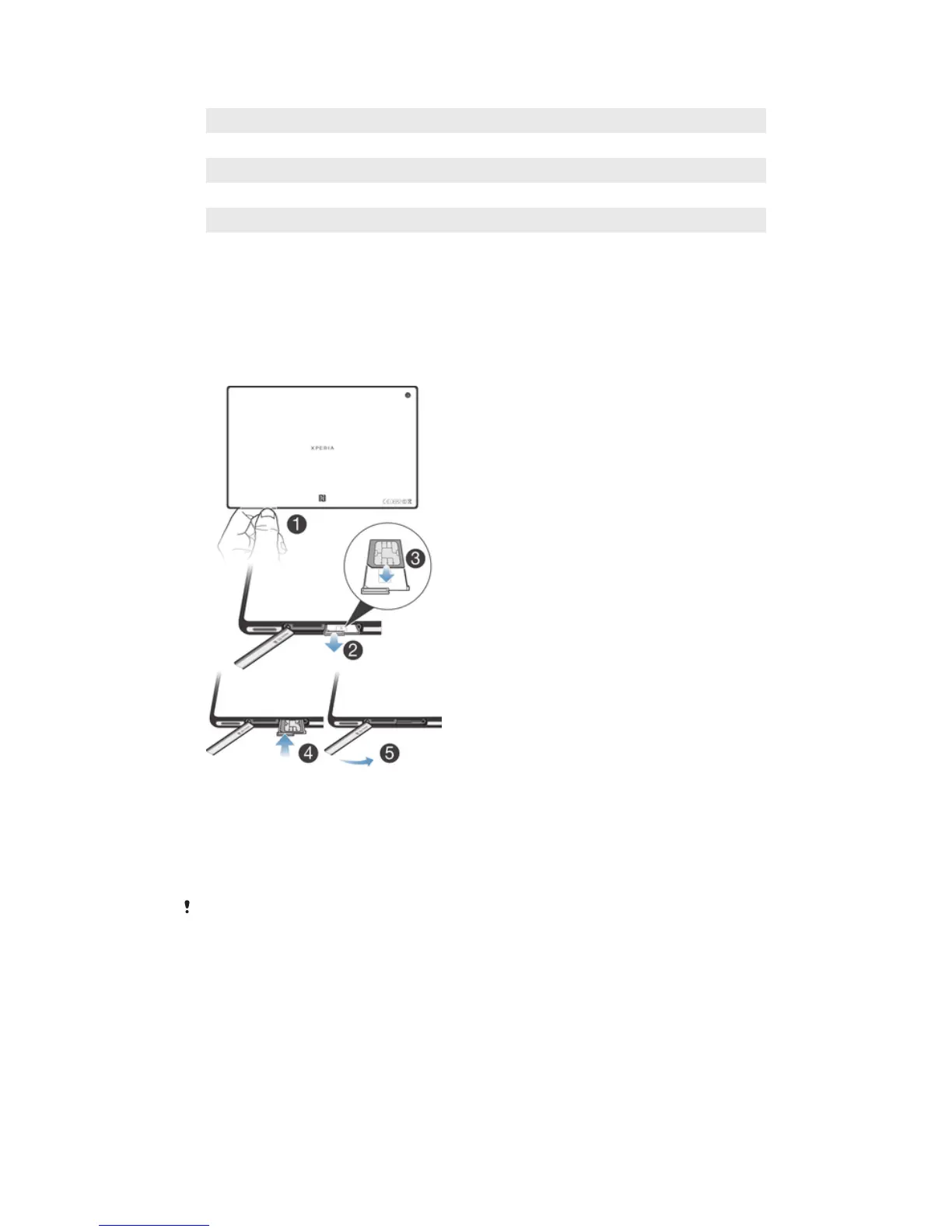
To insert the micro SIM card
1
Insert a fingernail into the gap between the micro SIM card slot cover and the
device, then detach the cover.
2 Using a fingernail, pull out the micro SIM card holder.
3 Place the micro SIM card on the holder, with the gold-colored contacts on the
micro SIM card facing up.
4 Insert the micro SIM card holder back into the device.
5 Re-attach the micro SIM card slot cover.
Inserting the micro SIM card into the device without the SIM card holder could damage your
micro SIM card or your device, and Sony Mobile does not warrant and will not be responsible
for any damage caused by such action.
7
This is an Internet version of this publication. © Print only for private use.














 To Next Page