EasyManua.ls Logo

Sony SLV-696HF - VCR Channel Presetting; Automatic Channel Scan and Store

Sony SLV-696HF
75 pages
Print Icon
To Next Page IconTo Next Page
To Previous Page IconTo Previous Page
Loading...
Presetting
the
Active
Channels
channels
14
to
69
and
CATV
channels
1
to
125.
These
@
Tum
ON
the
VCR
and
the
TV.
@
If
you
have
connected
the
TV
and
the
VCR
using
the
VHF/UHF
OUT
on
the
VCR
only,
make
sure
that
the
TV
is
set
to
the
correct
channel
(CH
3
or
CH
4)
for
the
VCR.
channels
can
be
preset
using
the
Remote
Commander
and
the
TUNER
PRESET
display.
First,
we
recommend
that
you
preset
the
active
channels
in
your
area
using
the
autematic
preset
mode.
Then,
if
there
are
any
unwanted
channels,
disable
them
manually.
If
you
have
already
decided
which
e
Press
TV/VTR
to
display
the
VTR
indicator
in
the
display
channels
you
wish
to
preset
on
the
VCR,
set
them
directly
window
on
the
VCR.
using
the
channel
number
buttons.
@
Press
INPUT
SELECT
so
that
the
TUNER
indicator
and
channel
number
appear
in
the
display
window
on
the
VCR.
Presetting
All
Receivable
Channels
Automatically
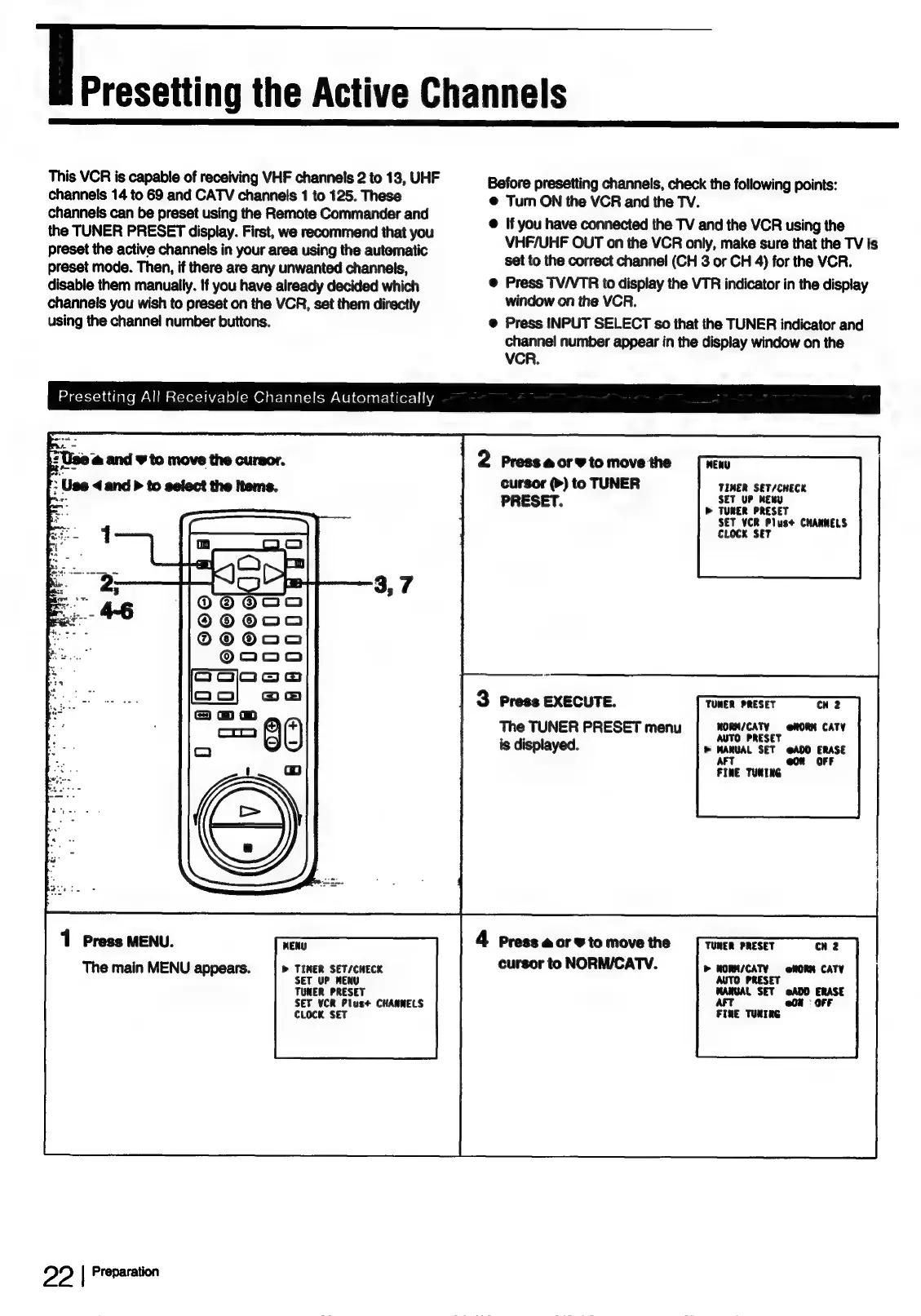
2
Press
@
or
9
to
move
the
cursor
(>)
to
TUNER
PRESET.
3
Press
EXECUTE.
The
TUNER
PRESET
menu
is
displayed.
1
Press
MENU.
MENU
4
Press
@
or
¥
to
move
the
The
main
MENU
appears.
|
>
Timer
set/cHeck
cursor
to
NORM/CATV.
SET
UP
MENU
TUNER
PRESET
SET
¥CR
Plus+
CHANNELS
CLOCK
SET
2?
|
Preparation
MENU
TIMER
SET/CHECK
SET
UP
MERU
D>
TUNER
PRESET
SET
VCR
Plus+
CHANNELS
CLocK
SET
TUMER
PRESET
cu
2
WORM/CATY
@RORM
CATY
AUTO
PRESET
>
MANUAL
SET
@ADD
ERASE
AFT
@on
OFF
FINE
TURING
TUNER
PRESET
CH
2
>
HORM/CATY
=
oNORM
CATY
AUTO
PRESET
MANUAL
SET
@ADD
ERASE
ArT
o0h
=
OFF
FINE
TUNING

Table of Contents