EasyManua.ls Logo

Sony SLV-696HF - Verifying Timer Recording Settings

Sony SLV-696HF
75 pages
Print Icon
To Next Page IconTo Next Page
To Previous Page IconTo Previous Page
Loading...
Timer
Recording
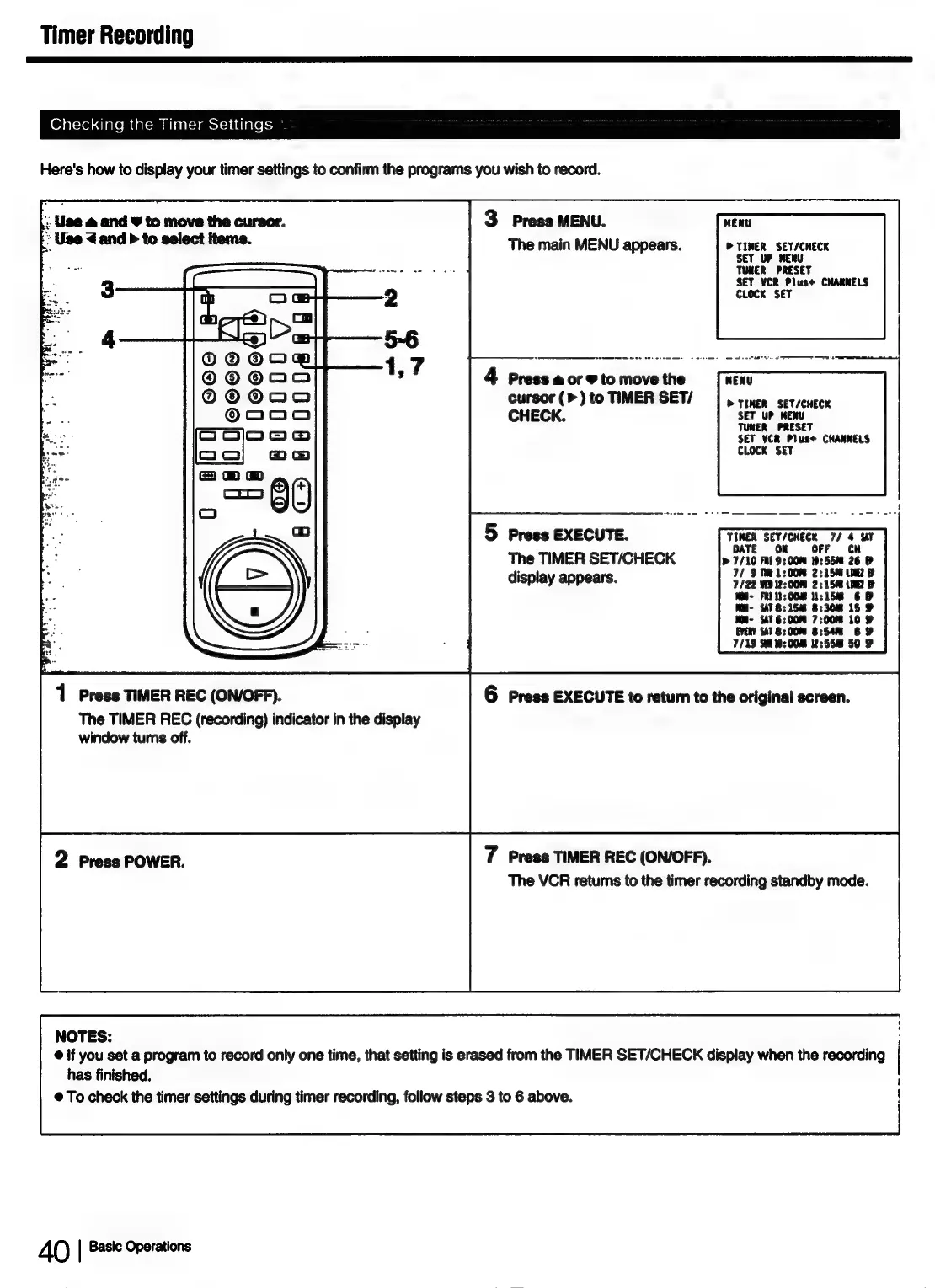
Checking
the
Timer
Settings
Here's
how
to
display
your
timer
settings
to
confirm
the
programs
you
wish
to
record.
|:
Use
&
and
¥
to
move
the
cursor.
3
Press
MENU.
WENU
“Use
<and
>
to
select
items.
The
main
MENU
appears.
PTINER
SET/CHECK
SET
UP
MENU
TUNER
PRESET
SET
YCR
Plus+
CHARNELS
CLOCK
SET
4
Press
a
or
¥
to
move
the
cursor
(>)
to
TIMER
SET/
|
riner
sev/cnece
UP
MENU
CHECK.
eT
TUNER
PRESET
SET VCR
Plus+
CHANNELS
CLOCK
SET
5
Press
EXECUTE.
The
TIMER
SET/CHECK
display
appears.
1
Press
TIMER
REC
(ON/OFF).
6
Press
EXECUTE
to
return
to
the
original
screen.
The
TIMER
REC
(recording)
indicator
in
the
display
window
turns
off.
2
Press
POWER.
7
Press
TIMER
REC
(ON/OFF).
The
VCR
retums
to
the
timer
recording
standby
mode.
NOTES:
©
if
you
set
a
program
to
record
only
one
time,
that
setting
is
erased
from
the
TIMER
SET/CHECK
display
when
the
recording
has
finished.
@
To
check
the
timer
settings
during
timer
recording,
follow
steps
3
to
6
above.
40
|
Basic
Operations

Table of Contents