EasyManua.ls Logo

Sony SLV-696HF - Mixed Hi-Fi and Normal Track Sound Playback

Sony SLV-696HF
75 pages
Print Icon
To Next Page IconTo Next Page
To Previous Page IconTo Previous Page
Loading...
Playback
SSS
SSS
a
a
a
a
a
a
a
a
I
a
TT
ES
a
IS
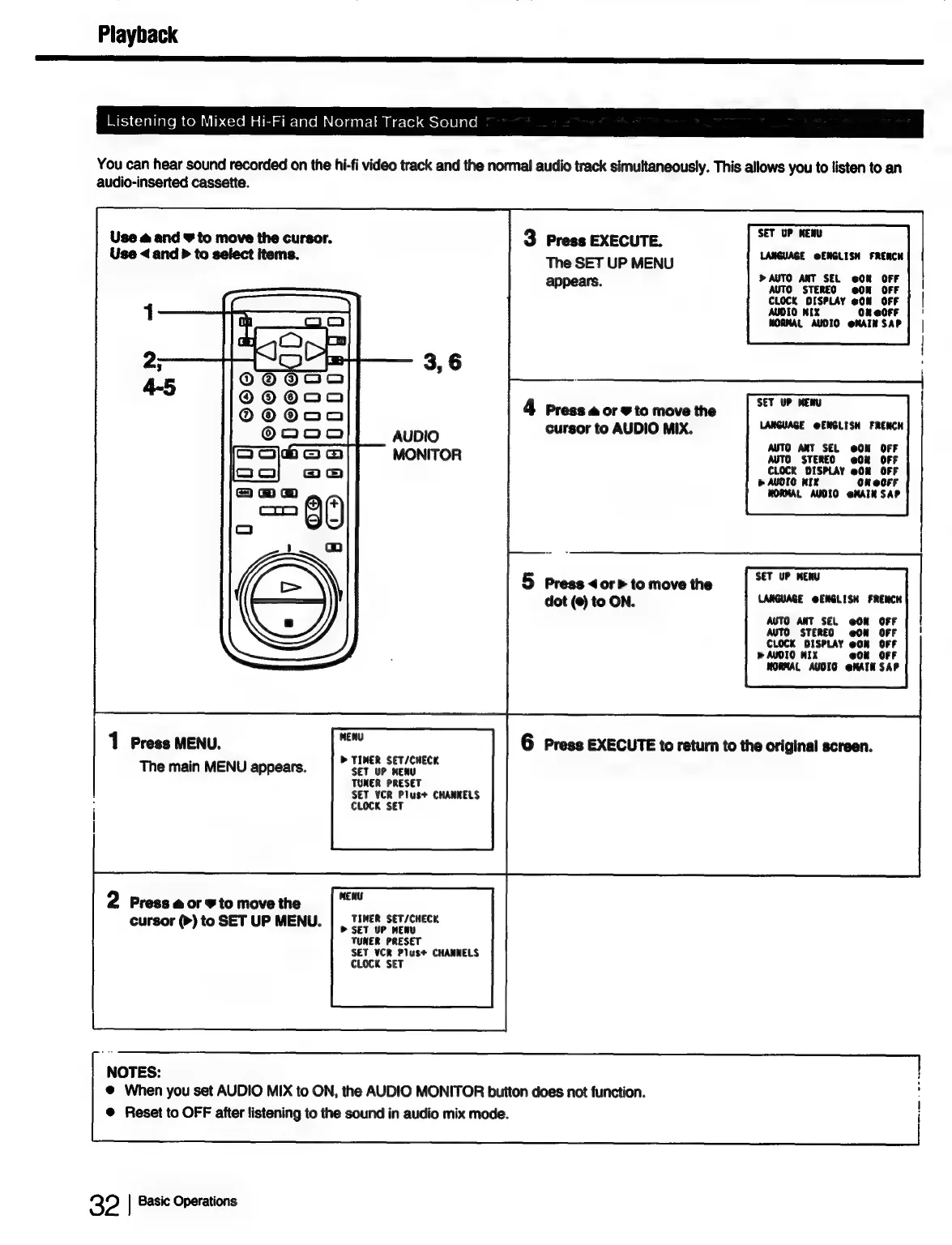
Listening
to
Mixed
Hi-Fi
and
Normal
Track
Sound
You
can
hear
sound
recorded
on
the
hi-fi
video
track
and
the
normal
audio
track
simultaneously.
This
allows
you
to
listen
to
an
audio-inserted
cassette.
Use
@
and
9
to
move
the
cursor.
3
Press
EXECUTE.
SET
UP
MENU
Use
<
and
P
to
select
items.
The
SET
UP
MENU
LANGUAGE
@ENGLISH
FREACH
AUTO
ANT
SEL
@OR
OFF
appears.
AUTO
STEREO
@ON
CLOCK
DISPLAY
eCm
AUDIO
MIX
OR
eOFF
HORMAL
AUDIO
@MAIN
SAP
3,6
4
Press
aore
to
move
the
as
cursor
to
AUDIO
MIX.
LANGUAGE
@ENGLISH
FRENCH
AUTO
ANT
SEL
@ON
OFF
AUTO
STEREO
@0%
OFF
CLOCK
DISPLAY
08
OFF
>
AUOIO
MIX
On
@OrF
WORMAL
AUDIO
@HAIN
SAP
AUDIO
MONITOR
5
Press
<or
>
to
move
the
elie
ass
dot
(@)
to
ON.
LANGUAGE
@ENGLISH
FRENCH
AUTO
ANT
SEL
@ON
OFF
AUTO
STEREO
@0N
OFF
foots
oo
@On
OFF
»
AUDI
@0ON
OFF
WORMAL
AUDIO
@NAIN
SAP
1
Press
MENU.
me
6
Press
EXECUTE
to
return
to
the
original
screen.
.
>
TIMER
HECK
The
main
MENU
appears.
cf
ir
aes
TUNER
PRESET
SET VCR
Plus+
CHANNELS
CLOCK
SET
MENU
2
Press
aor
to
move
the
TIMER
SET/CHECK
cursor
(>)
to
SET
UP
MENU.
peer
up
mene
TUNER
PRESET
SET
VCR
Plus+
CHANNELS
CLOCK
SET
NOTES:
|
@
When
you
set
AUDIO
MIX
to
ON,
the
AUDIO
MONITOR
button
does
not
function.
|
@
Reset
to
OFF
after
listening
to
the
sound
in
audio
mix
mode.
i
32
|
Basic
Operations

Table of Contents