EasyManua.ls Logo

Sony SLV-696HF - VCR Recording with TV Off; Watch TV While Recording Another Program; Recording MTS Broadcasts

Sony SLV-696HF
75 pages
Print Icon
To Next Page IconTo Next Page
To Previous Page IconTo Previous Page
Loading...
Recording
with
the
TV
Off
i'Fc)colalio
lem
@lalcam
M'
am
egele|
clan
Anil
ism
atcexe)
cellars]
Another
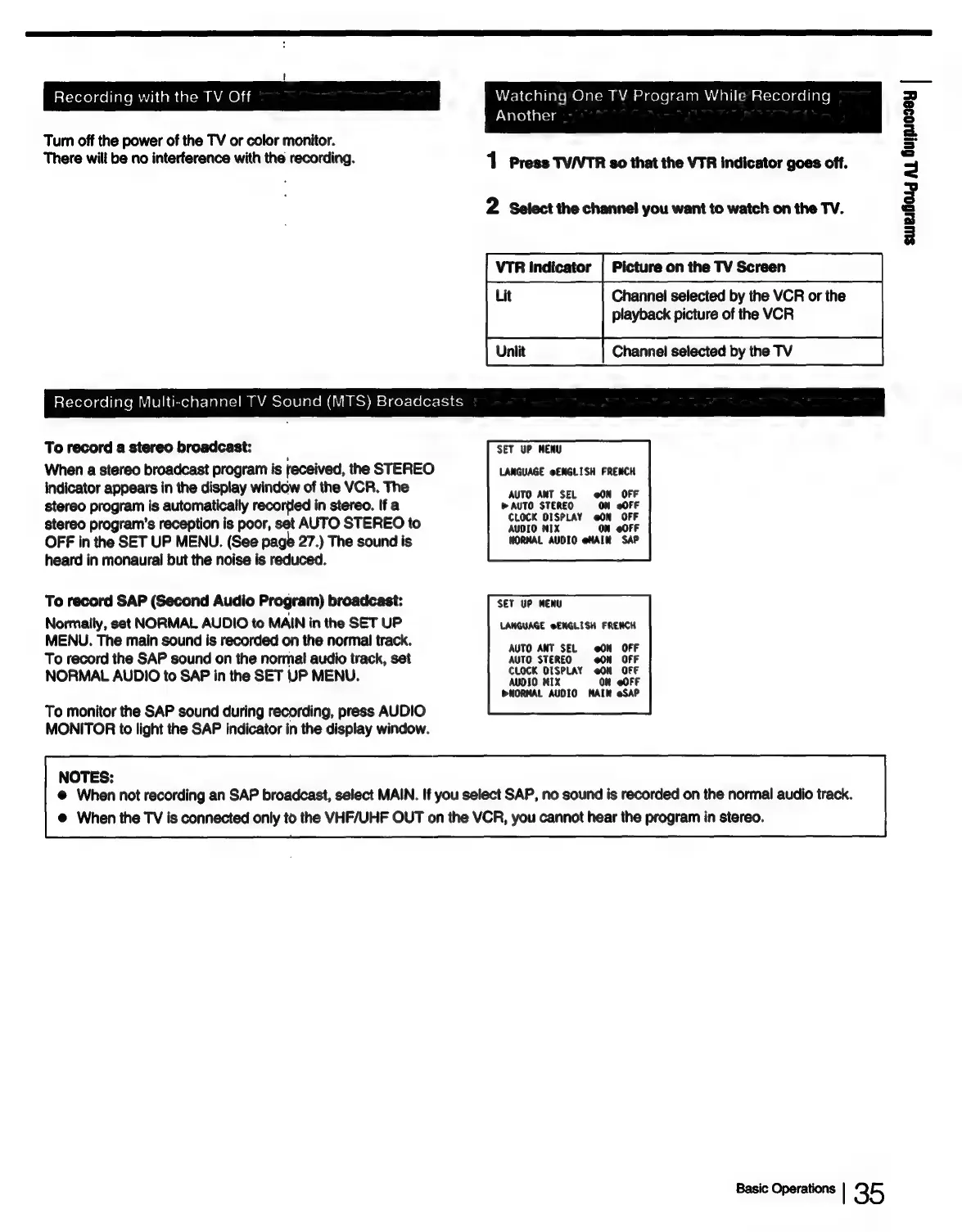
Turn
off
the
power
of
the
TV
or
color
monitor.
There
will
be
no
interference
with
the
recording.
1
Press
TVVTR
so
that
the
VTR
indicator
goes
off.
2
Select
the
channel
you
want
to
watch
on
the TV.
VTR
Indicator
|
Picture
on
the
TV
Screen
Channel
selected
by
the
VCR
or
the
playback
picture
of
the
VCR
Unilit
Channel
selected
by
the
TV
Recording
Multi-channel
TV
Sound
(MTS)
Broadcasts
To
record
a
stereo
broadcast:
SET
UP
MENU
When
a
stereo
broadcast
program
is
received,
the
STEREO
LANGUAGE
@ENGLISH
FRENCH
indicator
appears
in
the
display
window
of
the
VCR.
The
Sito
Aut
SEk
see
BER
stereo
program
is
automatically
recortied
in
stereo.
If
a
PAUTO
STEREO
ON
@OFF
stereo
program's
reception
is
poor,
set
AUTO
STEREO
to
pare
mie
on
uoek
OFF
in
the
SET
UP
MENU.
(See
page
27.)
The
sound
is
MORMAL
AUDIO
eMAIN.
SAP
heard
in
monaural
but
the
noise
is
reduced.
To
record
SAP
(Second
Audio
Program)
broadcast:
SET
UP
MENU
Normaily,
set
NORMAL
AUDIO
to
MAIN
in
the
SET
UP
LANGUAGE
@ENGLISH
FRENCH
MENU.
The
main
sound
is
recorded
on
the
normal
track.
pio:
Aitn
SEL.
“a0k
OE
To
record
the
SAP
sound
on
the
normal
audio
track,
set
AUTO
STEREO
@ON
OFF
NORMAL
AUDIO
to
SAP
in
the
SET
UP
MENU.
prep
teaea
errs
abe
AUDIO
MIX
ON
@OFF
DNORMAL
AUDIO
MAIN
@SAP
To
monitor
the
SAP
sound
during
recording,
press
AUDIO
MONITOR
to
light
the
SAP
indicator
in
the
display
window.
NOTES:
@
When
not
recording
an
SAP
broadcast,
select
MAIN.
If
you
select
SAP,
no
sound
is
recorded
on
the
normal
audio
track.
@
When
the
TV
is
connected
only
to
the
VHF/UHF
OUT
on
the
VCR,
you
cannot
hear
the
program
in
stereo.
Basic
Operations
|
35
sweiGorg
AL
Guipsozey
|

Table of Contents