EasyManua.ls Logo

Sony SLV-696HF - Erasing VCR Index Signals

Sony SLV-696HF
75 pages
Print Icon
To Next Page IconTo Next Page
To Previous Page IconTo Previous Page
Loading...
index
Function
a
Re
st
eck-s)alemlalelsy
@slie]arelis
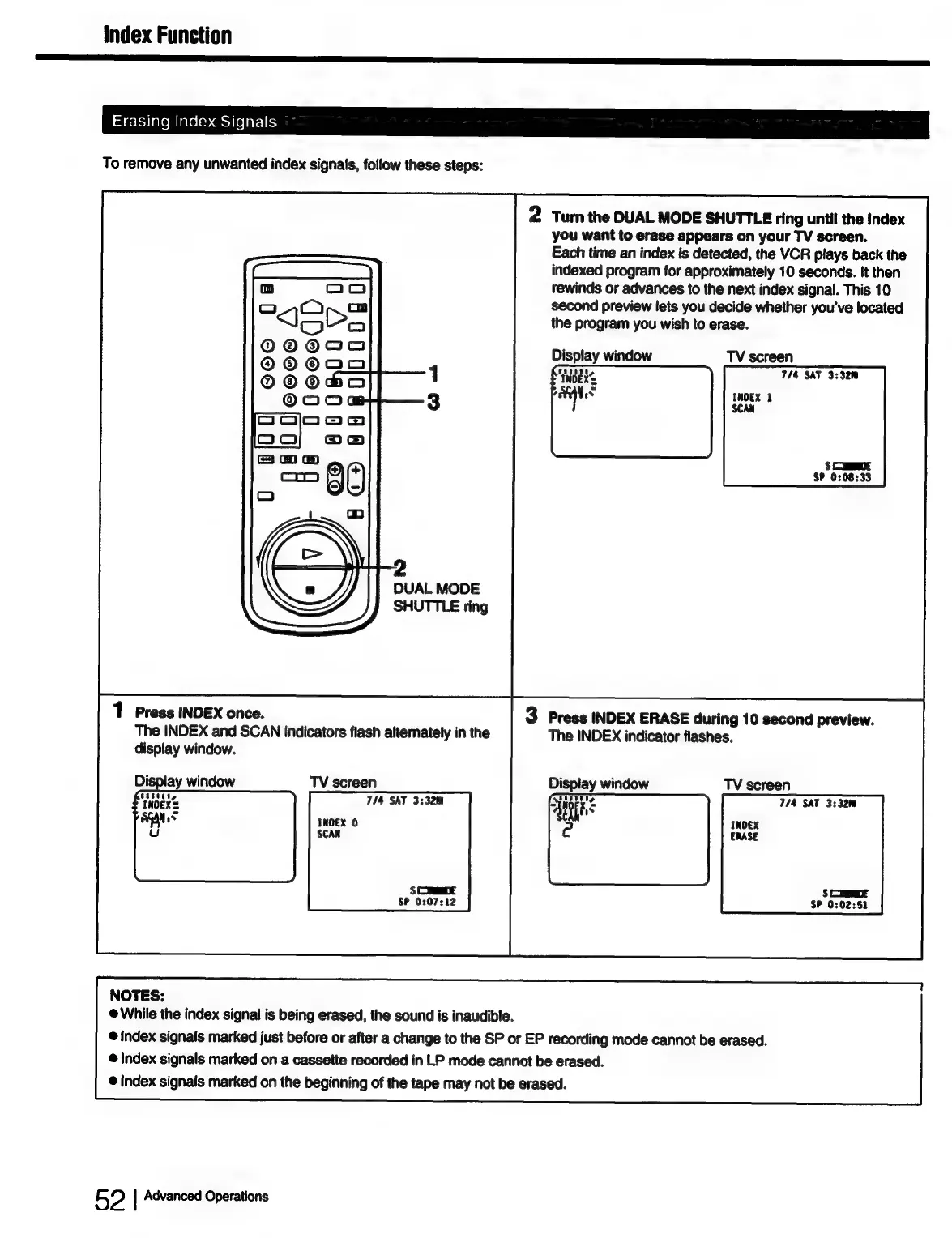
To
remove
any
unwanted
index
signals,
follow
these
steps:
2
Turn
the
DUAL
MODE
SHUTTLE
ring
until
the
index
you
want
to
erase
appears
on
your
TV
screen.
Each
time
an
index
is
detected,
the
VCR
plays
back
the
indexed
program
for
approximately
10
seconds.
It
then
rewinds
or
advances
to
the
next
index
signal.
This
10
second
preview
lets
you
decide
whether
you've
located
the
program
you
wish
to
erase.
Display
window
TV
screen
7/4 SAT
3:32m
INDEX
2
SCAN
DUAL
MODE
1
Press
INDEX
once.
3
Press
INDEX
ERASE
during
10
second
preview.
The
INDEX
and
SCAN
indicators
flash
alternately
in
the
The
INDEX
indicator
flashes.
display
window.
Display
window
TV
screen
714 SAT
3:32m
INDEX
0
SCAK
SCORE
S
CEE
SP
0:07:12
SP
0:02:51
NOTES:
@
While
the
index
signal
is
being
erased,
the
sound
is
inaudible.
@
index
signals
marked
just
before
or
after
a
change
to
the
SP
or
EP
recording
mode
cannot
be
erased.
@
Index
signals
marked
on
a
cassette
recorded
in
LP
mode
cannot
be
erased.
@
index
signals
marked
on
the
beginning
of
the
tape
may
not
be
erased.
52
|
Advanced
Operations

Table of Contents