EasyManua.ls Logo

Sony SLV-696HF - Page 44

Sony SLV-696HF
75 pages
Print Icon
To Next Page IconTo Next Page
To Previous Page IconTo Previous Page
Loading...
introducing
VCR
Plus+
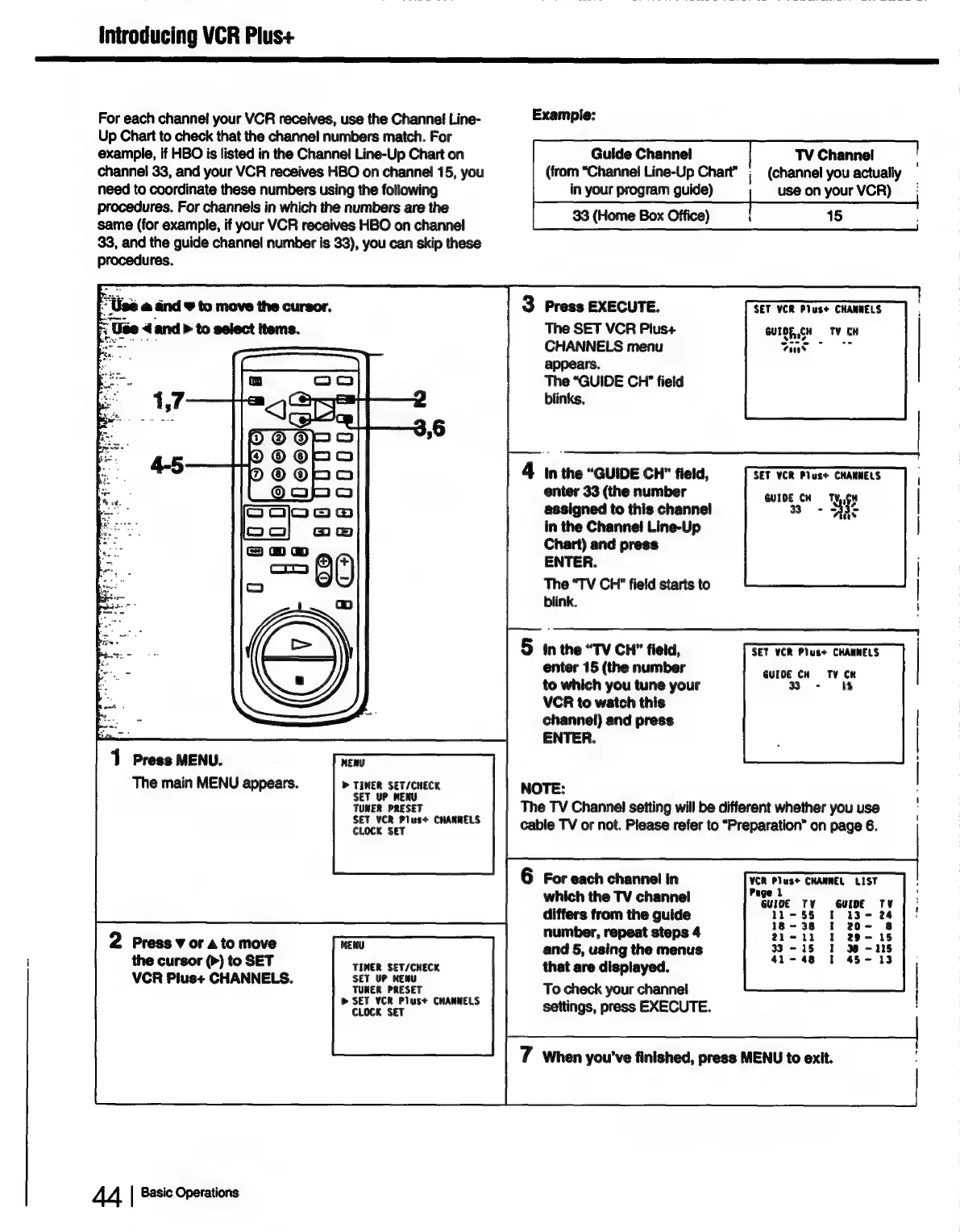
For
each
channel
your
VCR
receives,
use
the
Channel
Line-
Example:
Up
Chart
to
check
that
the
channel
numbers
match.
For
example,
if
HBO
is
listed
in
the
Channel
Line-Up
Chart
on
Guide
Channel!
TV
Channel
channel
33,
and
your
VCR
receives
HBO
on
channel!
15,
you
(from
“Channel
Line-Up
Chart”
;
(channel
you
actually
need
to
coordinate
these
numbers
using
the
following
in
your
program
guide)
use
on
your
VCR)
procedures.
For
channels
in
which
the
numbers
are
the
Office
same
(for
example,
if
your
VCR
receives
HBO
on
channel
se
(ome
Eee
)
33,
and
the
guide
channel
number
is
33),
you
can
skip
these
procedures.
Use
@
and
F
to
move
the
cursor.
3
Press
EXECUTE.
SET
VCR
Plus+
CHANNELS
7;
Use
and
>
to
select
items.
The
SET
VCR
Plus+
GUTOR,CH
TV
CH
CHANNELS
menu
foues
appears.
The
“GUIDE
CH”
field
blinks,
4
Inthe
“GUIDE
CH”
field,
enter
33
(the
number
assigned
to
this
channel
in
the
Channel
Line-Up
Chart)
and
press
ENTER.
oe
The
“TV
CH”
field
starts
to
a
blink.
\
en
ee
5
inthe
“TV
CH”
field,
SET
VCR
Plus+
CHANNELS
enter
15
(the
number
to
which
you
tune
your
VCR
to
watch
this
channel)
and
press
ENTER.
SET
YCR
Plus+
CHANNELS
GUIDE
CH
TY,,CH
33+
Bas
GUIDE
CH
TV
CR
330
-
iY)
1
Press
MENU.
The
main
MENU
appears.
MENU
>
TIMER
SET/CHECK
SET
UP
MENU
TUNER
PRESET
SET
VCR
Plus+
CHANNELS
CLOCK
SET
NOTE:
The
TV
Channel
setting
will
be
different
whether
you
use
cable
TV
or
not.
Please
refer
to
“Preparation”
on
page
6.
6
For
each
channel
in
VCR
Plus+
CHANNEL
LIST
which
the
TV
channel
:
eae
differs
from
the
guide
5
number,
repeat
steps
4
and
5,
using
the
menus
that
are
displayed.
To
check
your
channel
|
settings,
press
EXECUTE.
2
Press
¥
or
a
to
move
the
cursor
(>)
to
SET
VCR
Plus+
CHANNELS.
MENU
TIMER
SET/CHECK
SET
UP
KENU
TUNER
PRESET
®»
SET VCR
Plus+
CHANNELS
CLOCK
SET
7
When
you've
finished,
press
MENU
to
exit.
44
|
Basic
Operations

Table of Contents