EasyManua.ls Logo

Sony SLV-696HF - Audio;Video (A;V) VCR Hookup

Sony SLV-696HF
75 pages
Print Icon
To Next Page IconTo Next Page
To Previous Page IconTo Previous Page
Loading...
Hookup
1
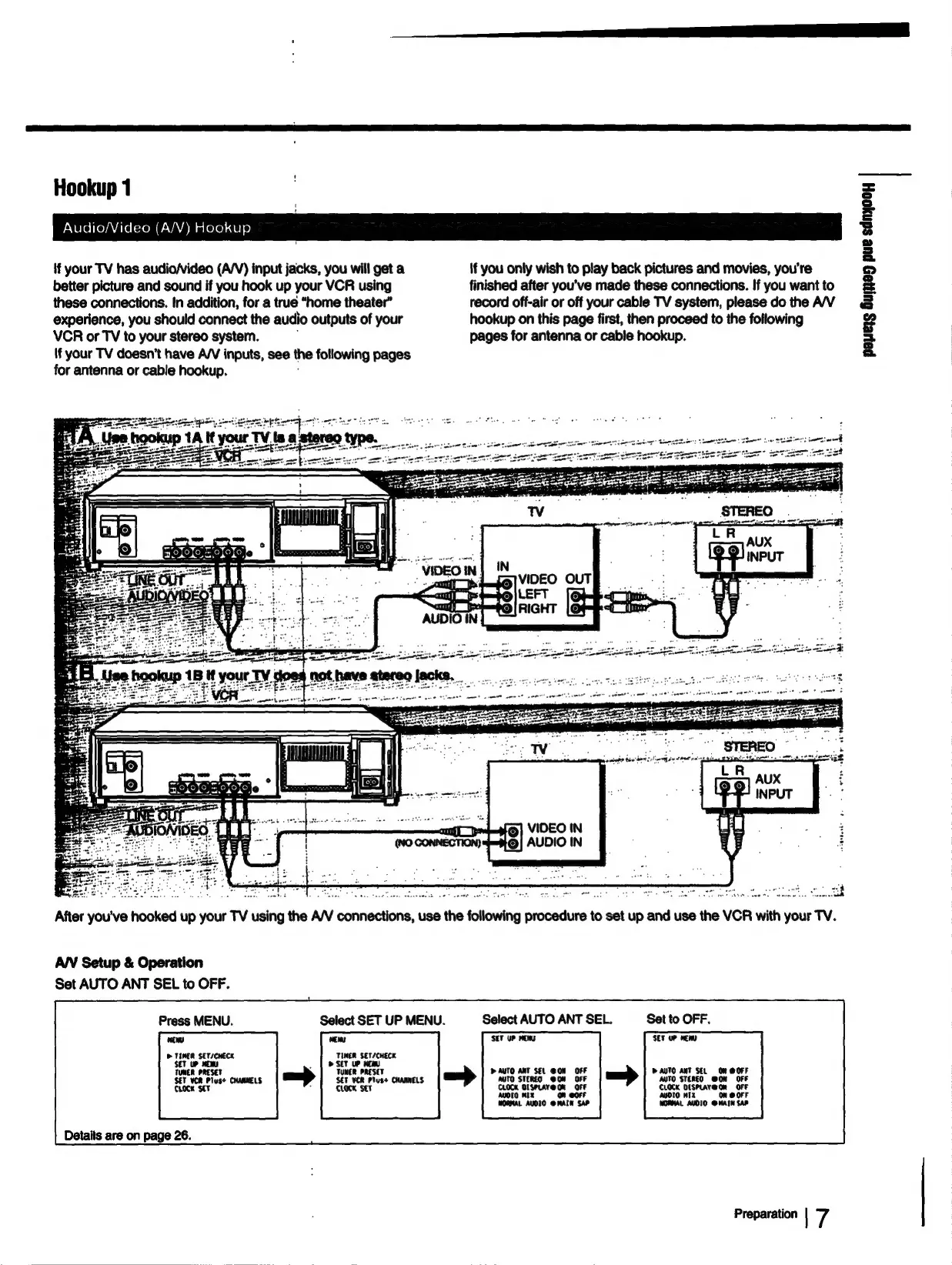
Audio/Video
(A/V)
Hookup
{f
your
TV
has
audio/video
(A/V)
input
jacks,
you
will
get
a
if
you
only
wish
to
play
back
pictures
and
movies,
you're
better
picture
and
sound
if
you
hook
up
your
VCR
using
finished
after
you’ve
made
these
connections.
If
you
want
to
these
connections.
In
addition,
for
a
true
“home
theater”
record
off-air
or
off
your
cable
TV
system,
please
do
the
A/V
experience,
you
should
connect
the
audio
outputs
of
your
hookup
on
this
page
first,
then
proceed
to
the
following
VCR
or
TV
to
your
stereo
system.
pages
for
antenna
or
cable
hookup.
(f
your
TV
doesn’t
have
A/V
inputs,
see
the
following
pages
for
antenna
or
cable
hookup.
0
pr
tae
a
pero
aigeere
Ut
After
you've
hooked
up
your
TV
using
the
A/V
connections,
use
the
following
procedure
to
set
up
and
use
the
VCR
with
your
TV.
AN
Setup
&
Operation
Set
AUTO
ANT
SEL
to
OFF.
Press
MENU.
Select
SET
UP
MENU.
Select
AUTO
ANT
SEL.
Set
to
OFF.
mew
vem
SET
UP
MEMS
SET
UP
HEM
>
TIMER
SET/CWECK
TUNER
ser/cutcx
>
TUNER
PRESET
;
TUNER
PRESET
»
AUTO
ANT
SEL
GON
or
D
AUTO
ANT
SEL
Om
@OFF
SET
VCR
Plus+
CHANNELS
SET
VER
Plus+
CHANNELS
MUTO
STEREO
GON
auto
Rlesy
oon
ore
CLOCK
SET
CLOCK
SET
CLOCK
O1SPLAY@
On
Orr
em
or
AUDIO
MIX
On
@OrF
WORMAL
AUDIO
@
MAIN
SAP
NORMAL
AUDIO
omin
sar
Details
are
on
page
26.
Preparation
|
7
papers
Guna
pue
sdnyooy

Table of Contents

Related product manuals