EasyManua.ls Logo

Sony SLV-696HF - Page 9

Sony SLV-696HF
75 pages
Print Icon
To Next Page IconTo Next Page
To Previous Page IconTo Previous Page
Loading...
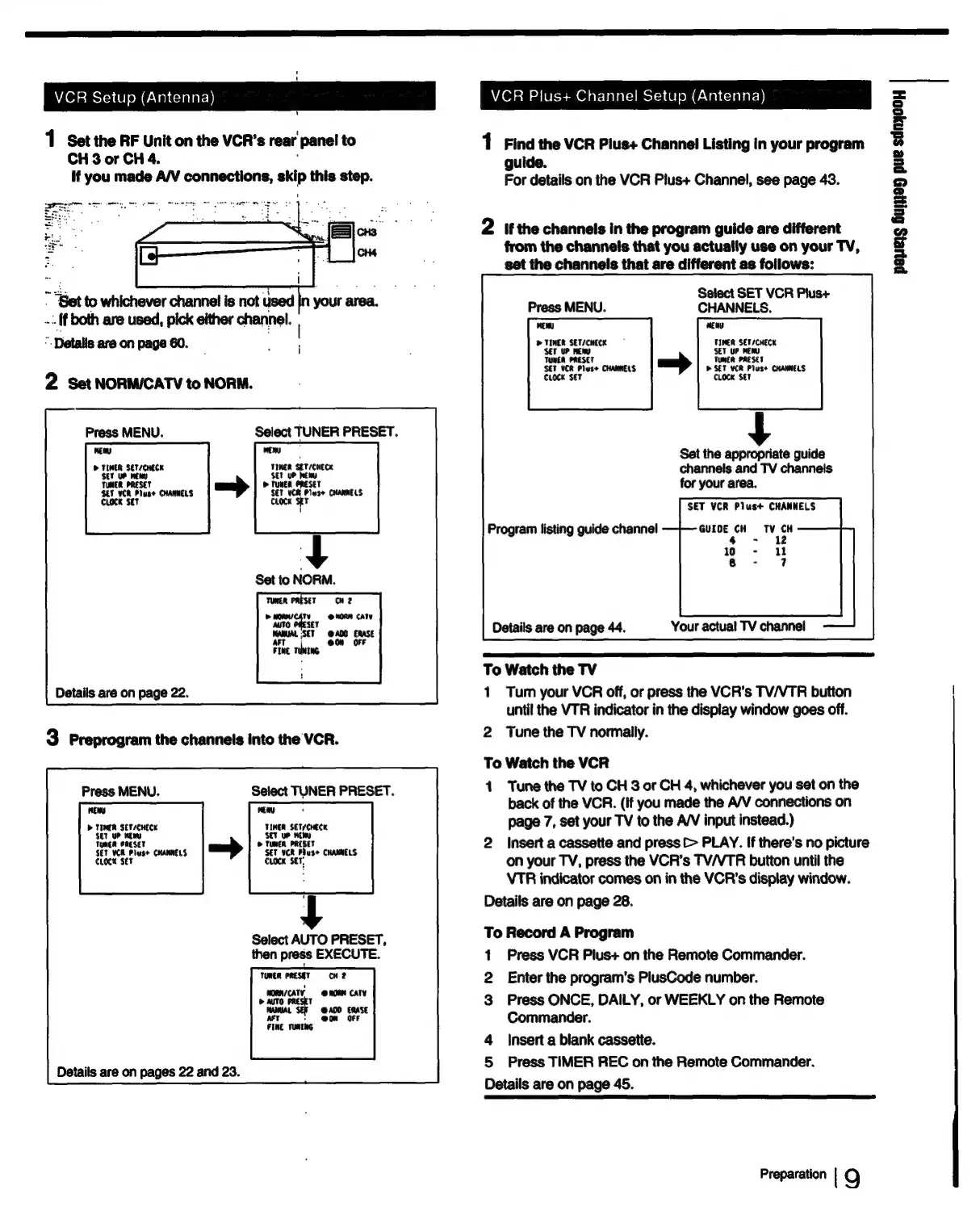
VCR
Setup
(Antenna)
1
Set
the
RF
Unit
on
the
VCR’s
rear
panel
to
CH
3
or
CH
4.
If
you
made
A/V
connections,
skip
this
step.
--
If
both
are
used,
pick
either
channel.
”.
Detalis
are
on
page
60.
2
Set
NORM/CATV
to
NORM.
Press
MENU.
Select
TUNER
PRESET.
nea
oo
>
TIMER
SET/CHECK
TIMER
SET/CHECK
TUNER
PRESET
»
Tunee
ORESE
SEF
VCR
Plus
CHANNELS
serv
a
Piese
CHANNELS
CLOCK
SET
Set
to
NORM.
CH
2
@NOAN
CATY
TO
AITO
RESET
AMAL
aT
@A00
ERASE
@0n
OFF
fine
rua
Details
are
on
page
22.
3
Preprogram
the
channels
into
the
VCR.
Press
MENU.
Select
TUNER
PRESET.
MENY Heny
.
D>
TIMER
SET/CHECK
TIMER
SET/CHECK
‘SET
UP
east
we
TUNER
PRESE
©
TUNER
PRI
SET
VCR
ieee
CKANNELS
set
vee
rhe
CHANNELS
set
CLOCK
CLOCK
Select
AUTO
PRESET,
then
press
EXECUTE.
TUNER
PRESET
cH
2
@
HORM
CATV
MANUAL
SEH
@
ADD
ERASE
AFT
+
@0n
OFF
FINE
TUNING
Details
are
on
pages
22
and
23.
Details
are
on
page
45.
VCR
Plus+
Channel
Setup
(Antenna)
1
Find
the
VCR
Plus+
Channel
Listing
in
your
program
guide.
For
details
on
the
VCR
Plus+
Channel,
see
page
43.
2
if
the
channels
in
the
program
guide
are
different
from
the
channels
that
you
actually
use
on
your
TV,
set
the
channels
that
are
different
as
follows:
Select
SET
VCR
Plus+
Press
MENU.
CHANNELS.
weENU
wen
>
ia
SET/CHECK
SET
UP
MEY
payers
Guyyey
pue
sdnyooy
Masi
SErscHece
SET
v
eee
Tul
McA
PRESET
Tonca
SET
VCR
Pluse
CHANNELS
>
SET
my
pluse
CHANNELS
CLOCK
SET
CLOCK
SET
Set
the
appropriate
guide
channels
and
TV
channels
for
your
area.
SET
VCR
Plus+
CHANNELS
Program
listing
guide
channel
GUIDE
CH
we
4
-
wo
-
«(1
8
-
7
Details
are
on
page
44.
Your
actual
TV
channel
To
Watch
the
TV
1
Tum
your
VCR
off,
or
press
the
VCR's
TV/VTR
button
until
the
VTR
indicator
in
the
dispiay
window
goes
off.
2
Tune
the
TV
normally.
To
Watch
the
VCR
1
Tune
the
TV
to
CH
3
or
CH
4,
whichever
you
set
on
the
back
of
the
VCR.
(If
you
made
the
A/V
connections
on
page
7,
set
your
TV
to
the
A/V
input
instead.)
2
Insert
a
cassette
and
press
>
PLAY.
If
there's
no
picture
on
your
TV,
press
the
VCR’s
TV/VTR
button
until
the
VTR
indicator
comes
on
in
the
VCR's
display
window.
Details
are
on
page
28.
To
Record
A
Program
1
Press
VCR
Plus+
on
the
Remote
Commander.
2
Enter
the
program's
PlusCode
number.
3
Press
ONCE,
DAILY,
or
WEEKLY
on
the
Remote
Commander.
4
Insert
a
blank
cassette.
5
Press
TIMER
REC
on
the
Remote
Commander.
Preparation
|
9

Table of Contents