Getting Started48
SLV-975HF 3-858-120-11 (1)
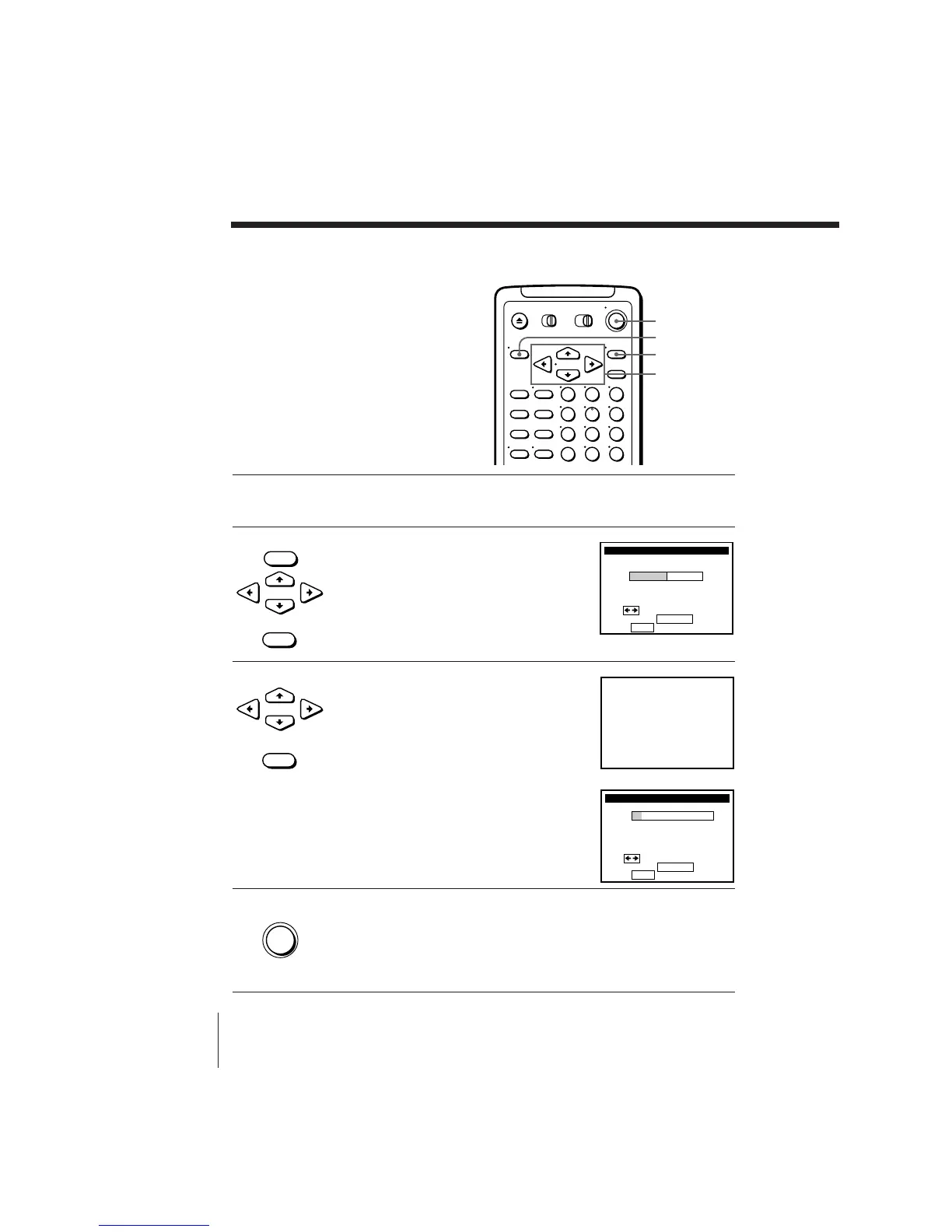
1 Set up the VCR using the EASY SET UP
function.
2 Press MENU, then press CURSOR >/. to
move the cursor to SET VCR Plus+
CHANNELS and press EXECUTE.
The SMART CHANNEL MAPPING menu
appears.
3 Press CURSOR ?// to select AUTO
and press EXECUTE.
The instruction shown on the right
appears on the TV screen for few seconds,
then the screen returns to the normal
display.
If the program information signal in your
area has several channel map patterns, the
Choose your Cable CH MAP menu
appears, and you must select the channel
map. See “To select the channel map” on
the next page.
4 Press POWER to turn off the VCR.
The VCR sets the program guide channels
from 0:00 am to 5:00 am while the VCR is
turned off. (It takes about 1 hour to
complete channel mapping.)
•
CURSOR
• EXECUTE
• MENU
•
CURSOR
• EXECUTE
Setting up VCR Plus+
automatically (Smart
Channel Mapping)
The VCR can automatically set the guide
channels in your area from ZIP CODE
you entered in EASY SET UP. The VCR
receives the program information signal
and renews the data everyday after you
complete the following procedure.
Setting up VCR Plus+ (continued)
• POWER
123
456
789
0
EXECUTE
POWER
MENU
CURSOR



 To Next Page