EasyManua.ls Logo

Sony SLV-E170EE - Page 10

Sony SLV-E170EE
116 pages
Print Icon
To Next Page IconTo Next Page
To Previous Page IconTo Previous Page
Loading...
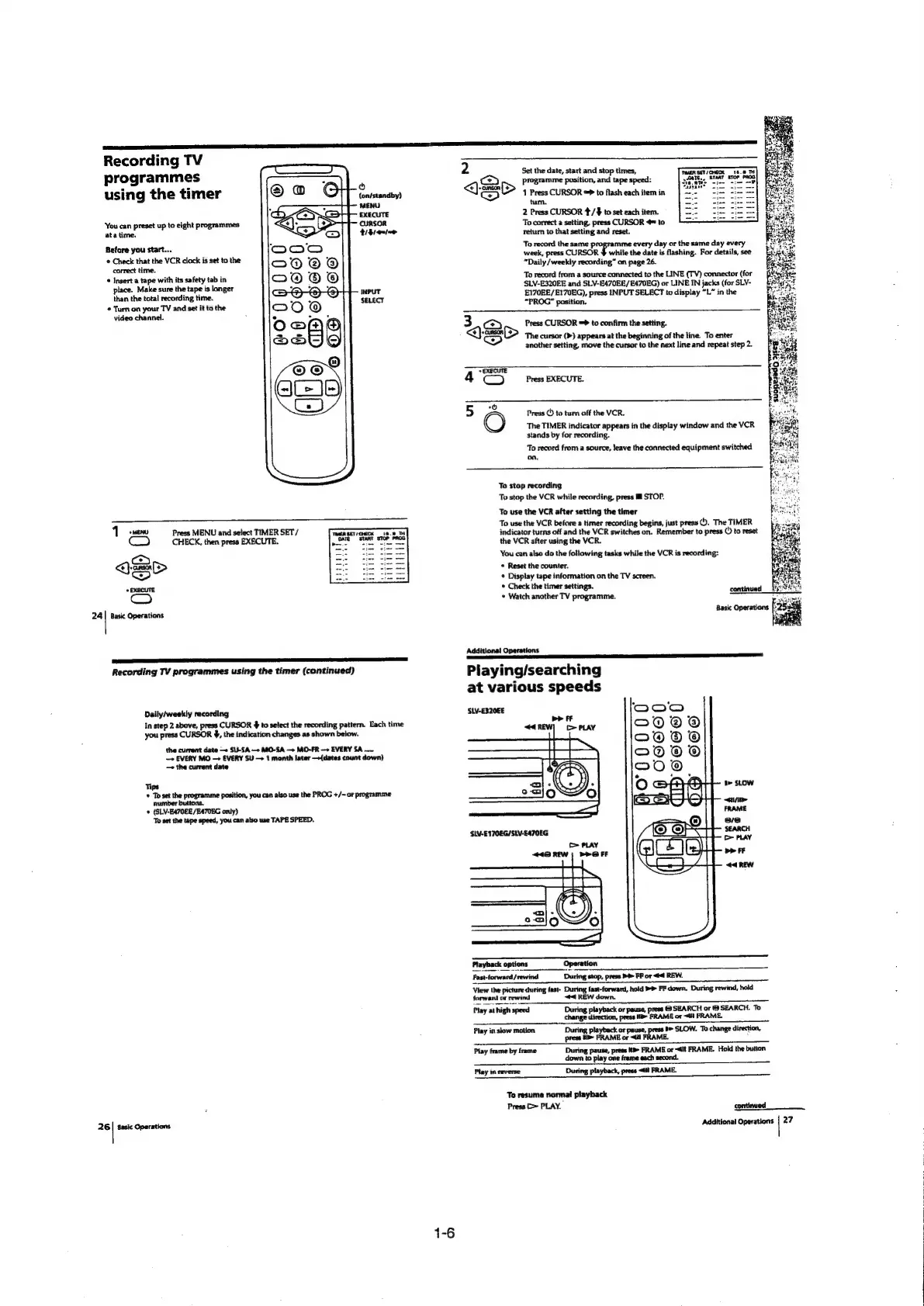
Recording
TV
programmes
using
the
timer
(on/standby)
MENU
EXECUTE
CURSOR
tiem
‘You
can
preset
up
to
eight
programmes
ata
time.
Before
you
start...
©
Check
that
the
VCR
clock
is
set
to
the
correct
time.
©
Insert
a
tape
with
its
safety
tab
in
place.
Make
sure
the
tape
is
longer
than
the
total
recording
time.
¢
Turn
on
your
TV
and
set
it
to
the
video
channel.
INPUT
SELECT
Press
MENU
and
select
TIMER
SET
/
CHECK,
then
press
EXECUTE.
24
|
Basic
Operations
26
ET
A
TS
Recording
TV
programmes
using
the
timer
(continued)
Daily/weekly
recording
In
step
2
above,
press
CURSOR
4
to
select
the
recording
pattern.
Each
time
you
press
CURSOR
4,
the
indication
changes
as
shown
below.
the
current
date
—+
SU-SA
—>
MO-SA
—>
MO-FR
—»
EVERY
SA
.....
—>
EVERY
MO
—+
EVERY
SU
—+
1
month
later
—+(dates
count
down}
the
current
date
Tips
»
Toset
the
programme
position,
you
can
also
use
the
PROG
+/-
or
programme
number
buttons.
©
(SLV-EA70EE/E4705G
only)
To
set
the
tape
speed,
you
can
also
use
TAPE
SPEED.
Basic
Operations
2
Set
the
date,
start
and
stop
times,
(<a)
programme
position,
and
tape
speed:
<Q)
(D>
+
press
CURSOR
=>
to
flash
each item
in
tum.
2
Press
CURSOR
4/$
to
set
each
item.
To
correct
a
setting,
press
CURSOR
@=
to
return
to
that
setting
and
reset.
To
record
the
same
programme
every
day
or
the
same
day
every
week,
press
CURSOR
#
while
the
date
is
flashing.
For
details,
see
“Daily
/weekly
recording”
on
page
26.
To
record
from
a
source
connected
to
the
LINE
(TV)
connector
(for
SLV-E320EE
and
SLV-E470EE/E470EG)
or
LINE
IN
jacks
(for
SLV-
E170EE/E170EG),
press
INPUT
SELECT
to
display
“L”
in
the
“PROG”
position.
WER
SET
CHECK
>a
am
START
STOP
PROG
Press
CURSOR
=>
to
confirm
the
setting.
©
The
cursor
(>)
appears
at
the
beginning
of
the
line.
To
enter
another
setting,
move
the
cursor
to
the
next
line
and
repeat
step
2.
3
<\
Ge
=
(om)
°S
Press
EXECUTE.
Press
©
to
tum
off
the
VCR.
The
TIMER
indicator
appears
in
the
display
window
and
the
VCR
stands
by
for
recording.
To
record
from
a
source,
leave
the
connected
equipment
switched
on,
To
stop
recording
To
stop
the
VCR
while
recording,
press
ll
STOP.
To
use
the
VCR
after
setting
the
timer
To
use
the
VCR
before
a
timer
recording
begins,
just
press
©.
The
TIMER
indicator
turns
off
and
the
VCR
switches
on.
Remember
to
press
()
to
reset
the
VCR
after
using
the
VCR.
You
can
also
do
the
following
tasks
while
the
VCR
is
recording:
*
Reset
the
counter.
*
Display
tape
information
on
the
TV
screen.
*
Check
the
timer
settings.
*
Watch
another
TV
programme.
Additional
Operations
ee
PRP
PP
Playing/searching
at
various
speeds
SLV-E320€E
b>
FF
44
REW)
«=
PLAY
I>
SLOW
FRAME
se
SEARCH
[>
PLAY
‘SLV-E170EG/SLV-E470EG
PLAY
448
REW
|
PPO
FF
View
the
picture
during
fast-
During
fast-forward,
hold
>>
FF
down,
During
rewind,
hold
forwand
or
rewind
#4
REW
down.
Play
at
high
speed
Dusit
layback
or
pause,
ress
©
SEARCH
or
&
SEARCH.
To
ape
change
direction,
press
HB
FRAME
or
<li
FRAME.
Play
in
slow
motion
During
playbec:
or
peut
Ot
be
SLOW.
To
change
direction,
press
1
FRAME
or
<4
ME.
2
Play
frame
by
frame
During
pause,
press
KP>
FRAME
or
-4it
FRAME,
Hold
the
button
down
to
play
one
frame
each
second.
Play
in
ceverse
During
playback,
press
<td
FRAME.
To
resume
normal
playback
Press
(>
PLAY.
contiwwed
Sent.
Additional
Operations
|
27

Table of Contents

Related product manuals