Getting Started
7
EN
Getting Started
1
2
continued
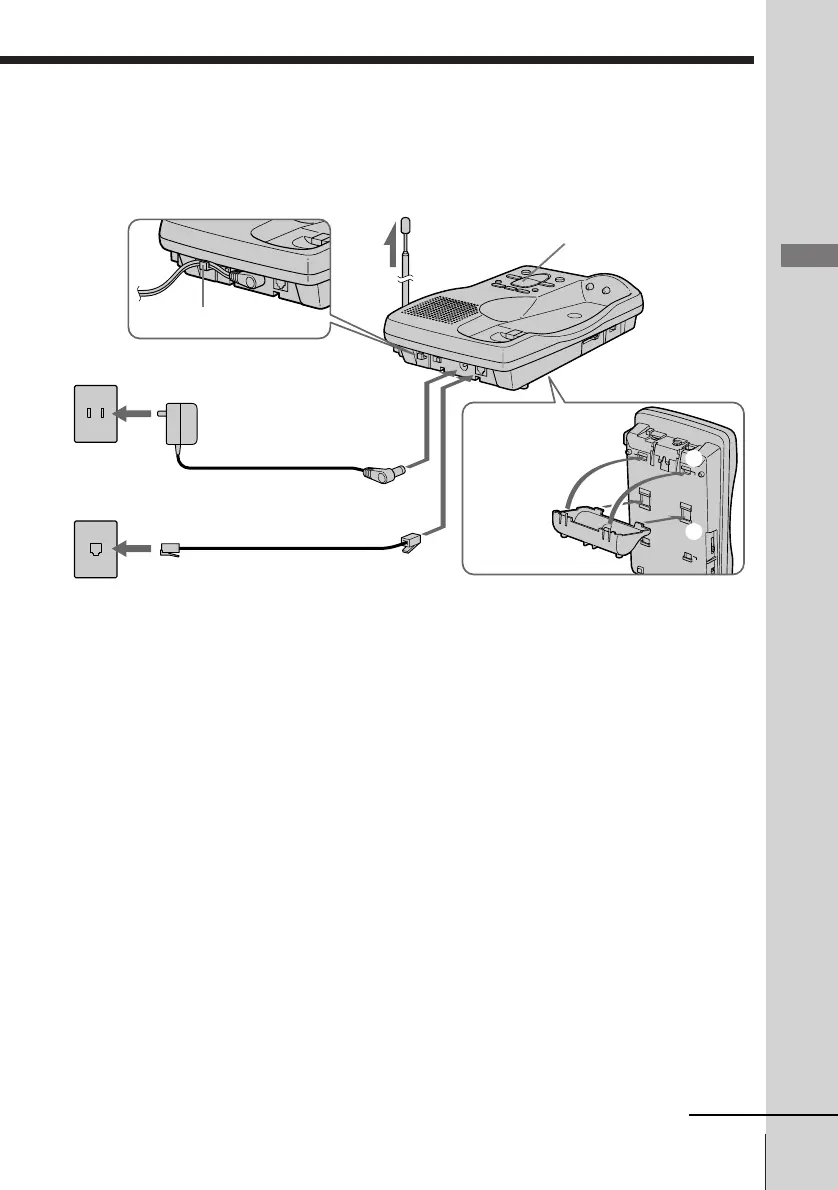
1 Attach the wall bracket on the
bottom of the base unit as
illustrated to use it as a stand.
2 Connect the telephone line cord
to the LINE jack and to a
telephone outlet.
3 Connect the AC power adaptor
to the DC IN 9V jack and to an
AC outlet.
“P” flashes in the message
counter.
4 Fully extend the antenna.
Make sure it points toward the
ceiling.
Hook the cord.
To DC IN 9V
To LINE
1
AC power adaptor
(supplied)
Telephone line cord
(supplied)
4
To AC outlet
3
To telephone outlet
2
Connect the base unit
If you want to hang the base unit on the wall, see page 27.
Message counter
Align the ¢
marks.












 To Next Page