Getting Started
9
EN
Getting Started
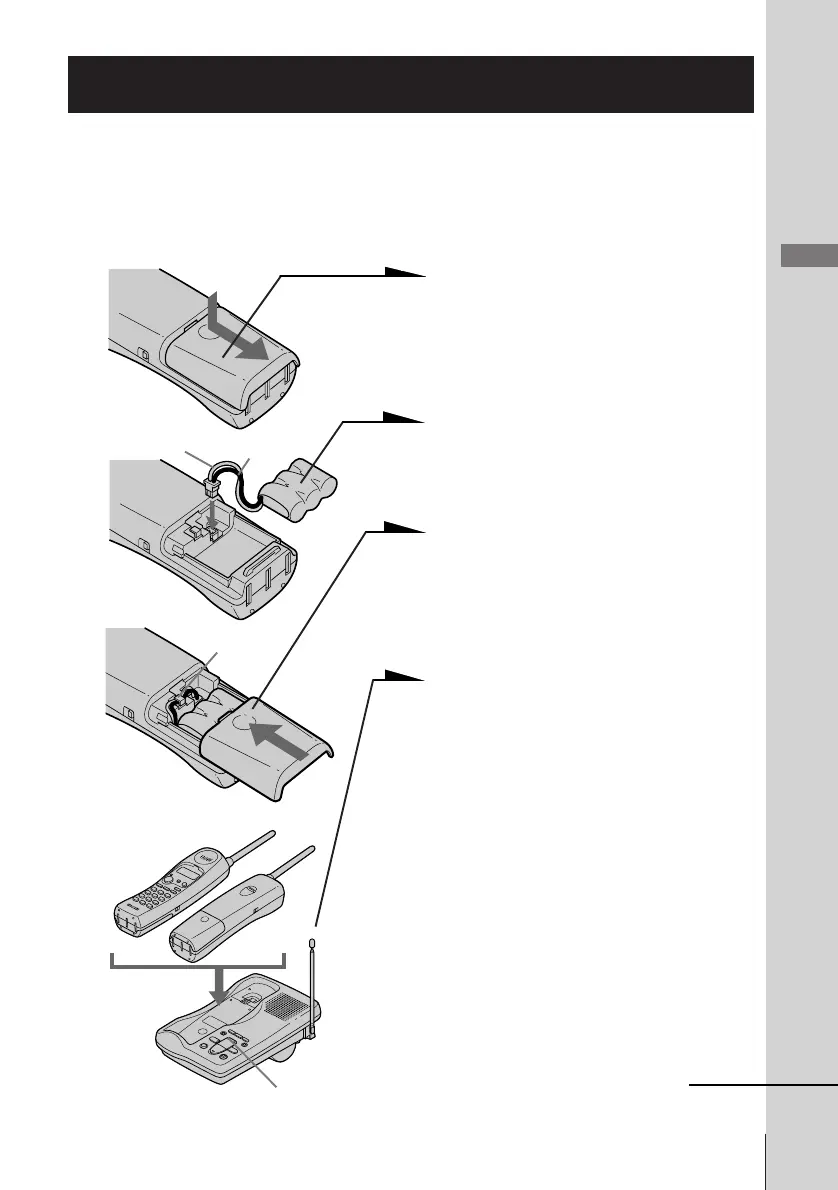
Preparing the battery pack
Charge the battery pack for more than 12 hours before you start using
your phone.
1 Slide open the battery
compartment lid of the handset.
2 Connect the battery connector
with correct polarity (black and
red cords).
3 Hook the cords and insert the
battery pack. Then close the lid.
4 Place the handset on the base
unit.
You can place either side facing
up.
The CHARGE/IN USE lamp
lights up when the handset is
properly seated on the charge
terminals of the base unit.
Charge the battery pack for
more than 12 hours so that the
battery is fully charged. The
CHARGE/IN USE lamp
remains lit even after charging
is completed.
continued
Step 3
Red
Black
CHARGE/
IN USE lamp
Hook












 To Next Page