EasyManua.ls Logo

Sony STR-D2010 - Using the Parametric Equalizer

Sony STR-D2010
55 pages
Print Icon
To Next Page IconTo Next Page
To Previous Page IconTo Previous Page
Loading...
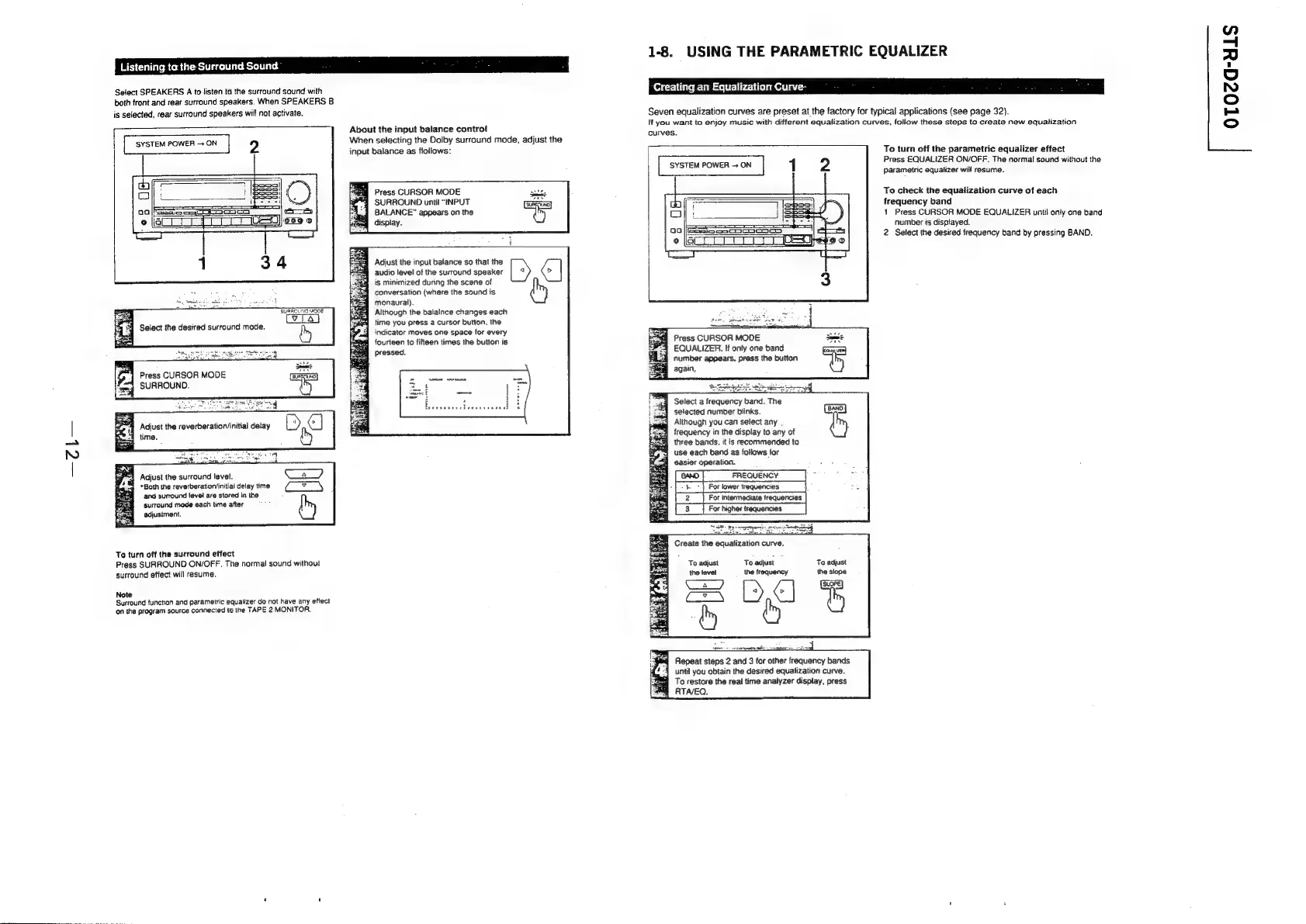
Listening
ta
the
Surround
Sound
:
ae.
Select
SPEAKERS
A
to
listen
to
the
surround
sound
with
both
front
and
rear
surround
speakers.
When
SPEAKERS
B
is
selected,
rear
surround
speakers
will
not
activate.
SYSTEM
POWER
ON
2
=
=
SURROUND
MODE
Fe:
a4
Select
the
desired
surround
mode.
by
Press
CURSOR
MODE
SURROUND.
8
Adjust
the
reverberatior/initial
delay
time.
Adjust
the
surround
level.
“Both
the
reverberatiorvinitial
delay
time
and
surround
level
are
stored
in
the
surround
mode
each
time
after
tad
adjustment.
Ta
turn
off
the
surround
effect
Press
SURROUND
ON/OFF.
The
normal
sound
without
surround
effect
will
resume.
Note
Surround
functian
and
parametric
equatizer
do
not
have
any
effect
‘on
the
program
source
connected
to
the
TAPE
2
MONITOR.
About
the
input
balance
control
When
selecting
the
Dolby
surround
mode,
adjust
the
input
balance
as
follows:
Press
CURSOR
MODE
SURROUND
until
“INPUT
BALANCE”
appears
on
the
display.
Adjust
the
input
balance
so
that
the
audio
level
of
the
surround
speaker
[
ig
minimized
during
the
scene
of
conversation
(where
the
sound
is
monaural).
Although
the
balalnce
changes
each
time
you
press
a
cursor
button,
the
indicator
moves
one
space
for
every
fourteen
to
fifteen
times
the
button
is
pressed.
1-8.
USING
THE
PARAMETRIC
EQUALIZER
Creating
an
Equalization
Curve-
Seven
equalization
curves
are
preset
at
the
factory
for
typical
applications
(see
page
32).
lf
you
want
to
enjoy
music
with
different
equalization
curves,
follow
these
steps
to
create
new
equalization
curves.
(mame)
4 2
Press
CURSOR
MODE
EQUALIZER.
If
only
one
band
number
appears,
press
the
button
again,
Select
a
frequency
band.
The
selected
number
blinks.
xo}
7
Although
you
can
select
any
4
frequency
in
the
display
to
any
of
three
bands,
it
is
recommended
to
use
each
band
as
follows
for
4
easier
operation.
[ewo]
FREQUENCY
|
[2
|
Forintermediate
requences
|
[3
|
Forrigherrequencies
|
Create
the
equalization
curve.
To
adjust
To
adjust
To
adjust
the
level
the
frequency
the
slope
Ene
eee
|
Repeat
steps
2
and
3
for
other
frequency
bands
until
you
obtain
the
desired
equalization
curve.
To
restore
the
real
time
analyzer
display,
press
RTAVEQ.
To
turn
off
the
parametric
equalizer
effect
Press
EQUALIZER
ON/OFF.
The
normal
sound
without
the
parametric
equalizer
will
resume.
To
check
the
equalization
curve
of
each
frequency
band
1
Press
CURSOR
MODE
EQUALIZER
until
only
one
band
number
is
displayed.
2
Select
the
desired
frequency
band
by
pressing
BAND.
OTOZG-uLs

Related product manuals