EasyManua.ls Logo

Sony STR-D2010 - Listening to Other Program Sources; Enjoying Digital Sound Effects

Sony STR-D2010
55 pages
Print Icon
To Next Page IconTo Next Page
To Previous Page IconTo Previous Page
Loading...
1-5.
LISTENING
TO
OTHER
PROGRAM
SOURCES
Cor
|3
4
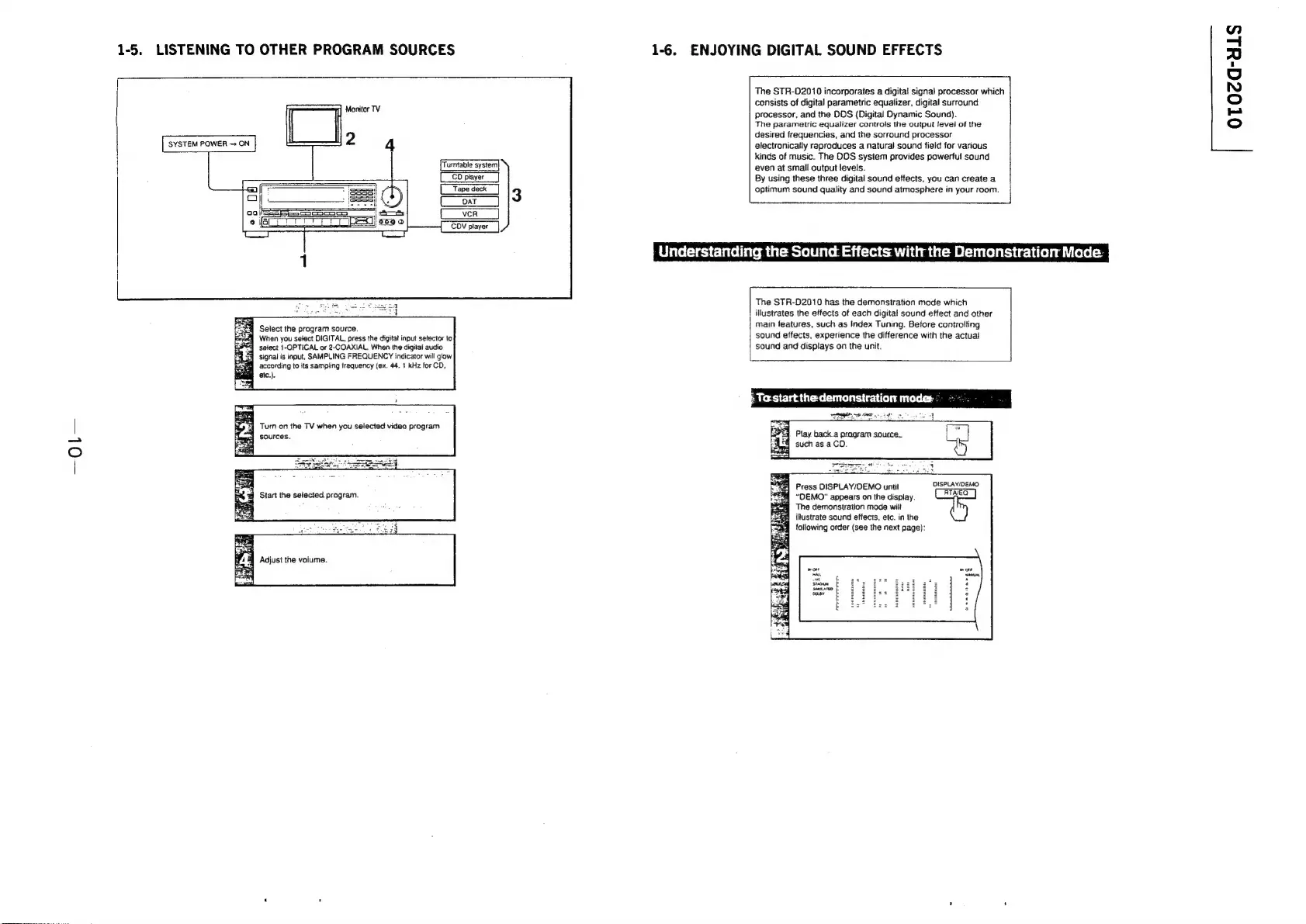
Select
the
program
source.
When
you
select
DIGITAL,
press
the
digital
input
selector
to
select
1-OPTICAL
or
2-COAXIAL.
When
the
digital
audio
signal
is
input,
SAMPLING
FREQUENCY
indicator
will
glow
according
to
its
sampling
frequency
(ex.
44.
1
kHz
for
CD,
M
atc.).
&
Turn
on
the
TV
when
you
selected
video
program
3}
sources.
Adjust
the
valume.
1-6.
ENJOYING
DIGITAL
SOUND
EFFECTS
The
STR-02010
incorporates
a
digital
signal
processor
which
consists
of
digital
parametric
equalizer,
digital
surround
processor,
and
the
DDS
(Digital
Dynamic
Sound).
The
parametric
equalizer
controls
the
output
level
of
the
desired
frequencies,
and
the
sorround
processor
electronically
reproduces
a
natural
sound
field
for
various
kinds
of
music.
The
DOS
system
provides
powerful
sound
even
at
small
output
levels.
By
using
these
three
digital
sound
effects,
you
can
create
a
optimum
sound
quality
and
sound
atmosphere
in
your
room.
Pine
eelacelte
mittee
ite@
ta
can
The
STR-D2010
has
the
demonstration
mode
which
|
illustrates
the
effects
of
each
digital
sound
effect
and
other
main
features,
such
as
Index
Tuning.
Before
controlling
sound
effects,
experience
the
difference
with
the
actual
sound
and
displays
on
the
unit.
Play
back
a
program
source.
such
as
a
CD.
Press
DISPLAY/DEMO
until
DISPLAY/DEMO,
“DEMO”
appears
on
the
display.
The
demonstration
mode
will
illustrate
sound
effects,
etc.
in
the
following
order
(see
the
next
page):
OTOZG-YHLS

Related product manuals