EasyManua.ls Logo

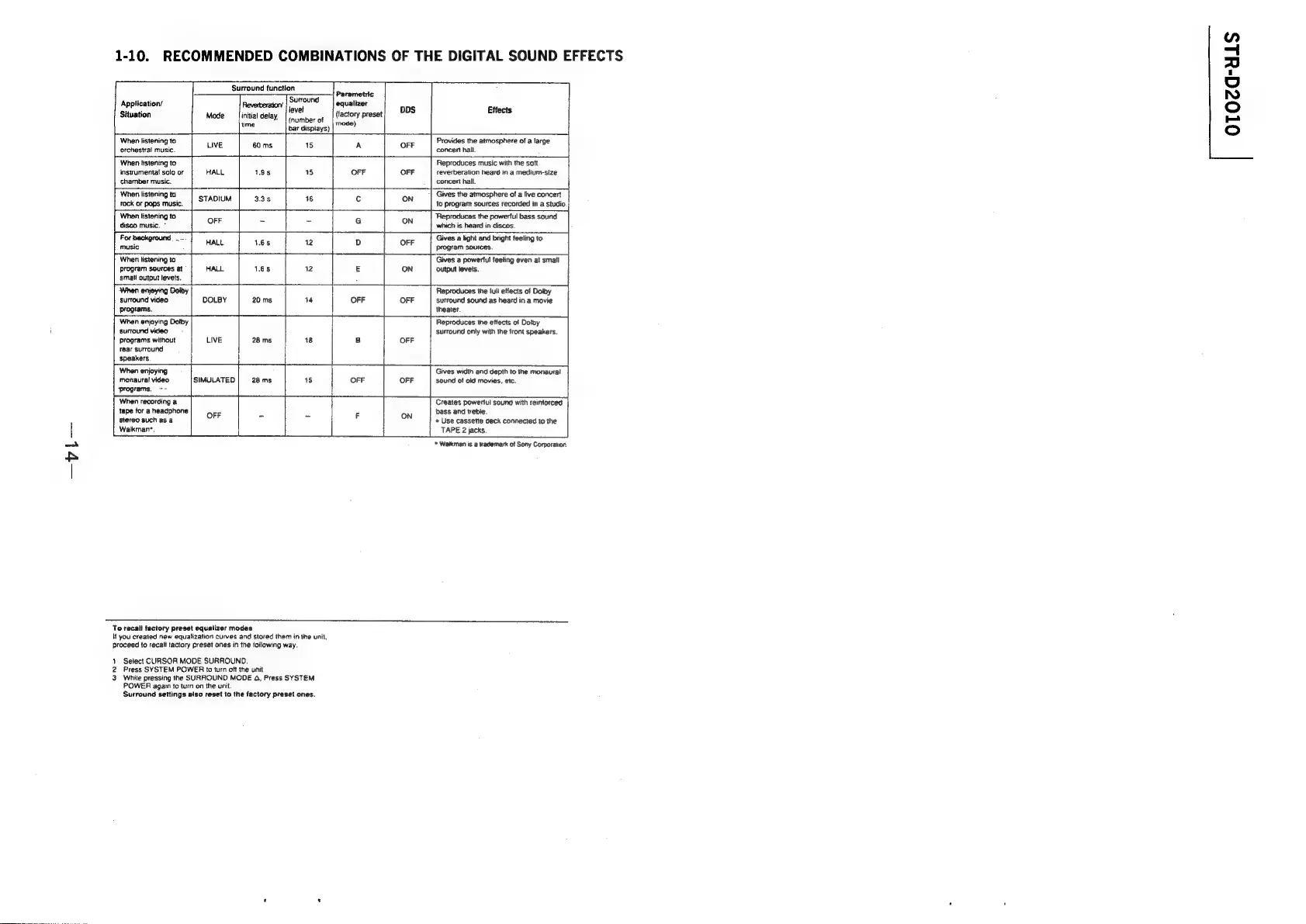
Sony STR-D2010 - Recommended Combinations of the Digital Sound Effects

Sony STR-D2010
55 pages
Print Icon
To Next Page IconTo Next Page
To Previous Page IconTo Previous Page
Loading...
1-10.
RECOMMENDED
COMBINATIONS
OF
THE
DIGITAL
SOUND
EFFECTS
Surround
function
r
il
"re
Teonouna
Parametric
Application’
Reverberatory
|
DUTOU
equalizer
:
-
level
1
DDS
Effects
Situation
Mode
_|initial
delay,
(tactory
preset
(number
of
mode)
ume:
bar
dispiays)
When
listening
to
Provides
the
atmosphere
of
a
large
orchestral
music.
LIVE:
some
-
7
OFF
concent
hail.
|
Ebina
tines
eae
When
listening
to
Reproduces
music
with
the
sott
instrumenta!
solo
or
HALL
19s
15
OFF OFF
reverberation
heard
in
a
medium-size
chamber
music.
concert
hall.
_4
When
listening
to
Gives
the
atmosphere
of
a
live
concert
rock
or
pops
music.
STADIUM
33s
ie
¢
ON
lo
program
sources
recorded
in
a
studio
When
listening
to
Reproduces
the
powerful
bass
sound
disco
music.
*
OFF
~
7
Ss
ON
which
is
heard
in
discos.
For
background
.--
Gives
a
light
and
bright
feeling
to
music
HALL
18s
2
OFF
program
sources.
When
listening
to
Gives
a
powerful
feeling
even
at
small
12
E
ON
Program
sources
at
©
HALL
1.65
output
levels.
small
output
levels.
A
|
When
enjeying
Dolby
Reproduces
the
iuli
effects
of
Dolby
surround
video
DOLBY
20
ms
14
OFF
OFF
Sufround
sound
as
heard
in
a
movie
programs.
theater.
When
enjoying
Dolby
Reproduces
the
etiects
of
Doty
surround
video
.
‘surround
only
with
the
front
speakers.
programs
without
LIVE
28
ms
18
B
OFF
rear
surround
speakers.
|
When
enjoying
Tt
Gives
width
and
depth
to
the
monaural
monaural
video
SIMULATED
28
ms
1S
OFF OFF
sound
of
oid
movies,
etc.
‘programs.
~~
When
recording
a
Creates
powerful
sound
with
reinforced
tape
for
a
headphone
bass
and
trebie.
stereo
such
as
a
OFF
> a
C
a
Use
cassette
deck
connected
to
the
Walkman*.
TAPE
2
jacks
*
Walkman
is
@
trademark
of
Sony
Corporation
To
recall
factory
preset
equalizer
modes
you
created
new
equalization
curves
and
stored
them
in
the
unil,
proceed
to
recall
factory
preset
ones
in
the
following
way.
Select
CURSOR
MODE
SURROUND.
Press
SYSTEM
POWER
to
turn
oft
the
unit
While
pressing
the
SURROUND
MODE
4,
Press
SYSTEM
POWER
again
to
turn
on
the
unit.
Surround
settings
also
reset
to
the
factory
preset
ones.
wn
oTOca-uLS

Related product manuals