EasyManua.ls Logo

Sony STR-D2010 - Receiving Radio Broadcast Programs

Sony STR-D2010
55 pages
Print Icon
To Next Page IconTo Next Page
To Previous Page IconTo Previous Page
Loading...
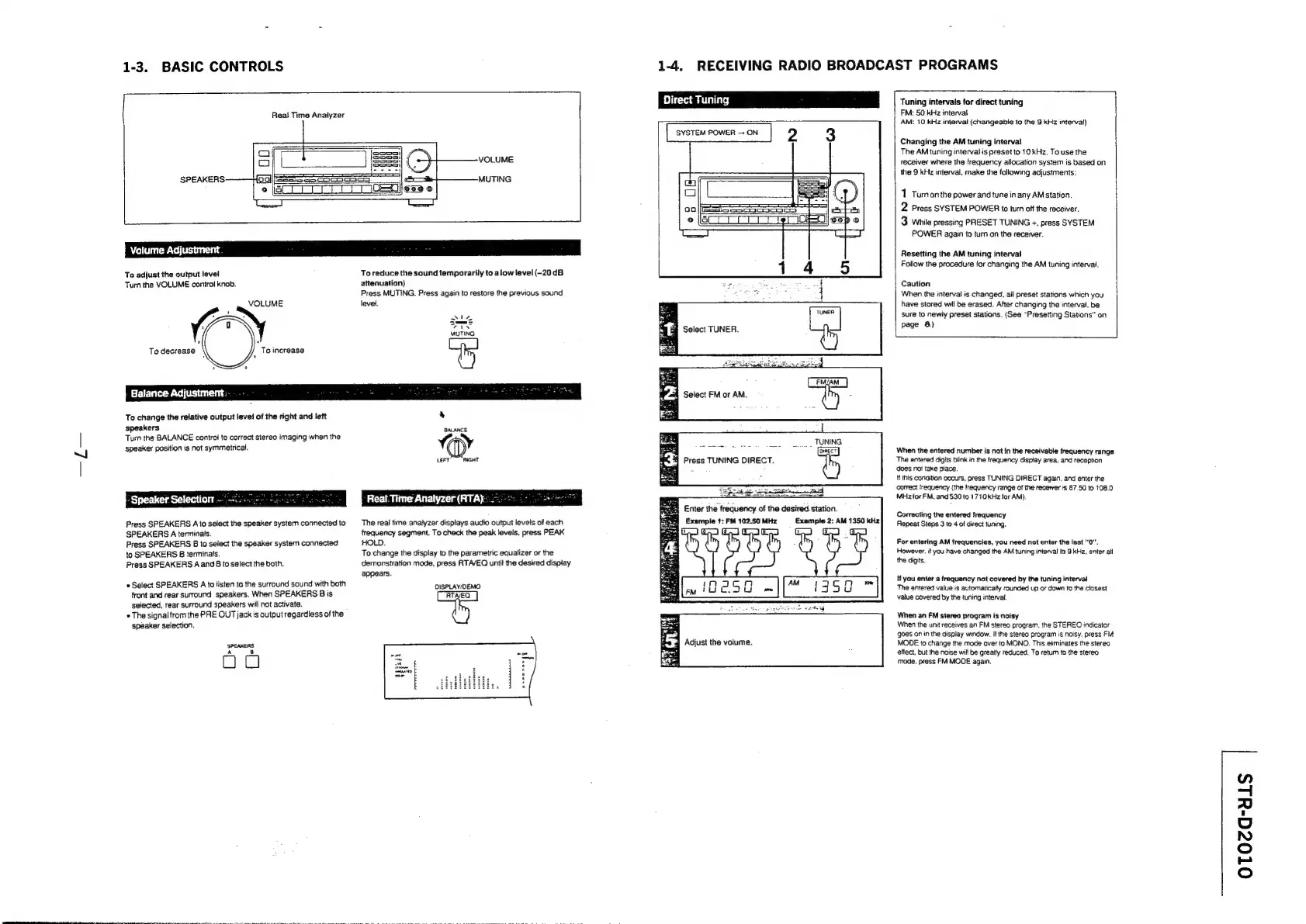
1-3.
BASIC
CONTROLS
-—
Real
Time
Analyzer
VOLUME
MUTING
To
adjust
the
output
level
Turn
the
VOLUME
control
knob.
VOLUME
To
increase
To
reduce
the
sound
temporarily
to
alow
level
(-20dB
attenuation)
Press
MUTING.
Press
again
to
restore
the
previous
sound
level.
To
change
the
relative
output
level
of
the
right
and
left
speakers
Turn
the
BALANCE
control
to
correct
stereo
imaging
when
the
speaker
position
is
not
symmetrical.
:
Speaker
Selection
—°—2+.0.55
=
Press
SPEAKERS
A
to
select
the
speaker
system
connected
to
SPEAKERS
A
terminals.
Press
SPEAKERS
B
to
select
the
speaker
system
connected
to
SPEAKERS
B
terminals.
Press
SPEAKERS
A
and
Bto
select
the
both.
Select
SPEAKERS
A
to
listen
to
the
surround
sound
with
both
front
and
rear
surround
speakers,
When
SPEAKERS
B
is
selected,
rear
surround
speakers
will
not
activate.
The
signal
from
the
PRE
OUT
jack
is
output
regardless
of
the
speaker
selection.
‘SPEAKERS.
oo
The
real
time
analyzer
displays
audio
output
levels
of
each
frequency
segment.
To
check
the
peak
levels,
press
PEAK
HOLD.
To
change
the
display
to
the
parametric
equalizer
or
the
demonstration
mode,
press
RTAVEQ
until
the
desired
display
appears.
OISPLAY/DEMO
1-4.
RECEIVING
RADIO
BROADCAST
PROGRAMS
Select
TUNER.
_...
.
TUNING
Press
TUNING
DIRECT.
Enter
the
frequency
of
the
desired
station.
Example
t:
FM
102.50
MHz
Exampte
2:
AM
1350
kHz
oy
rts
5
Adjust
the
volume.
es
Tuning
intervals
for
direct
tuning
FM:
50
kHz
interval
AM:
10
kHz
interval
(changeable
to
the
9
KHz
interval)
Changing
the
AM
tuning
interval
The
AM
tuning
interval
is
preset
to
10
kHz.
To
use
the
receiver
where
the
frequency
allocation
system
is
based
on
the
9
kHz
interval,
make
the
following
adjustments:
1
Turnonthe
power
and
tune
in
any
AM
station.
2
Press
SYSTEM
POWER
to
turn
off
the
receiver.
3
While
pressing
PRESET
TUNING
+,
press
SYSTEM
POWER
again
to
turn
on
the
receiver.
Resetting
the
AM
tuning
interval
Follow
the
procedure
for
changing
the
AM
tuning
interval.
Caution
When
the
interval
is
changed,
all
preset
stations
which
you
have
stored
will
be
erased.
After
changing
the
interval,
be
sure
to
newly
preset
stations.
(See
“Presetting
Stations”
on
page
8)
When
the
entered
number
is
not
In
the
receivable
frequency
range
The
entered
digits
blink
in
the
frequency
display
area.
and
reception
does
not
take
place.
{f
this
condition
occurs,
press
TUNING
DIRECT
again,
and
enter
the
correct
frequency
(the
trequency
range
of
the
recever
is
87.50
to
08.0
MHz
for
FM,
and
530
to
1710
kHz
tor
AM)
Correcting
the
entered
frequency
Repeat
Steps
3
to
4
of
direct
tuning.
For
entering
AM
frequencies,
you
need
not
enter
the
last
"0".
However.
if
you
have
changed
the
AM
tuning
interval
to
9
kHz,
enter
all
the
digits.
if
you
enter
a
frequency
nat
covered
by
the
tuning
interval
The
entered
value
is
automatically
rounded
up
or
down
to
the
closest
value
covered
by
the
tuning
interval.
When
an
FM
stereo
program
is
noisy
When
the
unit
receives
an
FM
stereo
program,
the
STEREO
indicator
goes
on
in
the
display
window.
If
the
stereo
program
is
noisy,
press
FM.
MODE
to
change
the
mode
aver
to
MONO.
This
eliminates
the
stereo
ettect,
but
the
noise
wilt
be
greatly
reduced.
To
retum
te
the
stereo
mode.
press
FM
MODE
again,
otToza-als

Related product manuals