EasyManua.ls Logo

Sony STR-D2010 - Page 8

Sony STR-D2010
55 pages
Print Icon
To Next Page IconTo Next Page
To Previous Page IconTo Previous Page
Loading...
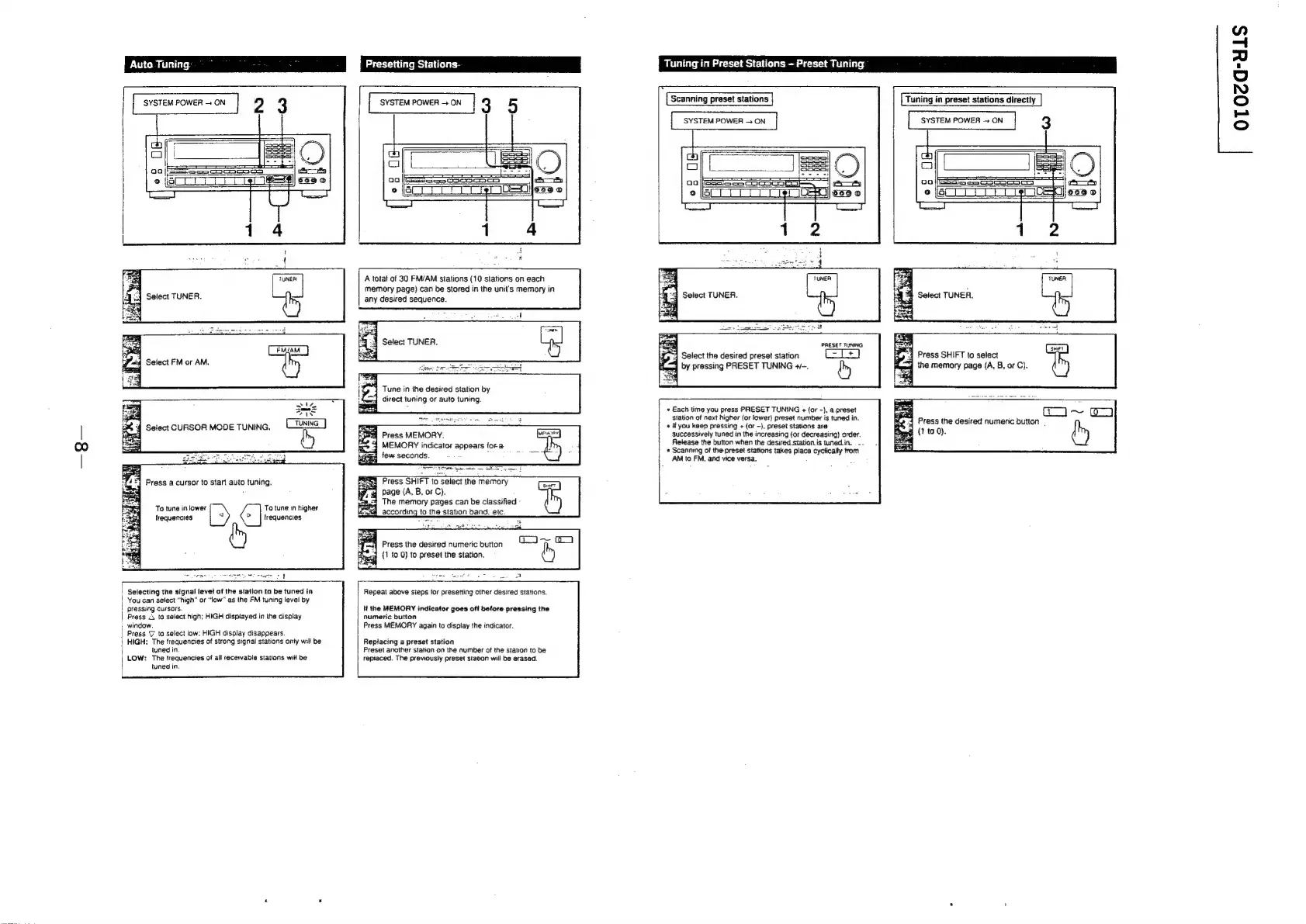
Auto
Tuning:
°
~
ae:
7
Presetting
Stations.
2
3
[amenn
3
5
A
total
of
30
FM/AM
stations
(10
stations
on
each
memory
page)
can
be
stored
in
the
unit's
memory
in
Select
TUNER.
any
desired
sequence.
Select
TUNER.
Select
FM
or
AM.
Tune
in
the
desired
station
by
direct
tuning
or
auto
tuning
Select
CURSOR
MODE
TUNING.
Press
MEMORY.
fueacae]
MEMORY
indicator
appears
fora
a
few
seconds.
:
:
Press
SHIFT
to
select
the
memory
4
page
(A,
B,
or
C).
The
memory
pages
can
be
classified
-
q_according
to
the
station
band,
etc.
Press
a
cursor
to
start
auto
tuning.
To
tune
in
lower
To
tune
in
higher
frequencies
frequencies
is
ee
:
E
7
Press
the
desired
numeric
button
4
(1
to
0)
to
preset
the
station.
Selecting
the
signal
levet
of
the
station
to
be
tuned
in
|
Repeat
above
steps
for
presetting
other
desired
stations.
You
can
setect
“high”
or
“low”
as
the
FM
tuning
level
by
pressing
cursors.
lf
the
MEMORY
indicator
goes
oft
before
pressing
the
Press
<3
to
select
high;
HIGH
disptayed
in
the
display
numeric
button
window.
Press
MEMORY
again
to
display
the
indicator.
Press
%
to
select
low:
HIGH
display
disappears.
HIGH:
The
frequencies
of
strong
signal
stations
anty
will
be
Replacing
a
preset
station
tuned
in.
Preset
another
station
on
the
number
of
the
station
to
be
LOW:
The
frequencies
of
all
recervable
stations
will
be
tepiaced.
The
previously
preset
station
will
be
erased.
tuned
in.
Tuning
in
Preset
Stations
-
Preset
Tuning
Scanning
preset
stations
SYSTEM
POWER
>
ON
Tuning
in
preset
stations
directly
|
SYSTEM
POWER
ON
3
a
A
4
Press
SHIFT
to
select
nis
aged
the
memory
page
(A,
B,
or
C).
PRESET
TUNING.
ee
ie
Select
the
desired
preset
station
(-T+)
Re.
by
pressing
PRESET
TUNING
4/-.
by
*
Each
time
you
press
PRESET
TUNING
¢
(or
-),
a.
preset
i
|
~
O-)
station
of
next
higher
(or
tower)
preset
number
is
tuned
in.
e
‘i
«
If
you
keep
pressing
+
(or
-),
preset
stations
are
oa
desired
numeric
button
successively
tuned
in
the
increasing
(or
decreasing)
order.
g
(1
ta
0).
Release
the
button
when
the
desired
station
is
tunedin.
.
_-
+
Scanning
of
the
preset
stations
takes
place
cycfically
from
AM
to
FM.
and
vice
versa.
s
OTO0za-u1S

Related product manuals