EasyManua.ls Logo

Sony STR-D2010 - Page 9

Sony STR-D2010
55 pages
Print Icon
To Next Page IconTo Next Page
To Previous Page IconTo Previous Page
Loading...
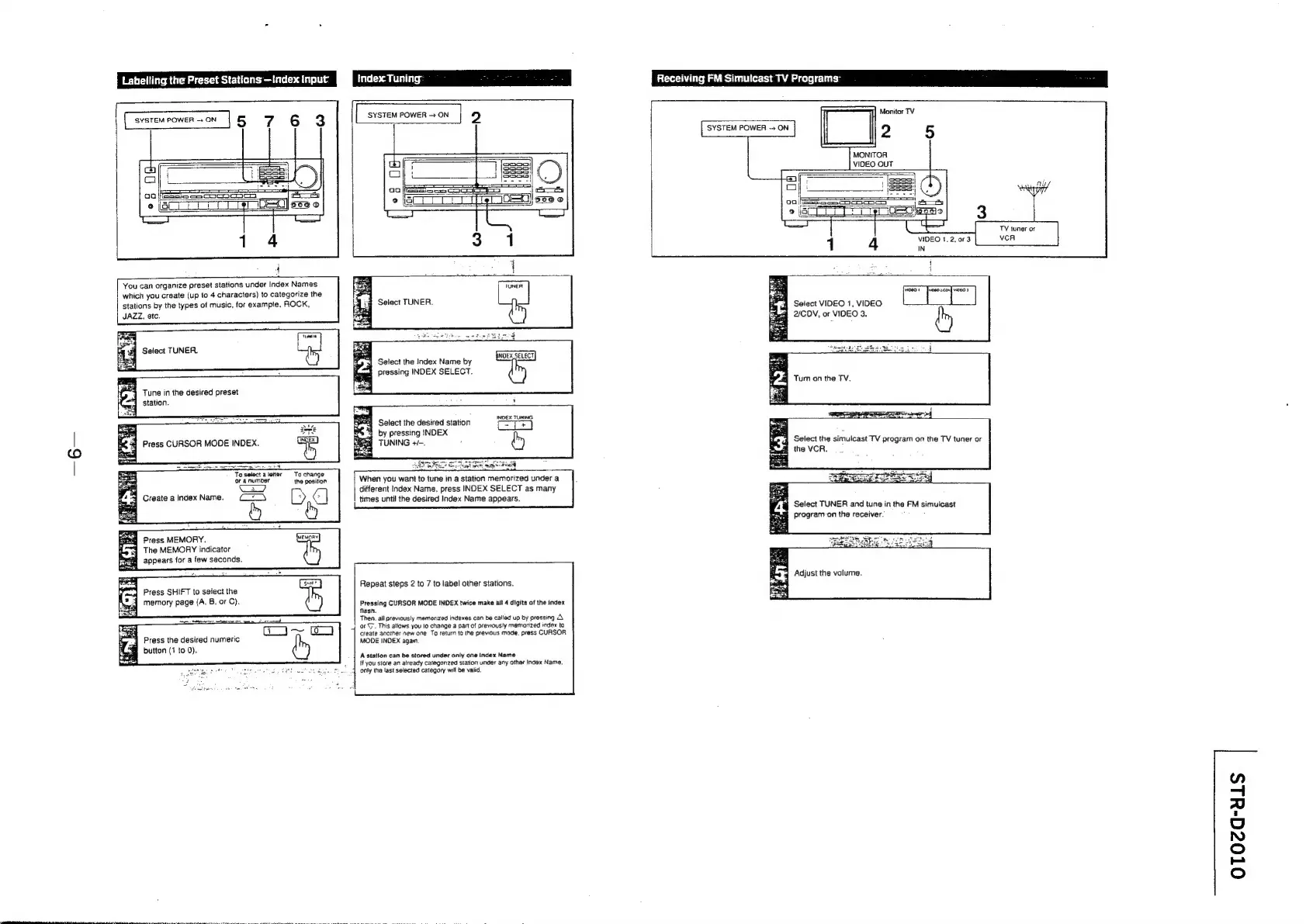
Labelling
the
Preset
Statians
—Index
Input
Index.
Tuning:
sEnee
ek
SYSTEM
POWER
ON
2
You
can
organize
preset
stations
under
Index
Names
which
you
create
(up
to
4
characters)
to
categorize
the
stations
by
the
types
of
music,
for
exampte,
ROCK,
JAZZ.
atc.
Select
TUNER.
Tune
in
the
desired
preset
station.
Press
CURSOR
MODE
INDEX.
To
select
aletter
To
change
or
a
number
the
position
Se
Create
a
index
Name.
[>
é]
&
8
q@
Press
MEMORY.
Hey
The
MEMORY
indicator
fee
appears
for
a
few
seconds.
Press
SHIFT
to
select
the
memory
page
(A.
B,
or
C}.
sre
ttc
hee
te
ee
net
INDEX
SELECT
Select
the
Index
Name
by
pressing
INDEX
SELECT.
Select
the
desired
station
by
pressing
INDEX
TUNING
+-.
When
you
want
to
tune
in
a
station
memorized
under
a
different
Index
Name,
press
INDEX
SELECT
as
many
times
until
the
desired
Index
Name
appears.
Repeat
steps
2
to
7
to
label
other
stations.
Pressing
CURSOR
MODE
INDEX
twice
make
ail
4
digits
af
the
index
flash.
Then.
all
previously
mamanzed
indexes
can
be
called
up
by
pressing
A
;
cog
Press
the
desired
numeric
button
(1
to
0).
‘or
(7.
This
allows
you
lo
change
a
part
of
previously
memorized
index
to
create
anoiher
new
one
To
return
to
the
previous
mode.
press
CURSOR
MODE
INDEX
agam.
A
station
can
be
stored
under
only
one
Index
Name
If
you
store
an
already
categonzed
station
under
any
other
Index
Name.
onty
the
last
selected
category
will
be
valid.
Receiving
FM
Simulcast
TV
Programs:
3
Monitor
TV
SYSTEM
POWER
~
ON
MONITOR
VIDEO
OUT
oj
ss)
ee
eee
peices
|
00
SSeS
soaesoocS
Select
VIDEO
1,
VIDEO
2/CDV,
or
VIDEO
3.
Tum
on
the
TV.
Select
TUNER
and
tune
in
the
FM
simulcast
program
on
the
receiver.
Adjust
the
volume.
OTOca-dLS

Related product manuals