EasyManua.ls Logo

Sony STR-D2010 - Using the Digital Dynamic Sound

Sony STR-D2010
55 pages
Print Icon
To Next Page IconTo Next Page
To Previous Page IconTo Previous Page
Loading...
Storing
an
Equalization
Curve
Assigning
an
Equalization
Mode
to
Preset:
Stations
EG
Link:
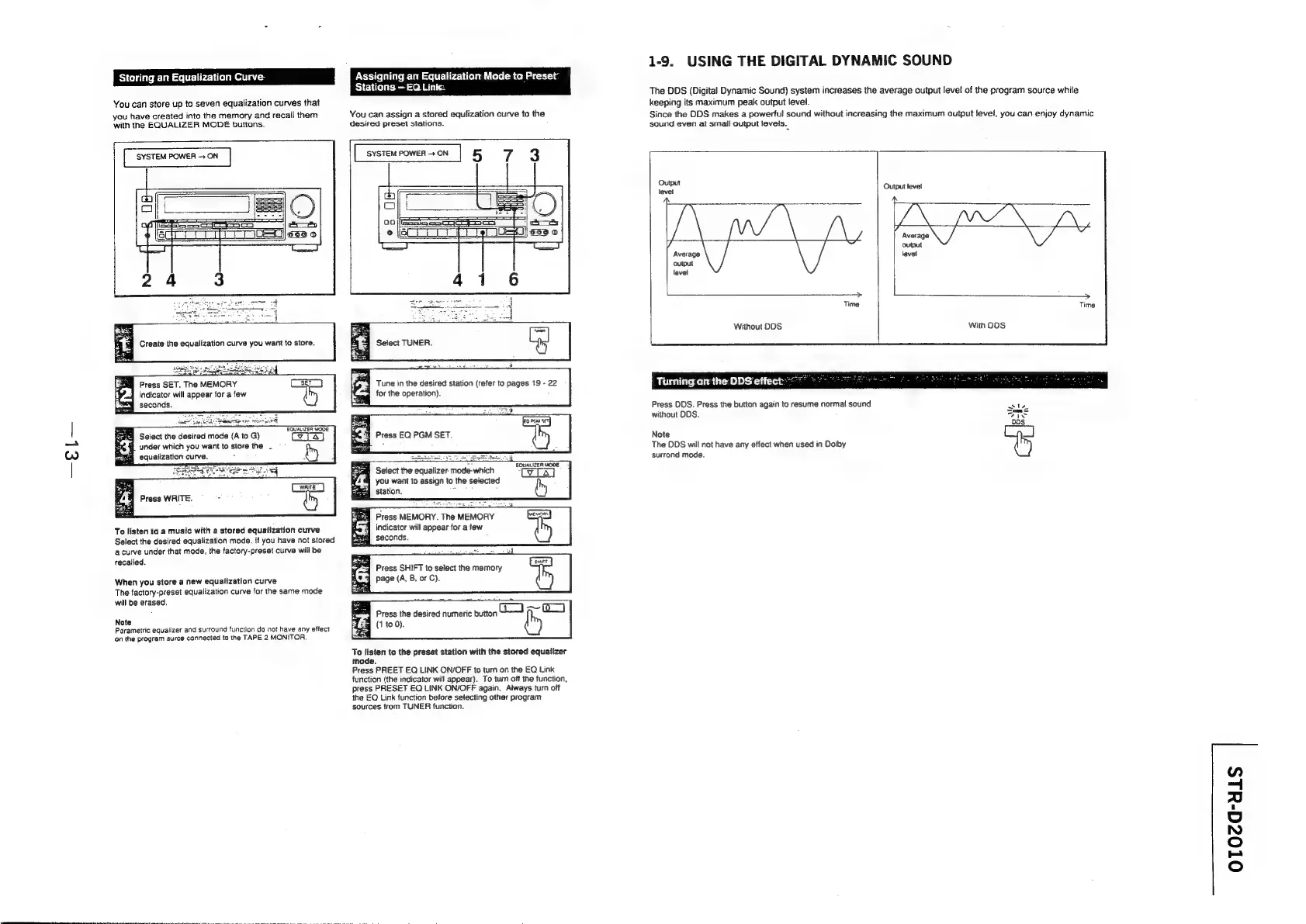
You
can
store
up
to
seven
equalization
curves
that
you
have
created
into
the
memory
and
recall
them
with
the
EQUALIZER
MODE
buttons.
SYSTEM
POWER
-—
ON
You
can
assign
a
stored
equlization
curve
to
the
desired
preset
stations.
[sme]
5
7 3
Press
SET.
The
MEMORY
indicator
will
appear
for
a
few
seconds.
EQUALIZER
WOOE
Select
the
desired
mode
(A
to
G)
under which
you
want
to
store
the
.
§
equalization
curve.
-
wh
Press
WRITE.
To
listen
to
a
music
with
a
stored
equalization
curve
Select
the
desired
equalization
mode.
If
you
have
not
stored
a
curve
under
that
mode,
the
factory-preset
curve
will
be
recalled.
When
you
store
a
new
equalization
curve
The
factory-preset
equalization
curve
for
the
same
mode
will
be
erased.
Note
Parametric
equalizer
and
surround
function
da
not
have
any
effect
‘on
the
program
surce
connected
to
the
TAPE
2
MONITOR.
Tune
in
the
desired
station
(refer
to
pages
19
-
22
for
the
operation).
Press
EQ
PGM
SET.
Sees
25
t
S
e
s
Fel
Select
the
equalizer
mode-which
TeLAT
you
want
to
assign
to
the
selected
station,
:
by
q
Press
MEMORY.
The
MEMORY
eR
indicator
will
appear
for
a
few
seconds.
4
Press
SHIFT
to
select
the
memory
page
(A,
B,
or
C).
Press
the
desired
numeric
button
(1
to
0).
To
listen
to
the
preset
station
with
the
stored
equalizer
mode.
Press
PREET
EQ
LINK
ON/OFF
to
turn
on
the
EQ
Link
function
(the
indicator
will
appear).
To
turn
off
the
function,
press
PRESET
EQ
LINK
ON/OFF
again.
Aiways
turn
off
the
EQ
Link
function
before
selecting
other
program
sources
from
TUNER
function.
1-9.
USING
THE
DIGITAL
DYNAMIC
SOUND
The
DDS
(Digital
Dynamic
Sound)
system
increases
the
average
output
level
of
the
program
source
while
keeping
its
maximum
peak
output
level.
Since
the
DDS
makes
a
powerful
sound
without
increasing
the
maximum
output
level,
you
can
enjoy
dynamic
sound
even
at
small
output
levels.
Output
level
Output
level
aN
Average
output
Average
level
output
Hl
level
|
>
>
Time Time
Without
DDS
With
DDS
Turning
on
the
DDS
effect:
Press
DDS.
Press
the
button
again
to
resume
normal
sound
without
DDS.
ai
Dos.
Note
The
DDS
will
not
have
any
effect
when
used
in
Dolby
surrond
mode.
OTOca-uls

Related product manuals