EasyManua.ls Logo

Sony STR-D2010 - Page 6

Sony STR-D2010
55 pages
Print Icon
To Next Page IconTo Next Page
To Previous Page IconTo Previous Page
Loading...
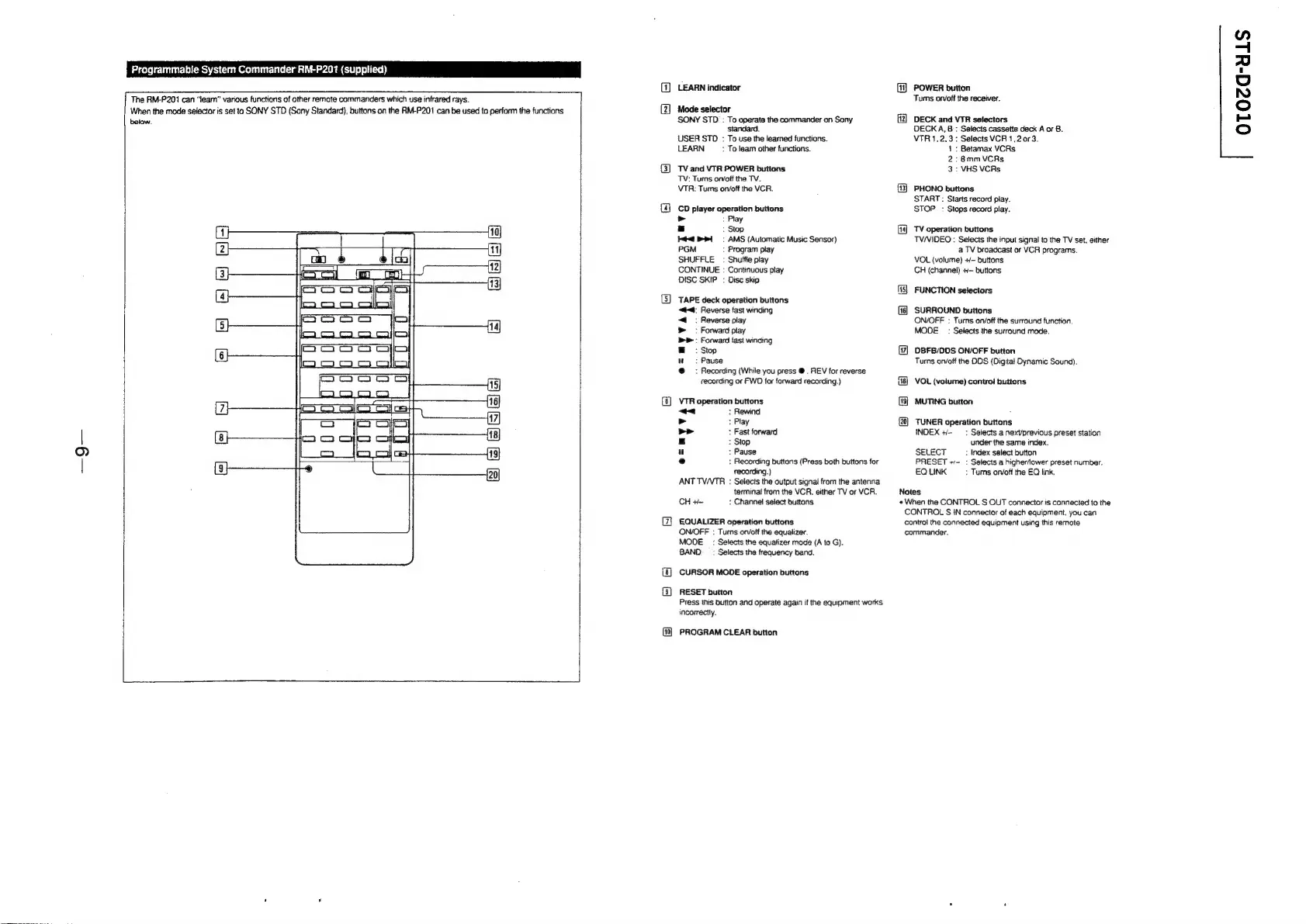
Programmable
System
Commander
RM-P201
(supplied)
OTOcGa-uls
(1)
LEARN
indicator
[1]
POWER
button
The
RM-P201
can
“team”
various
functions
of
other
remote
commanders
which
use
infrared
rays.
Tums
on/off
the
receiver.
When
the
mode
selector
is
set
to
SONY
STD
(Sony
Standard),
buttons
on
the
RM-P201
can
be
used
to
perform
the
functions
(2]
Mode
selector
Me
below.
SONY
STD
:
To
operate
the
commander
on
Sony
12}
DECK
and
VTR
selectors
standard.
DECKA,B
:
Selects
cassette
deck
A
or
B.
USER
STO
:
To
use
the
learned
functions.
VTR
1.2.3:
Selects
VCR
1,20r3.
LEARN
:
To
learn
other
functions.
1:
Betamax
VCRs
2:
8mmVCRs
(3)
TVand
VTR
POWER
buttons
3:
VHS
VCRs
TV:
Turns
on/off
the
TV.
VTR:
Tums
on/oft
the
VCR.
13]
PHONO
buttons
START
:
Starts
record
play.
STOP:
Stops
record
play.
(@
co
player
operation
buttons
Ld
:
Play
a
:
Stop
14]
TV
operation buttons
4
RPL.
AMS
(Automatic
Music
Sensor)
TV/VIDEO
:
Selects
the
input
signal
to
the
TV
set.
either
PGM
:
Program
play
a
TV
broadcast
or
VCR
programs.
SHUFFLE
:
Shuffle
play
CONTINUE
:
Continuous
play
VOL
(volume)
+/-
buttons
CH
(channel)
+~
buttons
DISC
SKIP
:
Disc
skip
115}
FUNCTION
selectors
(5)
TAPE
deck
operation buttons
«#4:
Reverse
fast
winding
16)
SURROUND
buttons
:
Reverse
play
ON/OFF
:
Turns
on/off
the
surround
function.
:
Forward
play
MODE:
Selects
the
surround
mode.
:
Forward
fast
winding
:
Stop
17]
DBFB/DDS
ON/OFF
button
:
Pause
Turns
orvotf
the
ODS
(Digital
Dynamic
Sound).
:
Recording
(While
you
press
@.
REV
for
reverse
recording
or
FWD
for
forward
recording.)
[18]
VOL
(volume)
contro!
buttons
(8)
VTR
operation
buttons
(19]
MUTING
button
'
“~<
:
Rewind
:
>
:
Play
(20)
TUNER
operation
buttons
>>
:
Fast
forward
INDEX
+-
—:
Selects
a
nexVprevious
preset
station
|
az
:
Stop
under
the
same
index.
(e))
u
:
Pause
SELECT
:
Index
select
button
|
e
:
Recording
buttons
(Press
both
buttons
for
PRESET
+~-
:
Selects
a
higherfower
preset
number,
recording.)
EQ
LINK
:
Tums
orvoft
the
EQ
link.
ANT
TV/VTR
:
Selects
the
output
signal
from
the
antenna
terminal
from
the
VCR.
either
TV
or
VCR.
Notes
CH
+~
:
Channel
select
buttons
«When
the
CONTROL
S
OUT
connector
is
connected
to
the
CONTROL
S
IN
connector
of
each
equipment.
you
can
EQUALIZER
operation
buttons
control
the
connected
equipment
using
this
remote
ON/OFF
:
Turns
on/off
the
equalizer.
commander.
MODE:
Selects
the
equalizer
mode
(A
to
G).
BAND
_ :
Selects
the
frequency
band.
(8)
CURSOR
MODE
operation
buttons
{3]
RESET
button
Press
this
button
and
operate
again
if
the
equipment
works
incorrectly.
PROGRAM
CLEAR
button

Related product manuals