EasyManua.ls Logo

Sony STR-D2010 - Page 16

Sony STR-D2010
55 pages
Print Icon
To Next Page IconTo Next Page
To Previous Page IconTo Previous Page
Loading...
STR-D2010
|
e
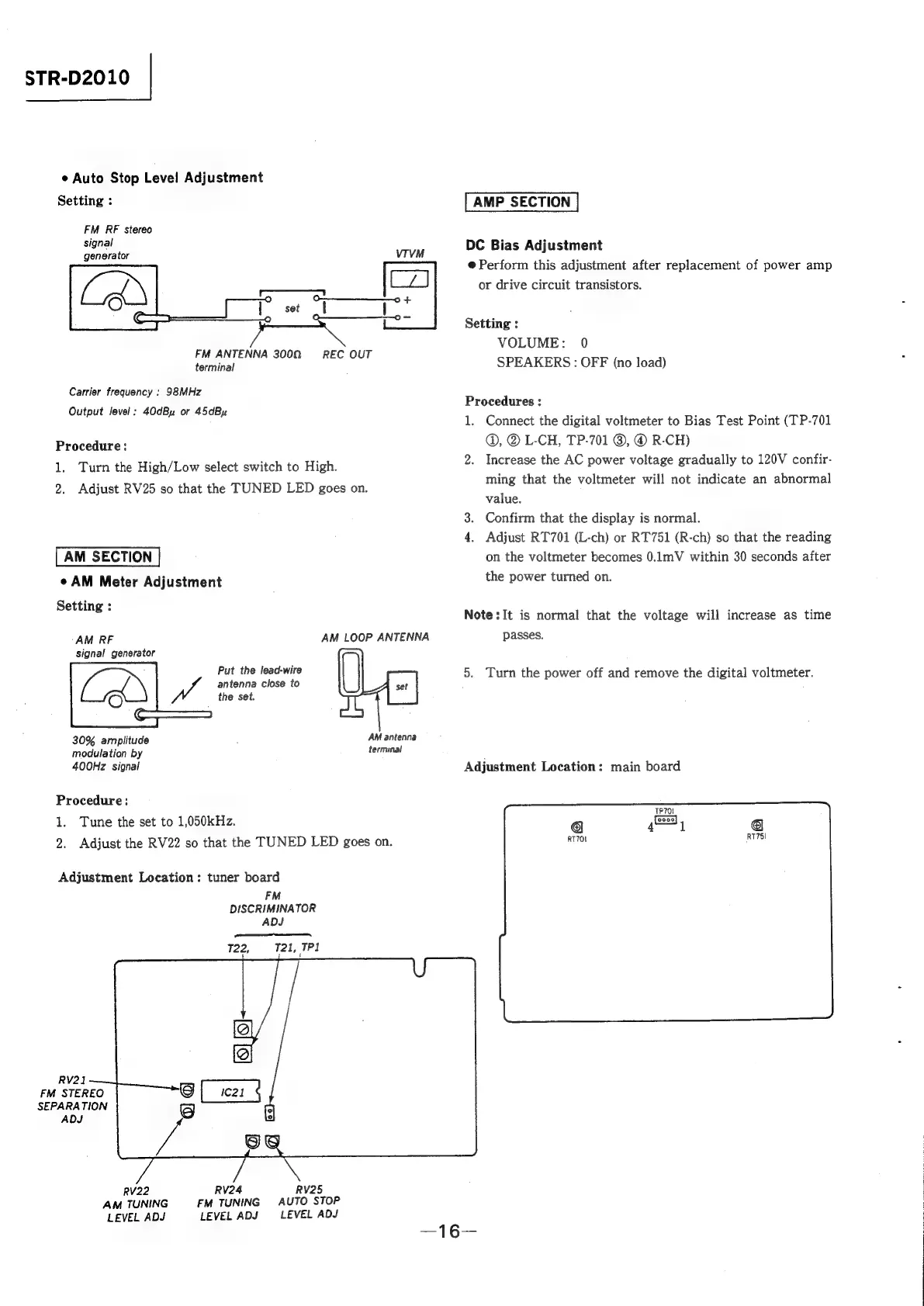
Auto
Stop
Level
Adjustment
Setting
:
FM
RF
stereo
signal
generator
VIVM
FM
ANTENNA
3000,
terminal
REC
OUT
Carrier
frequency
:
98MHz
Output
level:
40dBu
or
45dBy
Procedure:
1.
Turn
the
High/Low
select
switch
to
High.
2.
Adjust
RV25
so
that
the
TUNED
LED
goes
on.
AM
SECTION
¢
AM
Meter
Adjustment
Setting
:
‘AM
RF
AM
LOOP
ANTENNA
signal
generator
Put
the
lead-wire
(
antenna
close
to
Wt
the
set.
LA =|
(ES
JL
AM
antenna
30%
amplitude
terminal
modulation
by
400Hz
signal
Procedure:
1.
Tune
the
set
to
1,050kHz.
2.
Adjust
the
RV22
so
that
the
TUNED
LED
goes
on.
Adjustment
Location:
tuner
board
FM
DISCRIMINATOR
ADJ
pene
Mi
noon
T22,
T21,
TPd
RV21
FM
STEREO
SEPARATION
ADJ
RV22
RV24 RV25
AM
TUNING
FM
TUNING
AUTO
STOP
LEVEL
ADJ
LEVEL
ADJ
LEVEL
ADJ
AMP
SECTION
DC
Bias
Adjustment
@
Perform
this
adjustment
after
replacement
of
power
amp
or
drive
circuit
transistors.
Setting
:
VOLUME:
0
SPEAKERS:
OFF
(no
load)
Procedures
:
1.
Connect
the
digital
voltmeter
to
Bias
Test
Point
(TP-701
@,
@
L-CH,
TP-701
©,
©
R-CH)
2.
Increase
the
AC
power
voltage
gradually
to
120V
confir-
ming
that
the
voltmeter
will
not
indicate
an
abnormal
value.
3.
Confirm
that
the
display
is
normal.
4.
Adjust
RT701
(L-ch)
or
RT751
(R-ch)
so
that
the
reading
on
the
voltmeter
becomes
0.1mV
within
30
seconds
after
the
power
turned
on.
Note
:It
is
normal
that
the
voltage
will
increase
as
time
passes.
5.
Turn
the
power
off
and
remove
the
digital
voltmeter.
Adjustment
Location:
main
board

Related product manuals