145
GB
Operating Each Component Using the On-screen Remote (Quick Click)
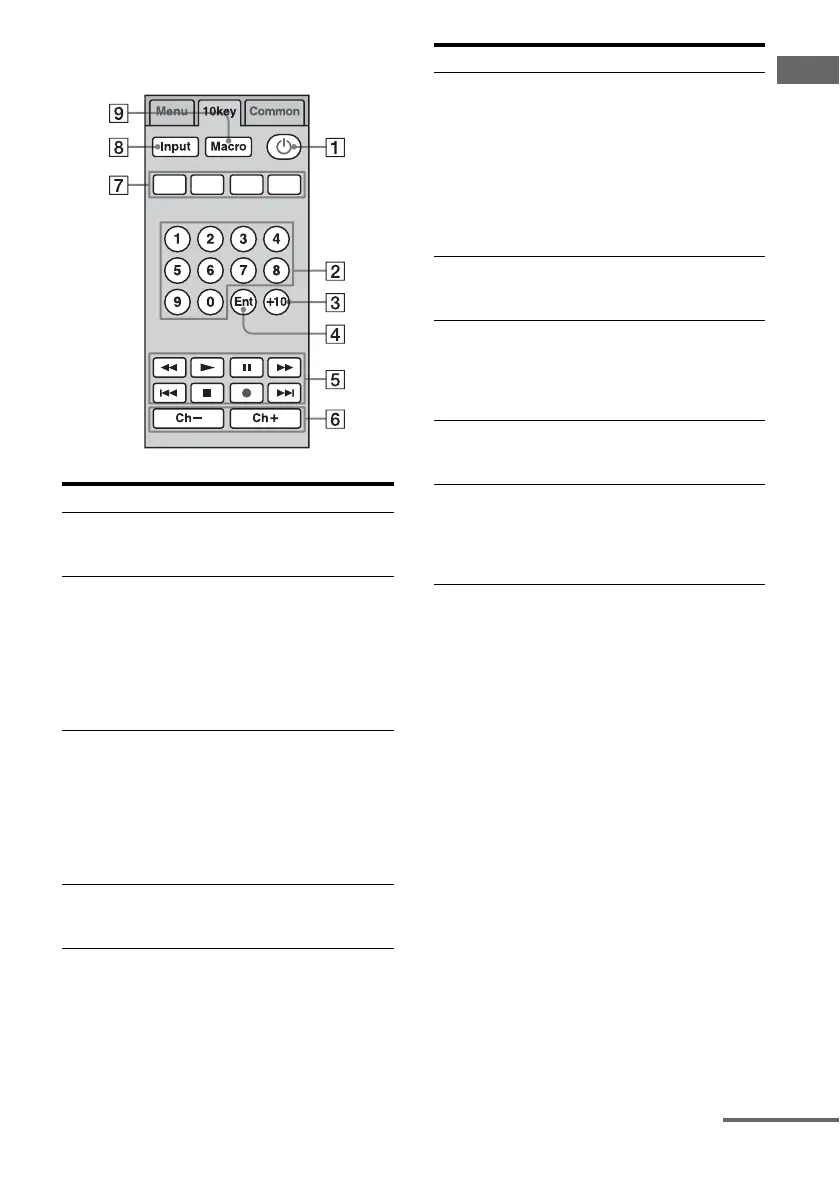
10 key tab
Button Function
A 1 Select to turn components
connected to the receiver on or
off.
B 10 key Select to
– select track numbers of the
CD player, DVD player,
Blu-ray Disc Player, or MD
deck.
– select channel numbers of
the TV, Satellite tuner or the
VCR.
C +10 (.) Select to
– select track numbers over 10
of the CD player, DVD
player, Blu-ray Disc Player,
or MD deck.
– select channel numbers over
10 of the TV, Satellite tuner
or the VCR.
D Ent Press to enter the value after
selecting a channel, disc or
track using the numeric buttons.
E N, z Select to start playback or to
record.
x, X Select to stop or pause playback
or recording.
m/M Select to fast-forward or fast-
reverse.
./> Select to go to the next/previous
track.
F Ch+/Ch– Select Ch +/– to select the
channel of the TV, satellite
tuner, VCR, etc.
G Color
buttons
(Red/Blue/
Green/
Yellow)
Select when you operate a DVD
player/recoder, Blu-ray Disc
Player, or cable box.
H Input Select the input source of
components connected to the
receiver.
I Macro Select to start a macro
programmed with Quick Click.
When there are no programmed
macros, this button does not
appear.
Button Function
continued















 To Next Page