147
GB
Operating Each Component Using the On-screen Remote (Quick Click)
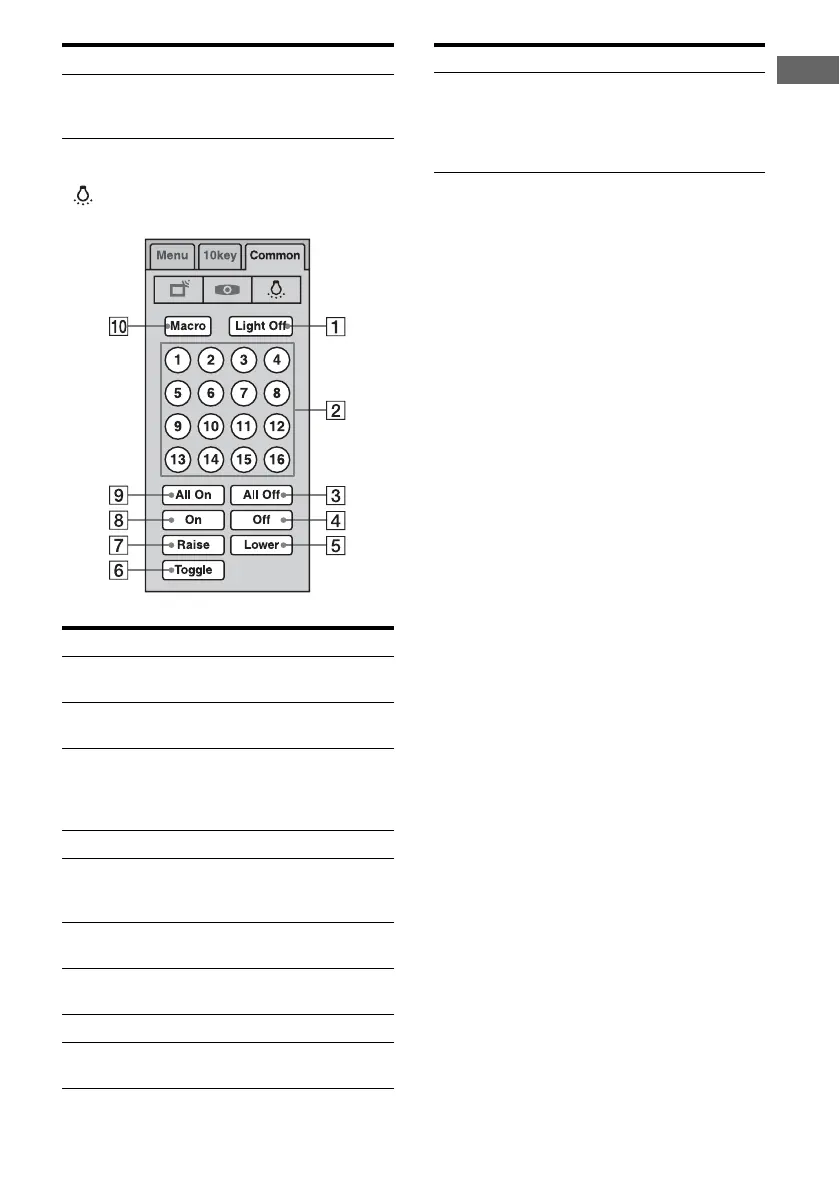
To operate the lighting, select
( ) on Common tab.
* A lighting control unit is a device which can adjust
the brightness of two or more lights with a one-
touch operation.
Consult your installation dealer about lighting
control unit installation.
To make the on-screen remote
disappear
Press QUICK CLICK or RETURN/EXIT O.
G Input Select the input source of the
components connected to the
receiver.
Button Function
A Light Off Select to turn off the power of
the lighting control unit.*
B Scene 1~16 Select to select a preset lighting
pattern.
C All Off Select to turn down the
brightness of all the lights to the
minimum (putting out the
lights).
D Off Select to turn off a single light.
E Lower Select to turn down the
brightness of all the lights at the
same time.
F Toggle Select to switch the preset
lighting pattern.
G Raise Select to turn up the brightness
of all the lights at the same time.
H On Select to turn on a single light.
I All On Select to turn up all the lights to
maximum brightness.
Button
Function
J Macro Select to start a macro
programmed with Quick Click.
When there are no programmed
macros, this button does not
appear.
Button Function















 To Next Page