49
GB
Getting Started
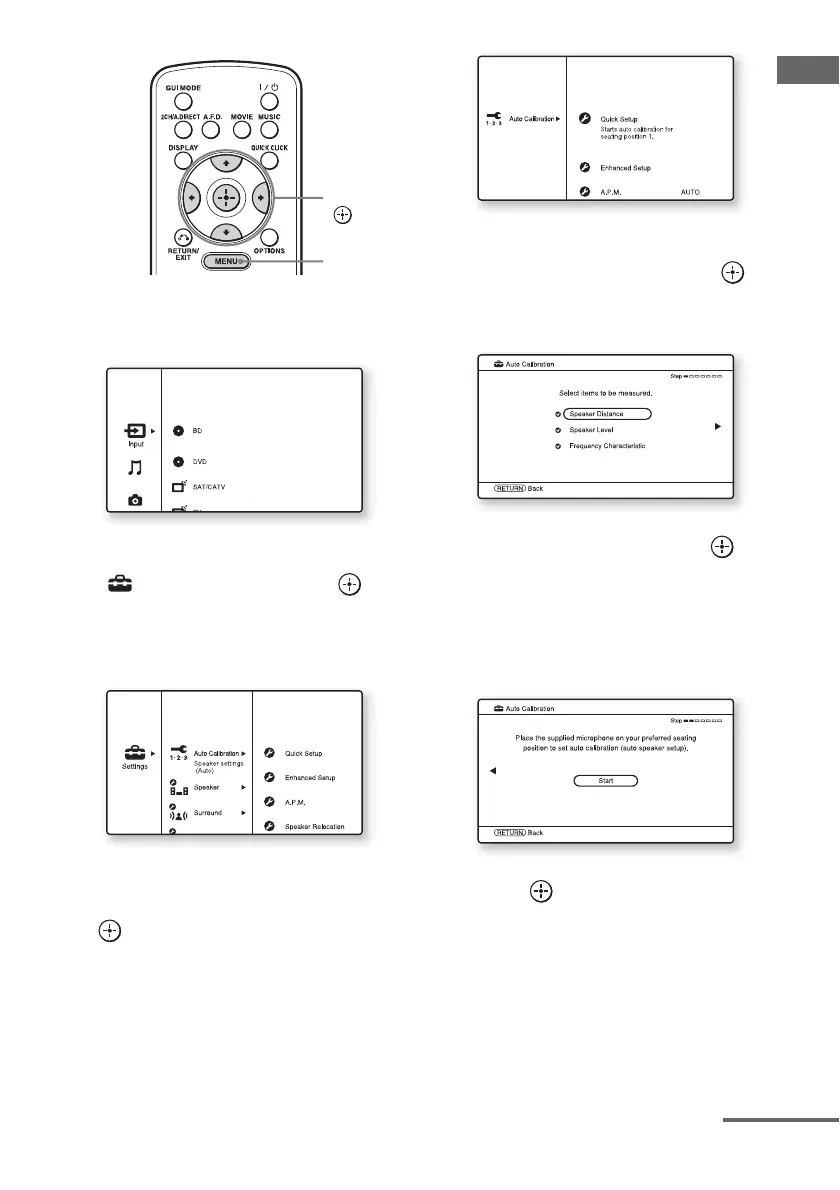
1 Press MENU.
The menu is displayed on the TV screen.
2 Press V/v repeatedly to select
“ Settings,” then press or
b.
The Settings menu list appears on the TV
screen.
3 Press V/v repeatedly to select
“Auto Calibration,” then press
or b.
4 Press V/v repeatedly to select
“Quick Setup,” then press .
The screen on which you can select the
item to be measured appears.
5 Press V/v repeatedly and to
un-check the items you do not
want to measure, then press b.
The confirmation screen, asking whether
you are ready to start measurement,
appears.
6 Press to select “Start.”
The measurement starts in five seconds.
When the measurement ends, a beep
sounds and the measurement result
appears on the TV screen.
V/v/B/b,
MENU
continued















 To Next Page