EasyManua.ls Logo

Sony STR-SE591 - Other Hookups

Sony STR-SE591
56 pages
Print Icon
To Next Page IconTo Next Page
To Previous Page IconTo Previous Page
Loading...
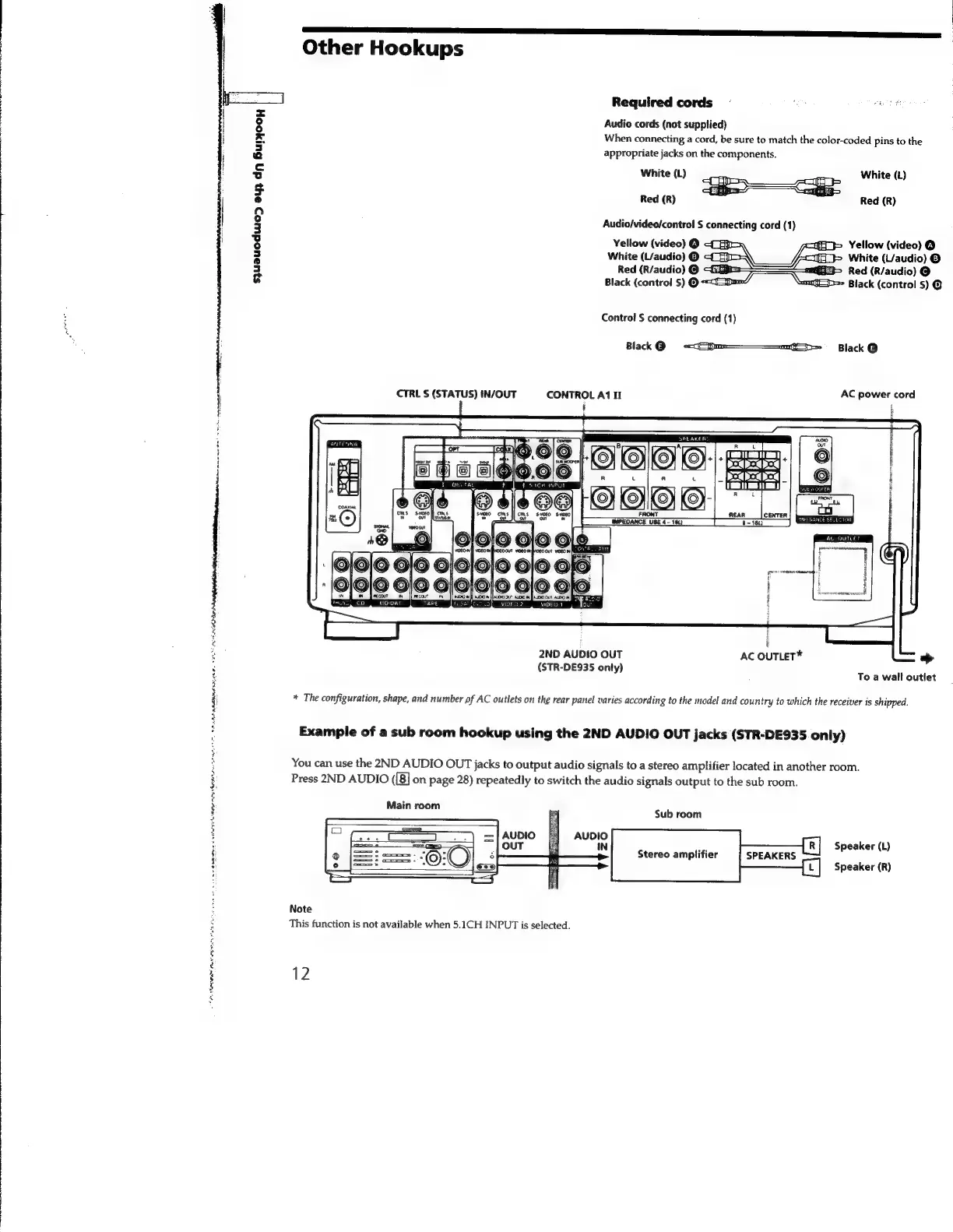
Other
Hookups
Required
cords
~
rn
ee
Audio
cords
(not
supplied)
When
connecting
a
cord,
be
sure
to
match
the
color-coded
pins
to
the
appropriate
jacks
on
the
components.
White
(L)
White
(L)
Red
(R)
Red
(R)
Audio/video/control
S
connecting
cord
(1)
Yellow
(video)
@
Yellow
(video)
@
White
(L/audio)
@
White
(L/audio)
©
Red
(R/audio)
@
Red
(R/audio)
@
syuauodwo>
ayy
dn
Bunjooy
Black
(control
S)
=
Black
(control
$)
@
Control
S
connecting
cord
(1)
Blak
@
r=
~—
Black
@
CTRL
S
(STATUS)
IN/OUT
CONTROL
A1
I
AC
power
cord
ENN
AAD
NII
Nin
tt
es
ae
i
2ND
AUDIO
OUT
AC
OUTLET*
>
(STR-DE935
only)
To
a
wall
outlet
*
The
configuration,
shape,
and
number
pf
AC
outlets
on
the
rear
panel
varies
according
to
the
model
and
country
to
which
the
receiver
is
shipped.
AAA
RAEN
AE.
Se
Example
of
a
sub
room
hookup
using
the
2ND
AUDIO
OUT
jacks
(STR-DE935
only)
You
can
use
the
2ND
AUDIO
OUT
jacks
to
output
audio
signals
to
a
stereo
amplifier
located
in
another
room.
;
Press
2ND
AUDIO
([8]
on
page
28)
repeatedly
to
switch
the
audio
signals
output
to
the
sub
room.
3
}
Main
room
Sui
room
:
Speaker
(L)
Stereo
amplifier
SPEAKERS
Speaker
(R)
sivas
enewme
Note
This
function
is
not
available
when
5.1CH
INPUT
is
selected.
12
é
é
é
:

Related product manuals