EasyManua.ls Logo

Sony STR-SE591 - Video Component Hookups

Sony STR-SE591
56 pages
Print Icon
To Next Page IconTo Next Page
To Previous Page IconTo Previous Page
Loading...
cos
mn
cE
che
heen
faites
+
PM
et
oR
sjuauodwo>
ain
dn
Bulyooy
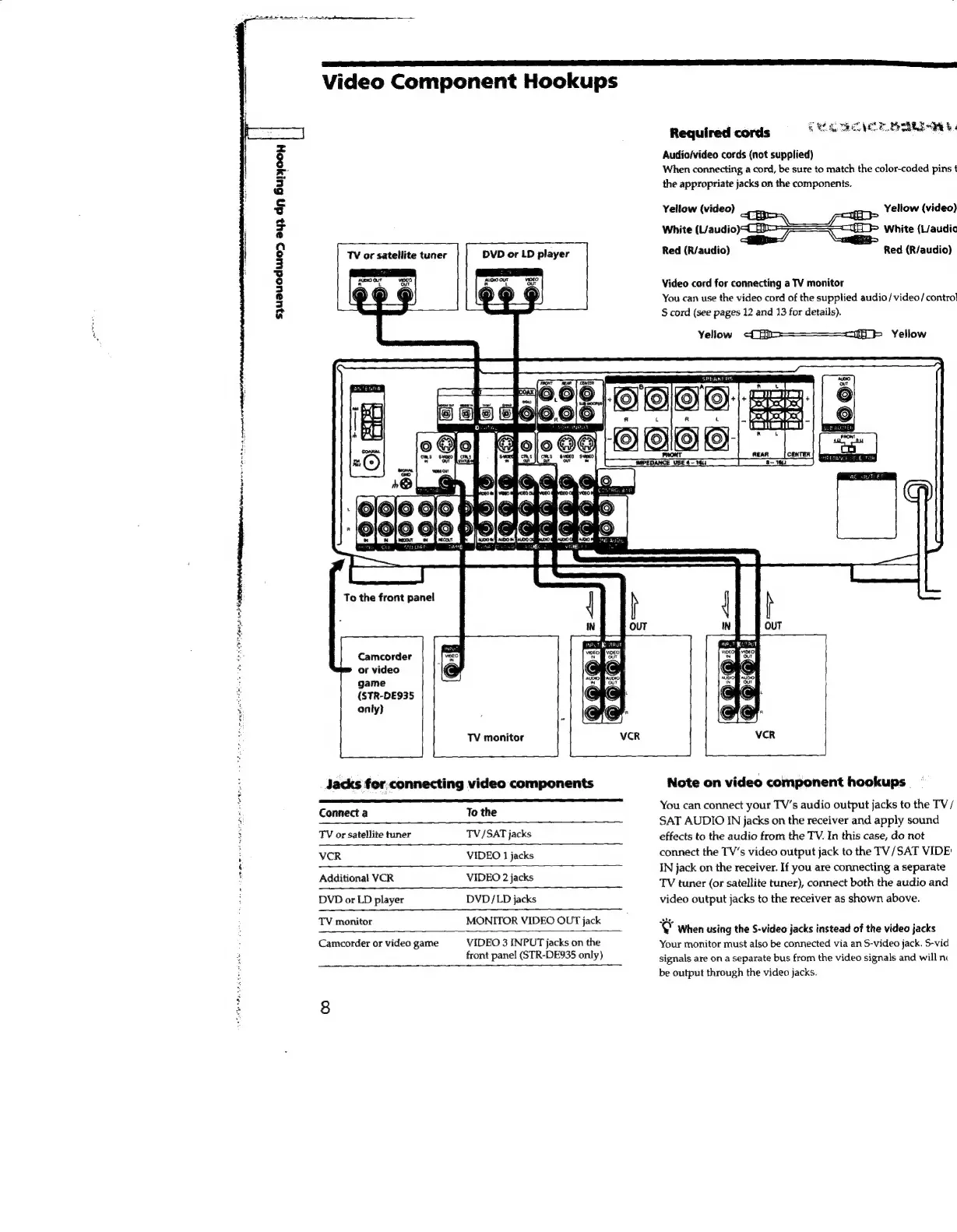
TV
or
satellite
tuner
DVD
or
LD
player
To
the
front
panel
Camcorder
or
video
game
(STR-DE935
only}
SNL
EE
AON
OD
I
a
Se
ES
a
OI
EE
IES
Video
Component
Hookups
Required
cords
5
MLA
RCL
eR
Audiofvideo
cords
(not
supplied)
When
connecting
a
cord,
be
sure
to
match
the
color-coded
pins
t
the
appropriate
jacks
on
the
components.
on
Yellow
(video)
White
(L/audio)\¢_
D>
a
White
(L/audic
Red
(R/audio)
~~
Red
(R/audio)
Video
cord
for
connecting
a
TV
monitor
You
can
use the
video
cord
of
the
supplied
audio/video
/
contro!
S
cord
(see
pages
12
and
13
for
details).
Yellow
-CHio——————r7fff
Yellow
TV
monitor
SPEAKERS
Jacks
for
connecting
video
components
Connect
a
To
the
TV
or
satellite
tuner
TV/SAT
jacks
VCR
VIDEO
1
jacks
Additional
VCR
VIDEO
2
jacks
DVD
or
LD
player
DVD/LD
jacks
TV
monitor
MONITOR
VIDEO
OUT
jack
Camcorder
or
video
game
VIDEO
3
INPUT
jacks
on
the
front
panel
(STR-DE935
only)
Note
on
video
component
hookups
You
can
connect
your
TV’s audio
output
jacks
to
the
TV/
SAT
AUDIO
IN
jacks
on
the
receiver
and
apply
sound
effects
to
the
audio
from
the
TV.
In
this
case,
do
not
connect
the
TV’s
video
output
jack
to
the
TV/SAT
VIDE
IN
jack
on
the
receiver.
If
you
are
connecting
a
separate
TV
tuner
(or
satellite
tuner),
connect
both
the
audio
and
video
output
jacks
to
the
receiver
as
shown
above.
'O
when
using
the
S-video
jacks
instead
of
the
video
jacks
Your
monitor
must
also
be
connected
via
an
S-video
jack.
S-vid
signals
are
on
a
separate
bus
from
the
video
signals
and
will
n
be
output
through
the
video
jacks.

Related product manuals