EasyManua.ls Logo

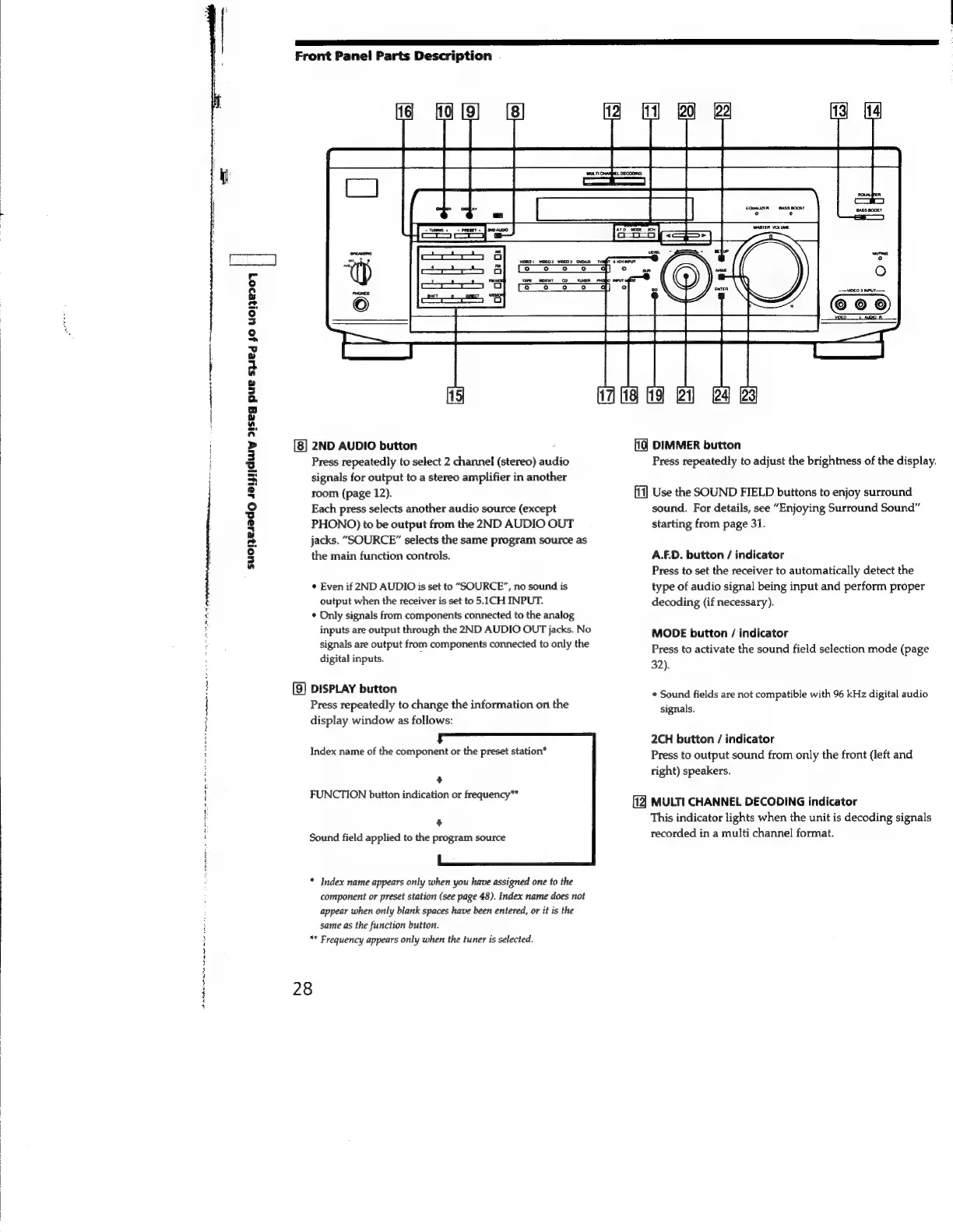
Sony STR-SE591 - 3 INPUT MODE button; 4 5.1 CH INPUT button; 5 MASTER VOLUME control; 7 SPEAKERS selector

Sony STR-SE591
56 pages
Print Icon
To Next Page IconTo Next Page
To Previous Page IconTo Previous Page
Loading...
a
tt
a
Srna
AAA
tome
nlaatet
t
ah
etter
nataererte
arte
een
Pt
te
amy
PRR
nate
Mee
tee
erie
oe
=
suojesad
saiptiduy
>s1seg
pue
spied
yo
U01}e207
|
Front
Panel
Parts
Description
.
2ND
AUDIO
button
Press
repeatedly
to
select
2
channel
(stereo)
audio
signals
for
output
to
a
stereo
amplifier
in
another
room
(page
12).
Each
press
selects
another
audio
source
(except
PHONO)
to
be
output
from
the
2ND
AUDIO
OUT
jacks.
“SOURCE”
selects
the
same
program
source
as
the
main
function
controls.
¢
Even
if
2ND
AUDIO
is
set
to
“SOURCE”,
no
sound
is
output
when
the
receiver
is
set
to
5.1CH
INPUT.
¢
Only
signals
from
components
connected
to
the
analog
inputs
are
output
through
the
2ND
AUDIO
OUT
jacks.
No
signals
are
output
from
components
connected
to
only
the
digital
inputs.
:
[9]
DISPLAY
button
Press
repeatedly
to
change
the
information
on
the
display
window
as
follows:
Index
name
of
the
component
or
the
preset
station*
+
FUNCTION
button
indication
or
frequency**
+
Sound
field
applied
to
the
program
source
*
Index
name
appears
only
when
you
have
assigned
one
to
the
component
or
preset
station
(see
page
48).
Index
name
does
not
appear
when
only
blank
spaces
have
been
entered,
or
it
is
the
same
as
the
function
button.
**
Frequency
appears
only
when
the
tuner
is
selected.
28
ff
DIMMER
button
Press
repeatedly
to
adjust
the
brightness
of
the
display.
[11]
Use
the
SOUND
FIELD
buttons
to
enjoy
surround
sound.
For
details,
see
“Enjoying
Surround
Sound”
starting
from page
31.
A.F.D.
button
/
indicator
Press
to
set
the
receiver
to
automatically
detect
the
type
of
audio
signal
being
input
and
perform
proper
decoding
(if
necessary).
MODE
button
/
indicator
Press
to
activate
the
sound
field
selection
mode
(page
32).
¢
Sound
fields
are
not
compatible
with
96
kHz
digital
audio
signals.
2CH
button
/
indicator
Press
to
output
sound
from
only
the
front
(left
and
right)
speakers.
[12
MULTI
CHANNEL
DECODING
indicator
This
indicator
lights
when
the
unit
is
decoding
signals
recorded
in
a
multi
channel
format.

Related product manuals