EasyManua.ls Logo

Sony STR-SE591 - Location of Parts and Basic Operations; 2 Function buttons

Sony STR-SE591
56 pages
Print Icon
To Next Page IconTo Next Page
To Previous Page IconTo Previous Page
Loading...
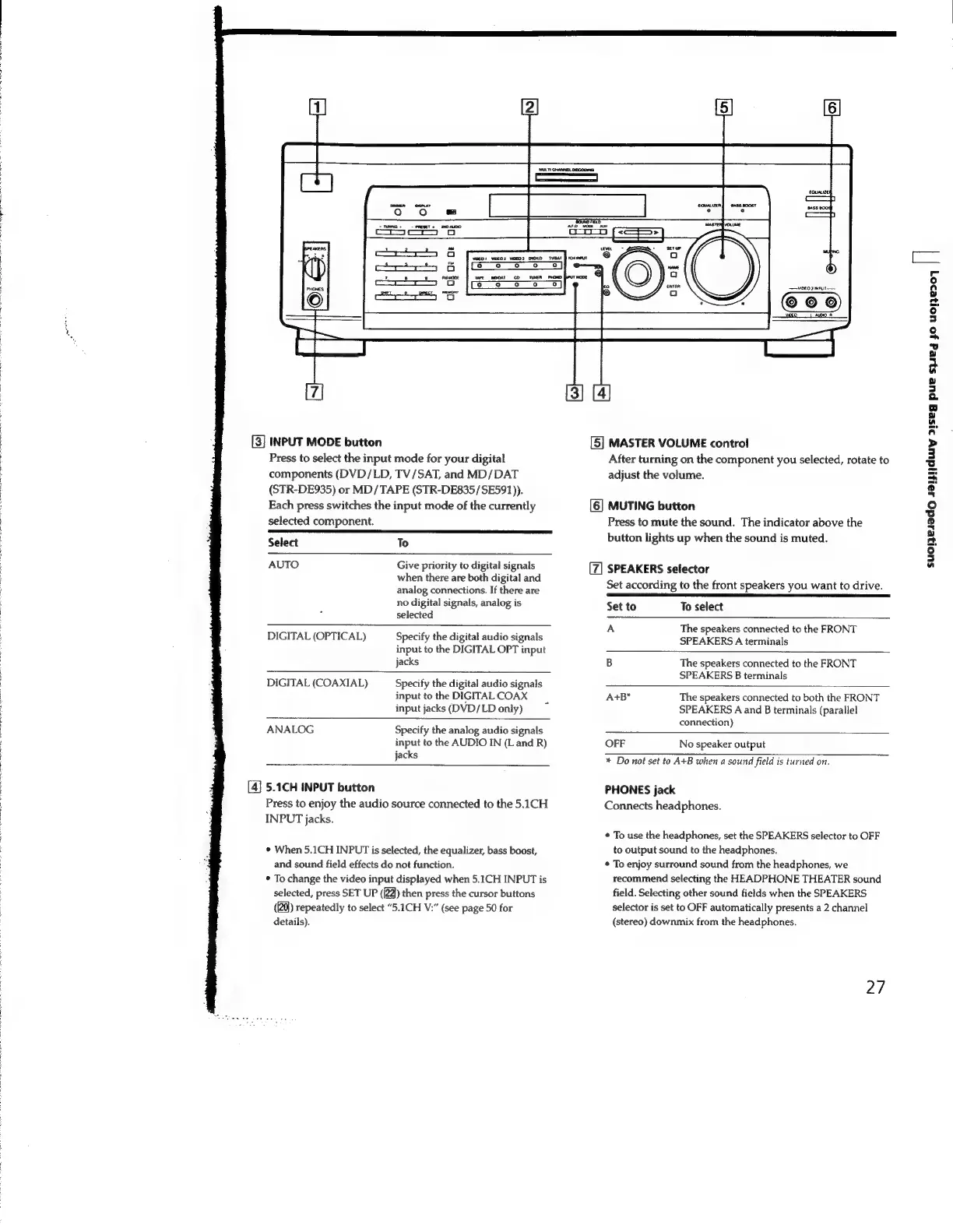
[3]
INPUT
MODE
button
Press
to
select
the
input
mode
for
your
digital
components
(DVD/LD,
TV/SAT,
and
MD/DAT
(STR-DE935)
or
MD/TAPE
(STR-DE835/SE591)).
Each
press
switches
the
input
mode
of
the
currently
selected
component.
Select
To
AUTO
Give
priority
to
digital
signals
when
there
are
both
digital
and
analog
connections.
If
there
are
no
digital
signals,
analog
is
selected
DIGITAL
(OPTICAL)
Specify
the
digital
audio
signals
input
to
the
DIGITAL
OPT
input
jacks
DIGITAL
(COAXIAL)
Specify
the
digital
audio
signals
input
to
the
DIGITAL
COAX
input
jacks
(DVD/LD
only)
ANALOG
Specify
the
analog
audio
signals
input
to
the
AUDIO
IN
(Land
R)
jacks
[4]
5.1CH
INPUT
button
Press
to
enjoy
the
audio
source
connected
to
the
5.1CH
INPUT
jacks.
¢
When
5.1CH
INPUT
is
selected,
the
equalizer,
bass
boost,
and
sound
field
effects
do
not
function.
*
To
change
the
video
input
displayed
when
5.1CH
INPUT
is
selected,
press
SET
UP
([2Q)
then
press
the
cursor
buttons
(20)
repeatedly
to
select
“5.1CH
V:”
(see
page
50
for
details).
[5]
MASTER
VOLUME
control
After
turning
on
the
component
you
selected,
rotate
to
adjust
the
volume.
[6]
MUTING
button
Press
to
mute
the
sound.
The
indicator
above
the
button
lights
up
when
the
sound
is
muted.
SPEAKERS
selector
Set
according
to
the
front
speakers
you
want
to
drive.
SENS
ana
Set
to
To
select
A
The
speakers
connected
to
the
FRONT
SPEAKERS
A
terminals
B
The
speakers
connected
to
the
FRONT
SPEAKERS
B
terminals
A+B*
The
speakers
connected
to
both
the
FRONT
SPEAKERS
A
and
B
terminals
(parallel
connection)
OFF
No
speaker
output
+
Do
not
set
to
A+B
when
a
sound
field
is
turned
on.
PHONES
jack
Connects
headphones.
*
To
use
the
headphones,
set
the
SPEAKERS
selector
to
OFF
to
output
sound
to
the
headphones.
*
To
enjoy
surround
sound
from
the
headphones,
we
recommend
selecting
the
HEADPHONE
THEATER
sound
field.
Selecting
other
sound
fields
when
the
SPEAKERS
selector
is
set
to
OFF
automatically
presents
a
2
channel
(stereo)
downmix
from
the
headphones.
2/7
suolzesedo
sa
dwiy
21seg
pue
syieg
yo
U01}e307
|
|

Related product manuals