EasyManua.ls Logo

Sony STR-SE591 - Digital Component Hookups

Sony STR-SE591
56 pages
Print Icon
To Next Page IconTo Next Page
To Previous Page IconTo Previous Page
Loading...
1
RW
0
nae
a
AARNE
2
AEE
RR
at
ve
eee
oe
ihe
A
AARC
nn
6.
ate
|
syuasuodwos
au3
dp
BurjooH
Se
a
ea
I
a
a
I
Digital
Component
Hookups
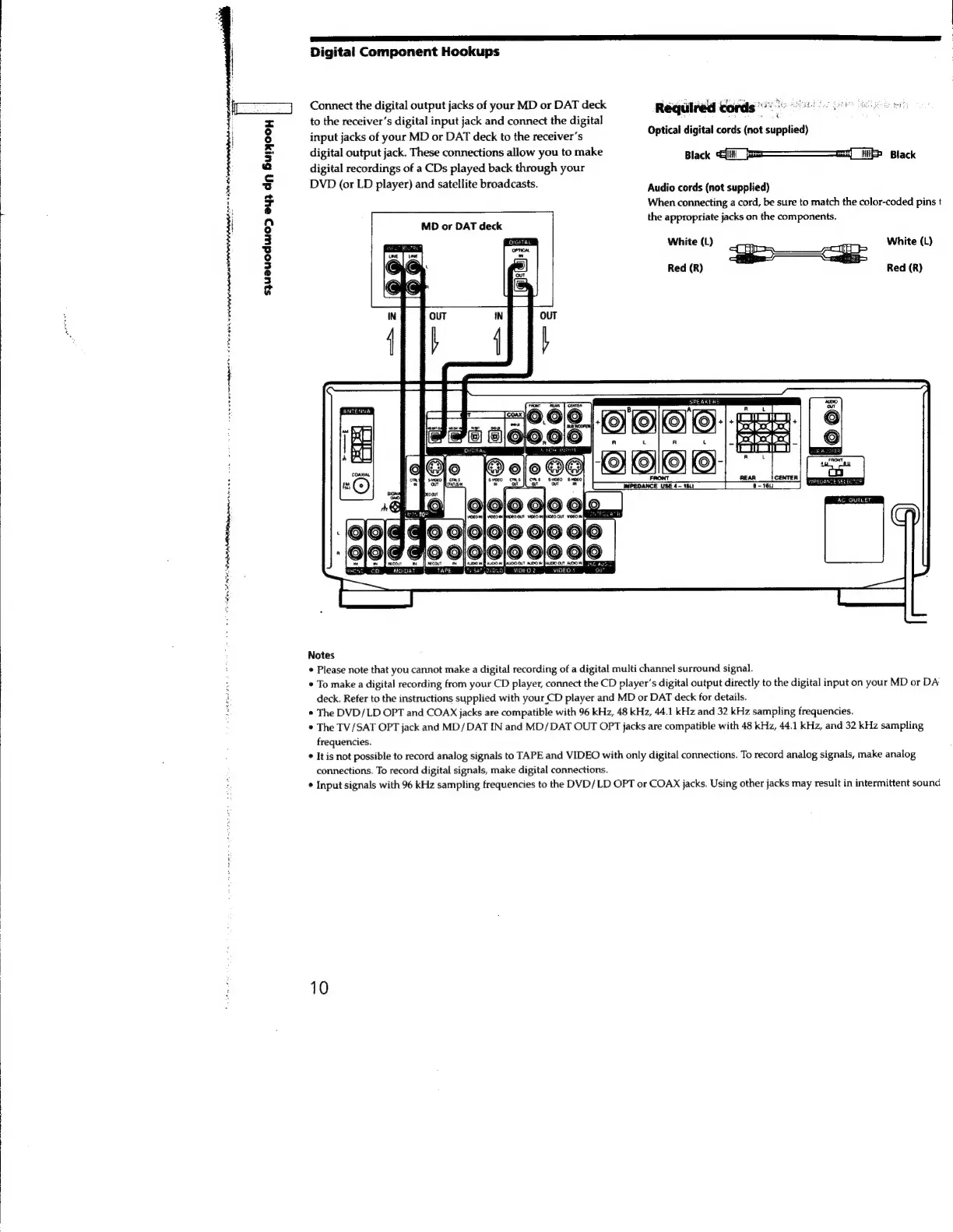
Connect
the
digital
output
jacks
of
your
MD
or
DAT
deck
Required
cords
ee
to
the
receiver's
digital
input
jack
and
connect
the
digital
eee
;
:
:
input
jacks
of
your
MD
or
DAT
deck
to
the
receiver's
Optical
digital
cords
{not
supplied)
digital
output
jack.
These
connections
allow
you
to
make
Black
Black
digital
recordings
of
a
CDs
played
back
through
your
DVD
(or
LD
player)
and
satellite
broadcasts.
Audio
cords
(not
supplied)
When
connecting
a
cord,
be
sure
to
match
the
color-coded
pins
t
the
appropriate
jacks
on
the
components.
MD
or
DAT
deck
White
(L)
White
(L)
Red
(R)
Red
(R)
SPEAKERS
a
OTD
AC
OUTLET
Notes
*
Please
note
that
you
cannot
make
a
digital
recording
of
a
digital
multi
channel
surround
signal.
*
To
make
a
digital
recording
from
your
CD
player,
connect
the
CD
player's
digital
output
directly
to
the
digital
input
on
your
MD
or
DA
deck. Refer
to
the
instructions
supplied
with
your
CD
player
and
MD
or
DAT
deck
for
details.
¢
The
DVD/LD
OPT
and
COAX
jacks
are
compatible
with
96
kHz,
48
kHz,
44.1
kHz
and
32
kHz
sampling
frequencies.
¢
The
TV/SAT
OPT
jack
and
MD/DAT
IN
and
MD/DAT
OUT
OPT
jacks
are
compatible
with
48
kHz,
44.1
kHz,
and
32
kHz
sampling
frequencies.
*
It
is
not
possible
to
record
analog
signals
to
TAPE
and
VIDEO
with
only
digital
connections.
To
record
analog
signals,
make
analog
connections.
To
record
digital
signals,
make
digital
connections.
¢
Input
signals
with
96
kHz
sampling
frequencies
to
the
DVD/LD
OPT
or
COAX
jacks.
Using
other
jacks
may
result
in
intermittent
sound
10

Related product manuals