EasyManua.ls Logo

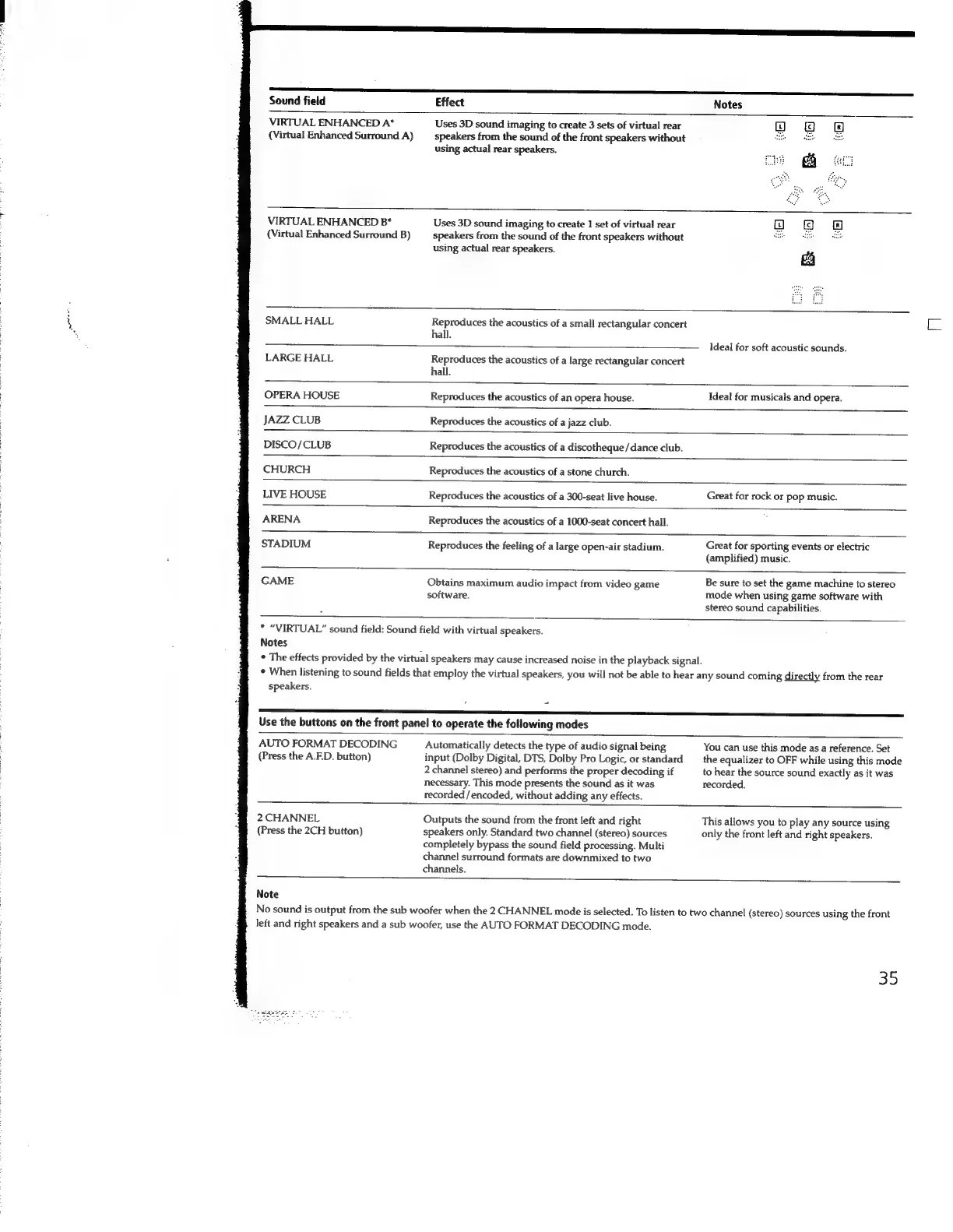
Sony STR-SE591 - VIRTUAL ENHANCED A* (Virtual Enhanced Surround A); VIRTUAL ENHANCED B* (Virtual Enhanced Surround B); Use the buttons on the front panel to operate the following modes; AUTO FORMAT DECODING (Press the A.F.D. button)

Sony STR-SE591
56 pages
Print Icon
To Next Page IconTo Next Page
To Previous Page IconTo Previous Page
Loading...
re
pepe
Sound
field
Effect
VIRTUAL
ENHANCED
A*
(Virtual
Enhanced
Surround
A)
Uses
3D
sound
imaging
to
create
3
sets
of
virtual
rear
speakers
from
the
sound
of
the
front
speakers
without
using
actual
rear
speakers.
VIRTUAL
ENHANCED
B*
(Virtual
Enhanced
Surround
B)
Uses
3D
sound imaging
to
create
1
set
of
virtual
rear
speakers
from
the
sound
of
the
front
speakers
without
using
actual
rear
speakers.
SMALL
HALL
Reproduces
the
acoustics
of
a
small
rectangular
concert
sua
Ideal
for
soft
acoustic
sounds.
LARGE
HALL
ed
sis
the
acoustics
of
a
large
rectangular
concert
OPERA
HOUSE
Reproduces
the
acoustics
of
an
opera
house.
Ideal
for
musicals
and
opera.
JAZZ
CLUB
Reproduces
the
acoustics
of
a
jazz
club.
DISCO/CLUB
Reproduces
the
acoustics
of
a
discotheque
/dance
club.
CHURCH
Reproduces
the
acoustics
of
a
stone
church.
LIVE
HOUSE
Reproduces
the
acoustics
of
a
300-seat
live
house.
Great
for
rock
or
pop
music.
ARENA
Reproduces
the
acoustics
of
a
1000-seat
concert
hall.
STADIUM
Reproduces
the
feeling
of
a
large
open-air
stadium.
Great
for
sporting
events
or
electric
(amplified)
music.
a
eee
GAME
Obtains
maximum
audio
impact
from
video
game
software.
*
“VIRTUAL”
sound
field:
Sound
field
with
virtual
speakers.
Notes
*
The
effects
provided
by
the
virtual
speakers
may
cause
increased
noise
in
the
playback
signal.
Be
sure
to
set
the
game
machine
to
stereo
mode
when
using
game
software
with
stereo
sound
capabilities.
+
When
listening
to
sound
fields
that
employ
the
virtual
speakers,
you
will
not
be
able
to
hear
any
sound
coming
directly
from
the
rear
speakers.
Use
the
buttons
on
the
front
panel
to
operate
the
following
modes
AUTO
FORMAT
DECODING
(Press
the
A.F.D.
button)
Automatically
detects
the
type
of
audio
signal
being
input
(Dolby
Digital,
DTS,
Dolby
Pro
Logic,
or
standard
2
channel
stereo)
and
performs
the
proper
decoding
if
necessary.
This
mode
presents
the
sound
as
it
was
recorded
/encoded,
without
adding
any
effects.
You
can
use
this
mode
as
a
reference.
Set
the
equalizer
to
OFF
while
using
this
mode
to
hear
the
source
sound
exactly
as
it
was
recorded.
2
CHANNEL
Outputs
the
sound
from
the
front
left
and
right
This
allows
you
to
play
any
source
using
(Press
the
2CH
button)
speakers
only.
Standard
two
channel
(stereo)
sources
only
the
front
left
and
right
speakers.
completely
bypass
the
sound
field
processing.
Multi
channel
surround
formats
are
downmixed
to
two
channels.
Note
No
sound
is
output
from
the
sub
woofer
when
the
2
CHANNEL
mode
is
selected.
To
listen
to
two
channel
(stereo)
sources
using
the
front
left
and
right
speakers
and
a
sub
woofer,
use
the
AUTO
FORMAT
DECODING
mode.
35

Related product manuals