r--q
r---1
SP_KE_,
PHONES
MU_rlCH_NELDEC_O_G
MASTERSOLUME
Ai,D_S_ITI
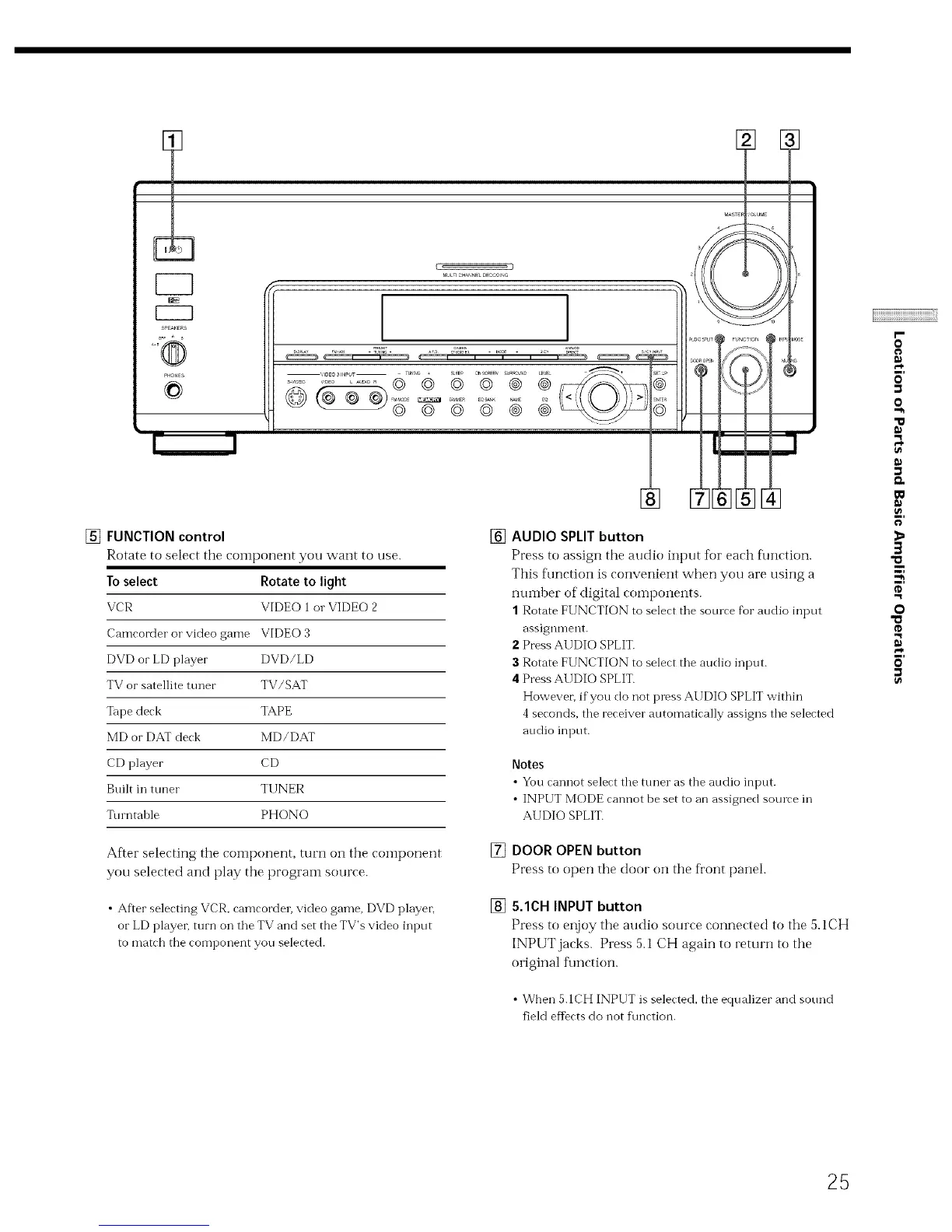
[] FUNCTION control
Rotate to select the component you want to use.
To select Rotate to light
VCR VIDEO 1ol. VIDEO 2
Camcorder o1"video game VIDEO 3
DVD or LD player DVD/LD
TV or satellite tuner TV/SAT
Tape deck TAPE
MD or DAT deck MD/DAT
CD player CD
Built in tuner Tl INER
Turntable PHONO
After selecting the component, turn on the component
you selected and play the prograln source.
• After selecting VCR, camcorder, video game, DVD player,
or LD player, turn on the TV and set the TV's video input
to match the component you selected.
[] AUDIO SPLIT button
Press to assign the audio input for each flmction.
This flmction is convenient when you are using a
nuinber of digital components.
1 Rotate FUNCTION to select the source for audio input
assignment.
Z Press AUDIO SPLIT.
3 Rotate FUNCTION to select the audio input.
4 Press AUDIO SPLIT.
However; ifyou do not press AUDIO SPLIT within
4seconds, the receiver automatically assigns the selected
audio input.
Notes
• You cannotselectthe tt/neras the audio input.
• INPUT MODE cannot be setto an assigned somve in
AUDIO SPLIT.
[] DOOR OPEN button
Press to open the door on the fl'ont panel.
[] 5.1CH INPUT button
Press to enjoy the audio source connected to the 5.1CH
INPUT jacks. Press 5.1 CH again to return to the
original function.
• When 5.1CH INPUT is selected, the equalizer and sotmd
field efIbcts do not f\mction.
I"
o
o
"111
"1
r,*
w
3
$,
"1
o
"0
"1
25



 To Next Page