43
[D] System Configuration – SYSTEM CONFIGURATION Menu
Chapter 2 Menu
[D] System Configuration
– SYSTEM
CONFIGURATION Menu
Overview
The system such as the network, parallel remote control
function, etc. is set with this menu.
The following are set.
• Setting the remote control function of the network
(NETWORK... menu)
• Setting for the parallel remote control functions
(PARALLEL REMOTE... menu)
• Power-up condition of the monitor (POWER... menu)
• Setting of the details about the blanking
(BLANKING SETTINGS... menu)
• Setting the data about the screen display (ON
SCREEN SET... menu)
• Setting the passwords for the menu (PASSWORD...
menu)
• Setting the GAMMA SW (GAMMA SW menu)
• Displaying the menu for maintenance
(MAINTENANCE... menu)
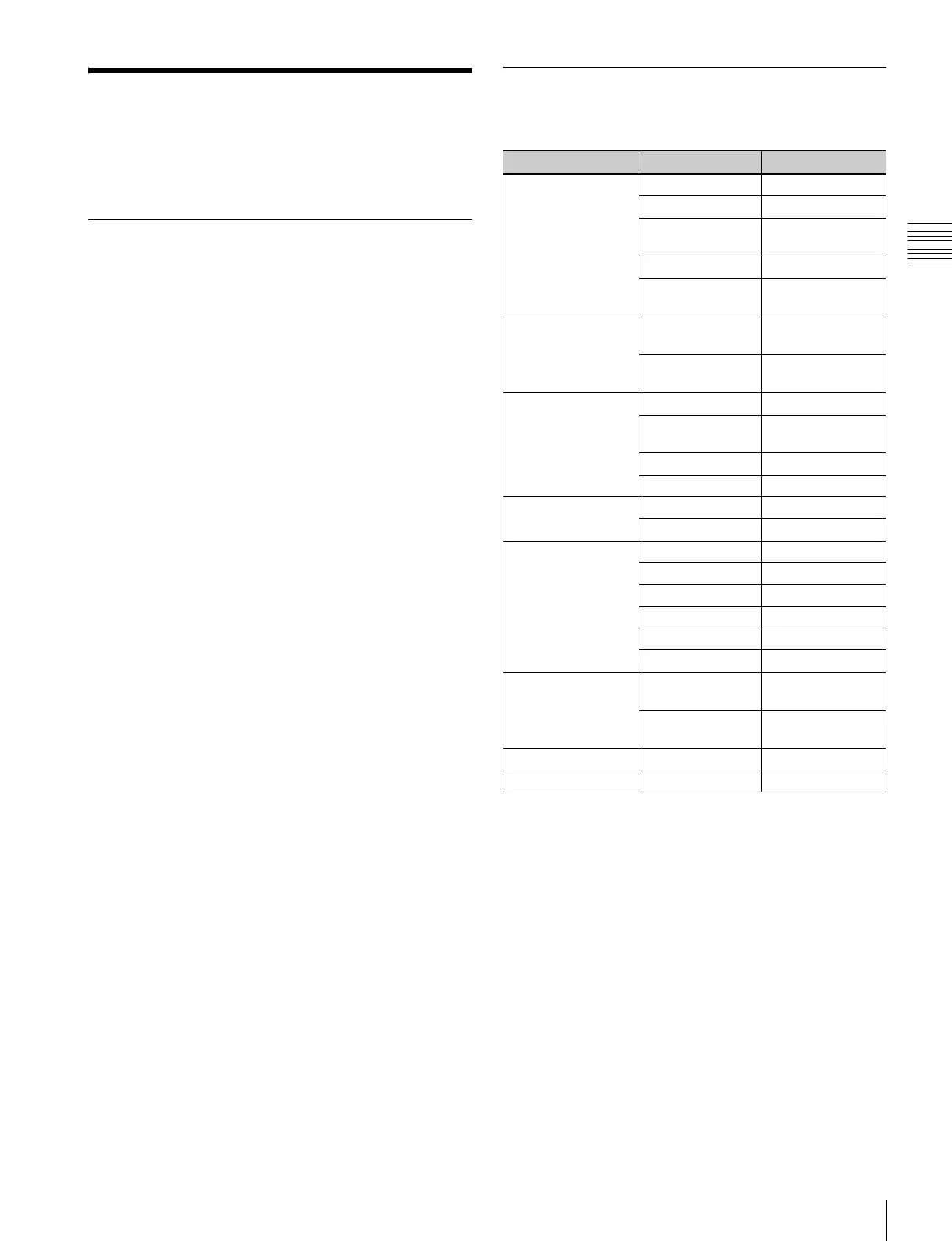
Structure of the SYSTEM
CONFIGURATION Menu
Level 1 Level 2 Level 3
NETWORK... [D1] MONITOR ID
GROUP ID
NETWORK
SETTINGS... [D11]
NETWORK SW
SNMP SETTINGS...
[D12]
PARALLEL
REMOTE... [D2]
PARALLEL
REMOTE
1 PIN... - 8 PIN...
[D21]
PARALLEL
REMOTE [D211]
POWER... [D3] STANDBY MODE
POWER ON
STATUS
DEFAULT CH
DEGAUSS DELAY
BLANKING
SETTINGS... [D4]
ANCILLARY DATA
VITS BLK
ON SCREEN SET...
[D5]
FORMAT DISPLAY
POSITION
CH NO
POSITION
CH NAME
POSITION
PASSWORD... [D6] CHANGE
PASSWORD... [D61]
CHANGE
PASSWORD [D611]
APPLY
PASSWORD... [D62]
APPLY PASSWORD
[D621]
GAMMA SW
MAINTENANCE... [D7]










 To Next Page