CPD-210GS/210EST
4
4
1
2
4
4
1
2
B
R
1
2
R
B
B
R
12
+
R
B
1
2
BR
R
B
12
+
1. Receive R.B. cross-hatch.
2. Adjust H.STAT and V.STAT at four-pole magnet.
<4 Pole Magnet>
SECTION 4
ADJUSTMENTS
• Landing Rough Adjustment
1. Enter the full white signal.
2. Adjust the contrast to the maximum.
3. Make the screen monogreen.
4. Reverse the DY, and adjust coarsely the purity magnet so
that a green raster positions in the center of screen.
5. Moving the DY forward, adjust so that an entire screen be-
comes monogreen.
6. Adjust the tilt of DY, and fix lightly with a clamp.
• Landing Fine Adjustment
1. Place the set in the Helmholtz coil.
2. Enter a green signal only.
3. Degauss the entire screen with hand-degausser.
Then auto degauss it.
4. Attach a wobbling coil to the specified position of CRT
neck.
5. Attach a landing adjuster sensor on the CRT.
6. Using a landing checker, adjust the DY position, purity on
DY, tilt of DY.
7. Clamp the DY screw.
Clamping torque: 22 ± 2kgcm (2.2 ± 0.2Nm)
• Convergence Rough Adjustment
1. Enter the white crosshatch signal.
2. Adjust roughly the horizontal and vertical convergence at
four-pole magnet.
3. Adjust roughly HMC and VMC at six-pole magnet.
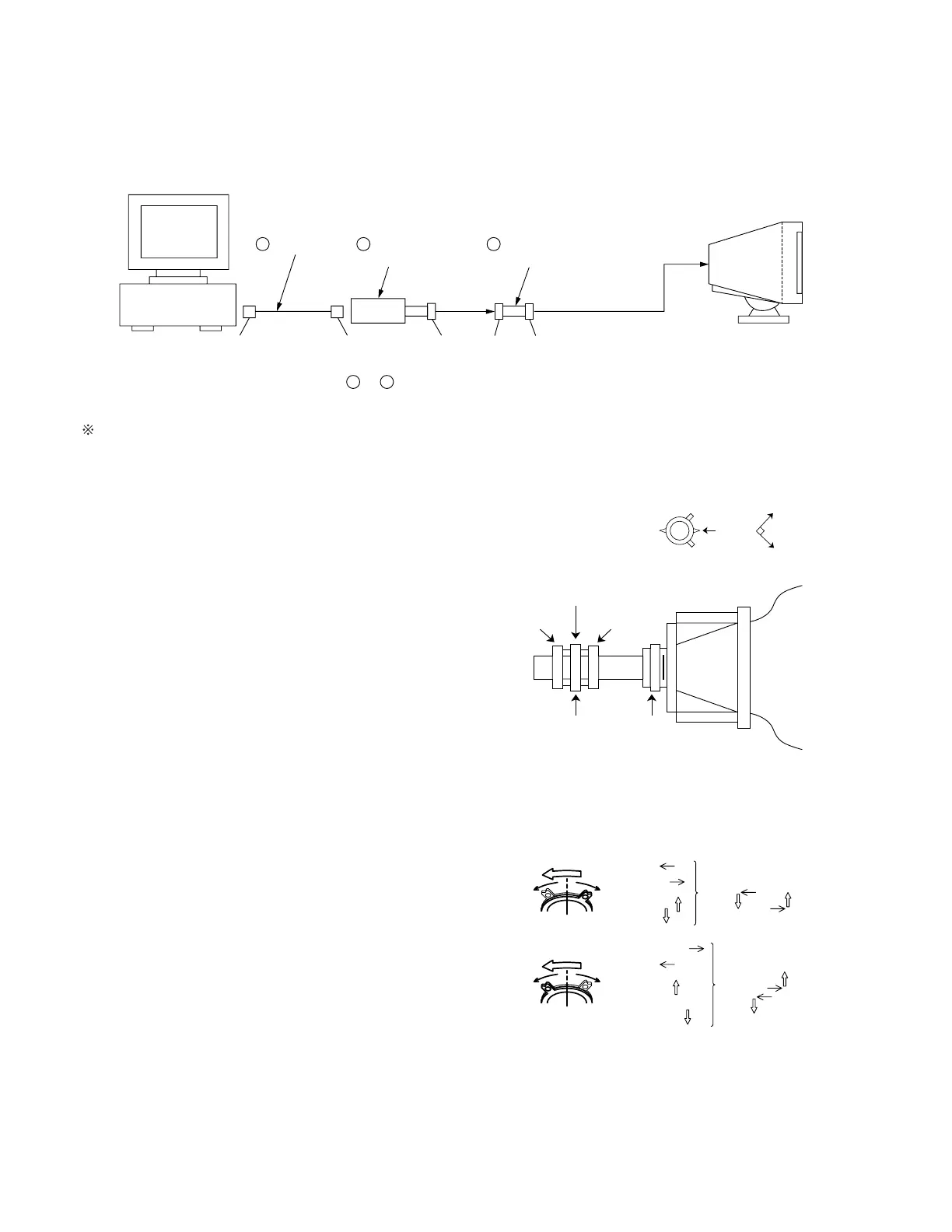
Connect the communication cable of the computer to the connector located on the D board on the monitor. Run the service software
and then follow the instruction.
IBM AT Computer
as a Jig
1-690-391-21
1
A-1500-819-A
Interface Unit
2
*The parts above ( ~ ) are necessary for DAS adjustment.
1
3
D-sub
(9 Pin [female])
mini Din
(8Pin)
4 Pin
3-702-691-01
Connector Attachment
3
To BUS CONNECTOR
4 Pin 4 Pin
• Convergence Fine Adjustment
Set DY four-pole magnet to mechanical center before adjust-
ment.
This should be prime mode.
4-1
Allow a 30 minute warm-up period prior to making the following adjustments.
NECK Assy
6Pole Mg
(Stable)
P.S Mg
DY CRT
4Pole Mg
P.S Mg
Mechanic
Center
Set the
finger






 To Next Page