3)
Again watch the right and
left
pincushion distortion.
When one side
is
over corrected
or
under corrected
after
the
other
side has been made linear with
I PIN
AMP
I
RV203,
rotate
I SIDE
PIN]A!J
RV206
to
adjust
the
pincushion distortion
on
both
sides equally,
then
again adjust
to
make linear with
IPIN
AMP
I
RV203.
D¢D~
Fig.2-10-4 PIN BAL Movement
(2)
(1) When
right
and
left
pincushion
distortion
is
not
equal.
(2)
Adjust
SIDE
PIN
SAL
(RV206)
equalize
right
and
left
amounts
of
distortion.
(3)
Adjust
the
PIN
AMP
(RV203)
to
be linear.
Fig.
2-10-5
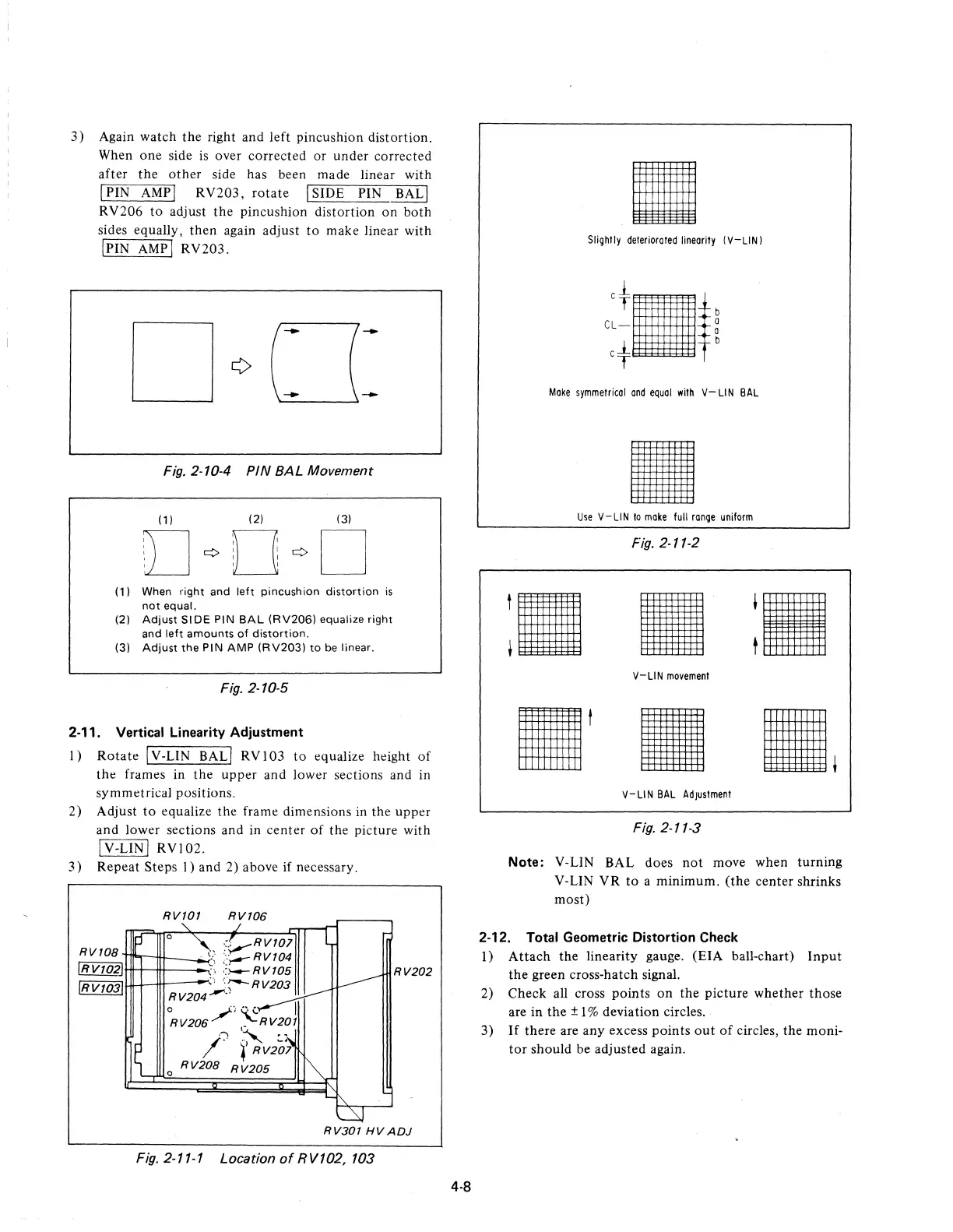
2-11. Vertical Linearity
Adjustment
I)
Rotate
IV-LIN BALI
RVI03
to
equalize height
of
tht:!
framt:!s
in
the
uppt:!r
and
lowt:!r
sections and in
symmt:!trical positions.
2) Adjust
to
equalizt:!
tht:!
framt:!
dimensions in the
uppt:!r
and lower sections and in
center
of
the picture with
ry-CiN]
RVI02.
3)
Repeat Steps
I)
and 2) above if necessary.
RVTOB
IRVT02]
IRV1031
p-
RVTOT
RVT06
'.:
.I
o
'\-.
::VRVTOl
...;:;
::i--'
RVT04
.,
-=
__
RVT05
~,
.'
:
':';""-RV203
RV204---"
o
/)",(.~
RV206
~RV20T
'''l
~
':~
/.
i'RV201
o R V20B R
V205
L
V
~
~
L..
I\.
L:J
RV202
RV30T
HVADJ
Fig.
2-11-1 Location
of
RV102, 103
4-8
•
Slighlly
deteriorated
linearity
(V-LIN I
Make
symmetrical
and
equal
with
V-LIN
SAL
•
Use
V-LIN
to
make
full
range
uniform
Fig.
2-11-2
•
V-LIN
movement
V-LIN
SAL
Adjustment
Fig.
2-11-3
Note:
V-LIN
SAL
does
not
move when turning
V-LIN
VR
to
a minimum.
(the
center shrinks
most)
2-12. Total Geometric Distortion Check
I)
Attach
the linearity gauge.
(EIA
ball-chart)
Input
the
green cross-hatch signal.
2) Check all cross
points
on
the
picture whether those
are in
the
± 1 % deviation circles.
3)
If
there are any excess
points
out
of
circles, the moni-
tor
should be adjusted again.











 To Next Page