EasyManua.ls Logo

Sony TRINITRON GDM-1601 - Page 33

Sony TRINITRON GDM-1601
67 pages
Print Icon
To Next Page IconTo Next Page
To Previous Page IconTo Previous Page
Loading...
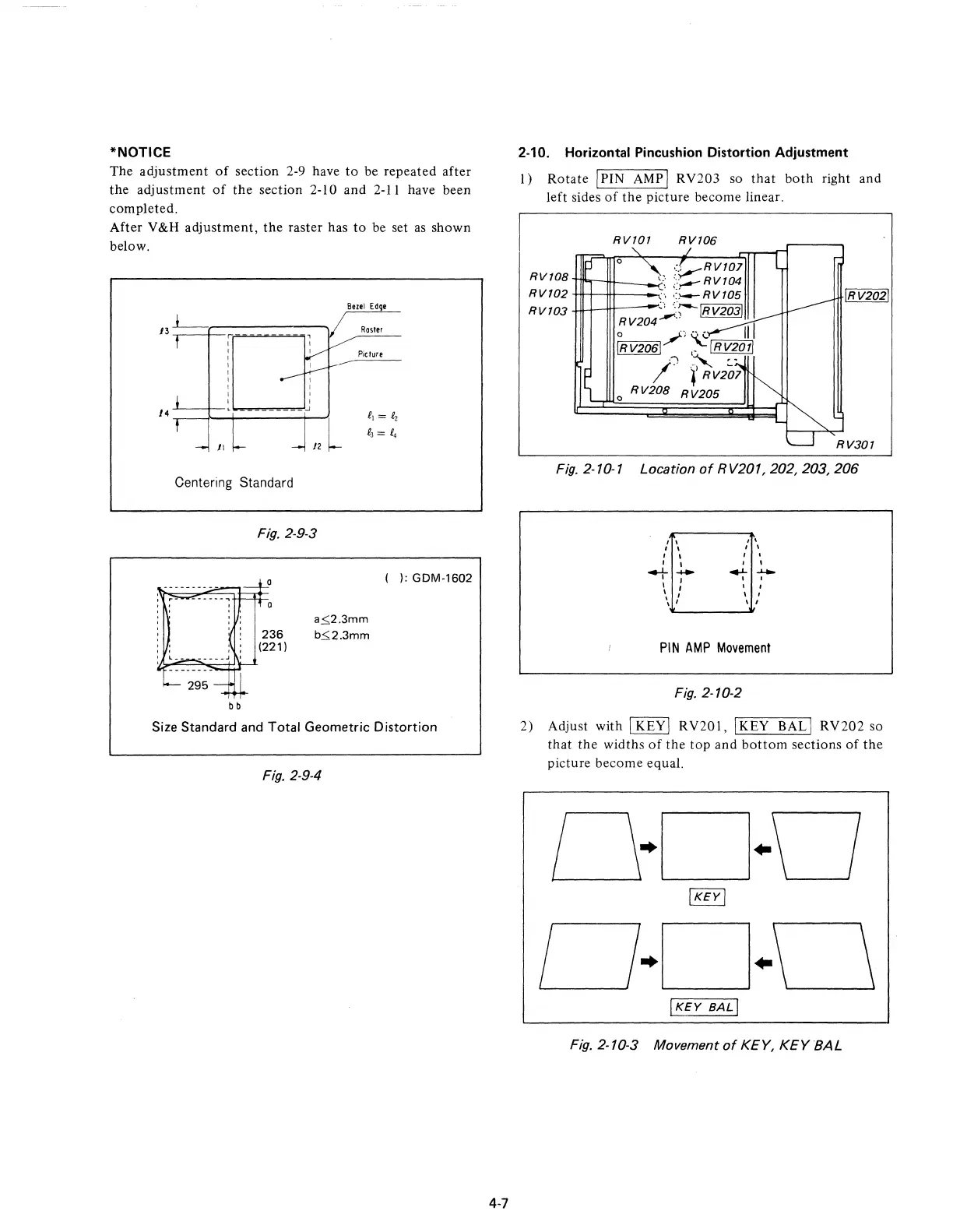
*NOTICE
The
adjustment
of
section 2-9 have
to
be repeated after
the
adjustment
of
the
section 2-10 and 2-11 have been
completed.
After V
&H
adjustment,
the
raster has
to
be set
as
shown
below.
Bezel
Ed
e
J3L-
Rosier
Picture
14
-'---t--
Centering Standard
bb
Fig.
2-9-3
236
(221)
a~2.3mm
b~2.3mm
( ): GDM-1602
Size Standard and Total Geometric
Distortion
Fig.
2-9-4
4-7
2-10. Horizontal Pincushion Distortion Adjustment
1)
Rotate
I PIN
AMP
I RV203 so
that
both
right and
left sides
of
the
picture become linear.
RV101
RV106
,:.,...--RVI01
RV
lOB
l11",----!H---_~\~
:"=::-
RV
104
RV102
\
::i---RVI05
R V 1
03
",
";---IR
V2031
RV204--"
o
.)
",
t
III
IRV2061/
~IRV2011
.')
.~
~.
/ 4
1
RV201
o
RV20B
R V205
RV301
Fig.
2-10-1 Location
of
RV201, 202, 203,
206
, \
, \
, I
I I
, \
, \
, .
I
-t~
I 1
4'-
----
I ,
I '
\ '
\ '
I ,
I ,
I I
PIN
AMP
Movement
Fig.
2-10-2
2) Adjust with
I KEYI RV201,
IKEY
BALI RV202 so
that
the
widths
of
the
top
and
bottom
sections
of
the
picture become equal.
IKEY
BALI
Fig.2-10-3 Movement
of
KEY,
KEYBAL

Related product manuals