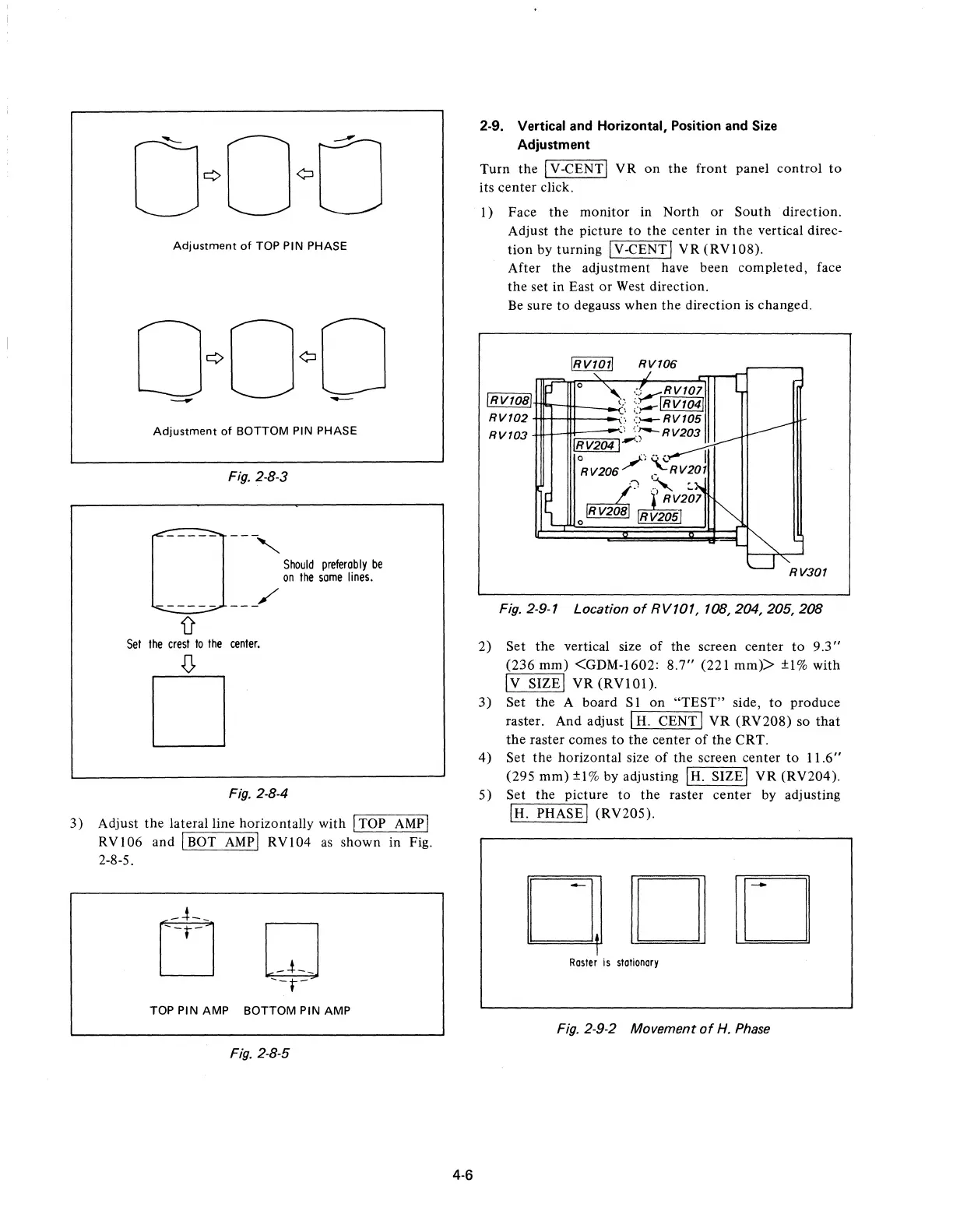
Adjustment
of
TOP PIN PHASE
Adjustment
of
BOTTOM PIN PHASE
Fig. 2-8-3
0
------
-,
Should
preferably
be
on
Ihe
some
lines.
------
-_/
D'
Sel
Ihe
cresl
10
Ihe
cenler.
.(J,
D
Fig. 2·8-4
3)
Adjust
the
lateral line horizontally with I TOP
AMP
I
RVI06
and I BOT
AMPI
RVI04
as
shown in Fig.
2-8-5.
TOP PIN AMP BOTTOM PIN AMP
Fig. 2-8-5
4·6
2-9. Vertical and Horizontal, Position and Size
Adjustment
Turn
the
I V -CENT I V R
on
the
front panel
control
to
its
center
click.
I)
Face
the
monitor in North
or
South
direction.
Adjust
the
picture
to
the
center in
the
vertical direc-
tion
by turning I V -CENT I
VR
(RV 1 08).
After the adjustment have been completed, face
the
set in East
or
West direction.
Be
sure
to
degauss when
the
direction
is
changed.
IRv1011
RV106
~
':v,RV101
i!JJ!J!l!lJT1I"'I-1tt-_..;.-\~
;;-,--1
R
V1
041
RV102
.:'
':l-4-RV105
RV103
",
('--RV203
IRv2041-"
°RV206/)
~RV20j
/~
~VI~}
o~
RV205
RV301
Fig. 2·9·7 Location
of
RV107,
708,204,205,208
2)
Set
the
vertical size
of
the
screen center
to
9.3"
(236
mm)
<GDM-1602:
8.7"
(221 mm»
±1%
with
Iv
SIZEI
VR
(RVI0l).
3)
Set
the
A board S 1 on
"TEST"
side,
to
produce
raster. And adjust I
H.
CENT I
VR
(RV208)
so
that
the
raster comes
to
the
center
of
the
CRT.
4)
Set
the
horizontal size
of
the screen center
to
11.6"
(295
mm)
±l%
by adjusting IH. SIZEI
VR
(RV204).
5)
Set the picture
to
the
raster center by adjusting
IH. PHASEI (RV205).
ODD
Rasler
is
stationary
Fig. 2·9·2 Movement
of
H.
Phase











 To Next Page