EasyManua.ls Logo

Sony Trinitron KV-13VM30 - Page 109

Sony Trinitron KV-13VM30
116 pages
Print Icon
To Next Page IconTo Next Page
To Previous Page IconTo Previous Page
Loading...
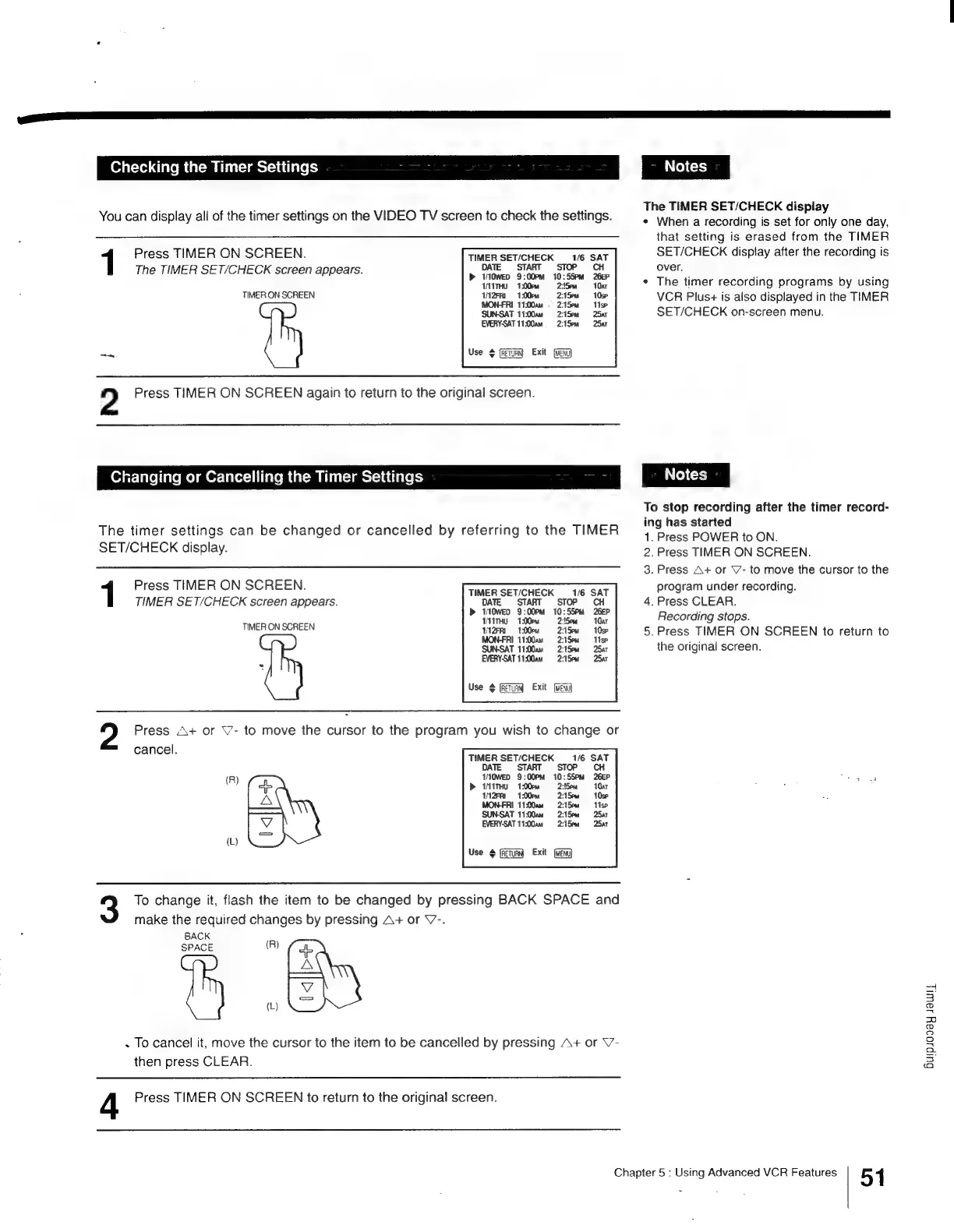
Checking
the
Timer
Settings
|
Notes
|
You
can
display
all
of
the
timer
settings
on
the
VIDEO
TV
screen
to
check
the
settings.
1
Press
TIMER
ON
SCREEN.
The
TIMER
SET/CHECK
screen
appears.
TIMER
SET/CHECK
1/6
DATE
START
STOP
®
110weD
9:00PM
10:55PM
ViiTHU
1:00PM
2:!5em
TIMER
ON
SCREEN
VI2FRI1:00em
2:15em
MON-FRI
11:00am
=
-2:15m
SUN-SAT
14:00am
=
-2:15em
EVERY-SAT
11:00am
=
.2:15em
—~
Use
¢
(ReTuaN
Exit
2
Press
TIMER
ON
SCREEN
again
to
return
to
the
original
screen.
Changing
or
Cancelling
the
Timer
Settings
The
timer
settings
can be
changed
or
cancelled
by
referring
to
the
TIMER
SET/CHECK
display.
Press
TIMER
ON
SCREEN.
TIMER
SET/CHECK
1/6
TIMER
SET/CHECK
screen
appears.
DATE
START
STOP
CI
>
1/10wED
9:00PM
TIMER
ON
SCREEN
eee
MON-FRI
11:00am
SUN-SAT
11:00em
EVERY-SAT
11:00am
Use
$
ReTuAN
Exit
Press
A+
or
Y7-
to
move
the
cursor
to
the
program
you
wish
to
change
or
cancel.
TIMER
SET/CHECK
16
DATE
START
STOP
Cl
1AOWED
9:00PM
b>
1A1THU
1:00pm
WA2FRt
1:00em
MON-FRI
11:00am
SUN-SAT
11:00am
EVERY-SAT
11:00am
Use
4
Exit
To
change
it,
flash
the
item
to
be
changed
by
pressing
BACK
SPACE
and
make
the
required
changes
by
pressing
A+
or
V-.
BACK
SPACE
(R)
Exc
(L)
=]
.
To
cancel
it,
move
the
cursor
to
the
item
to
be
cancelled
by
pressing
A+
or
V7-
then
press
CLEAR.
4
Press
TIMER
ON
SCREEN
to
return
to
the
original
screen.
The
TIMER
SET/CHECK
display
¢
When
a
recording
is
set
for
only
one
day,
that
setting
is
erased
from
the
TIMER
SET/CHECK
display
after
the
recording
is
over.
¢«
The
timer
recording
programs
by
using
VCR
Plus+
is
also
displayed
in
the
TIMER
SET/CHECK
on-screen
menu.
To
stop
recording
after
the
timer
record-
ing
has
started
1.
Press
POWER
to
ON.
2.
Press
TIMER
ON
SCREEN.
3.
Press
A+
or
V7-
to
move
the
cursor
to
the
program
under
recording.
4.
Press
CLEAR.
Recording
stops.
5.Press
TIMER
ON
SCREEN
to
return
to
the
original
screen.
Chapter
5
:
Using
Advanced
VCR
Features
51
Bulpsooay
soul)