EasyManua.ls Logo

Sony Trinitron KV-13VM30 - Connecting Other Equipment

Sony Trinitron KV-13VM30
116 pages
Print Icon
To Next Page IconTo Next Page
To Previous Page IconTo Previous Page
Loading...
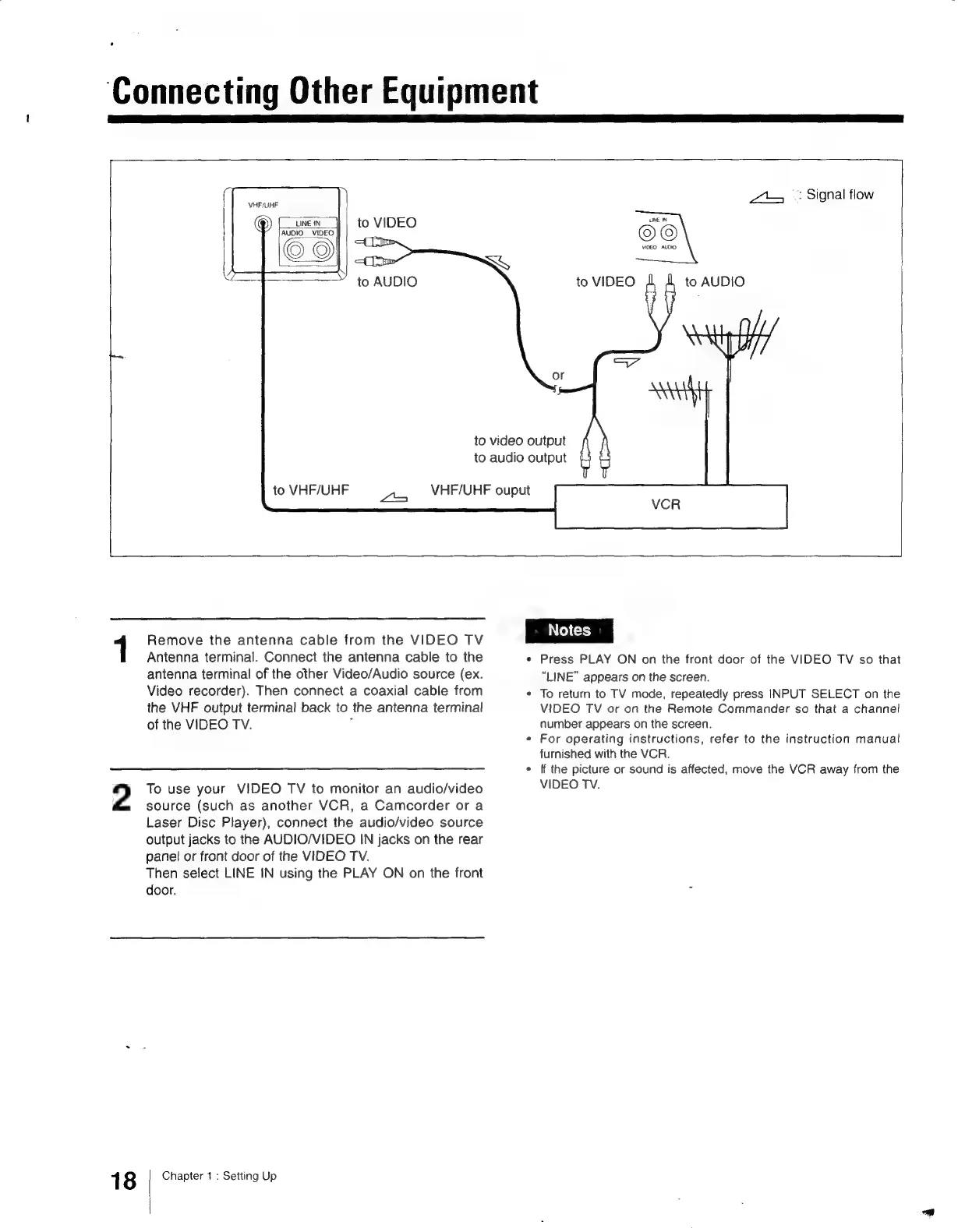
Connecting
Other
Equipment
Zt
+:
Signal
flow
VHF/UHF
to
VIDEO
AUDIO
VIDEO
to
AUDIO
to
VIDEO
to
video
output
to
audio
output
to
VHF/UHF
VHF/UHF
ouput
a5
Remove
the
antenna
cable
from
the
VIDEO
TV
|
Notes
|
1
Antenna
terminal.
Connect
the
antenna
cable
to
the
¢
Press
PLAY
ON
on
the
front
door
of
the
VIDEO
TV
so
that
antenna
terminal
of
the
other
Video/Audio
source
(ex.
“LINE”
appears
on
the
screen.
Video
recorder).
Then
connect
a
coaxial
cable
from
*
To
return
to
TV
mode,
repeatedly
press
INPUT
SELECT
on
the
the
VHF
output
terminal
back
to
the
antenna
terminal
VIDEO
TV
or
on
the
Remote
Commander
so
that
a
channel
of
the
VIDEO
TV.
:
number
appears
on the
screen.
¢
For
operating
instructions,
refer
to
the
instruction
manual
furnished
with
the
VCR.
OU
*
ff
the
picture
or
sound
is
affected,
move
the
VCR
away
from
the
2
To
use
your
VIDEO
TV
to
monitor
an
audio/video
VIDEO
TV.
source
(such
as
another
VCR,
a
Camcorder
or
a
Laser
Disc
Player),
connect
the
audio/video
source
output
jacks
to
the
AUDIO/VIDEO
IN
jacks
on
the
rear
panel
or
front
door
of
the
VIDEO
TV.
Then
select
LINE
IN
using
the
PLAY
ON
on
the
front
door.
1
8
Chapter
1
:
Setting
Up

Other manuals for Sony Trinitron KV-13VM30

Related product manuals