EasyManua.ls Logo

Sony Trinitron KV-13VM30 - Chapter 1: Setting up

Sony Trinitron KV-13VM30
116 pages
Print Icon
To Next Page IconTo Next Page
To Previous Page IconTo Previous Page
Loading...
Chapter
1:
Setting
Up
Connecting
TV
Antenna/Cable
aS
SS
a
aT
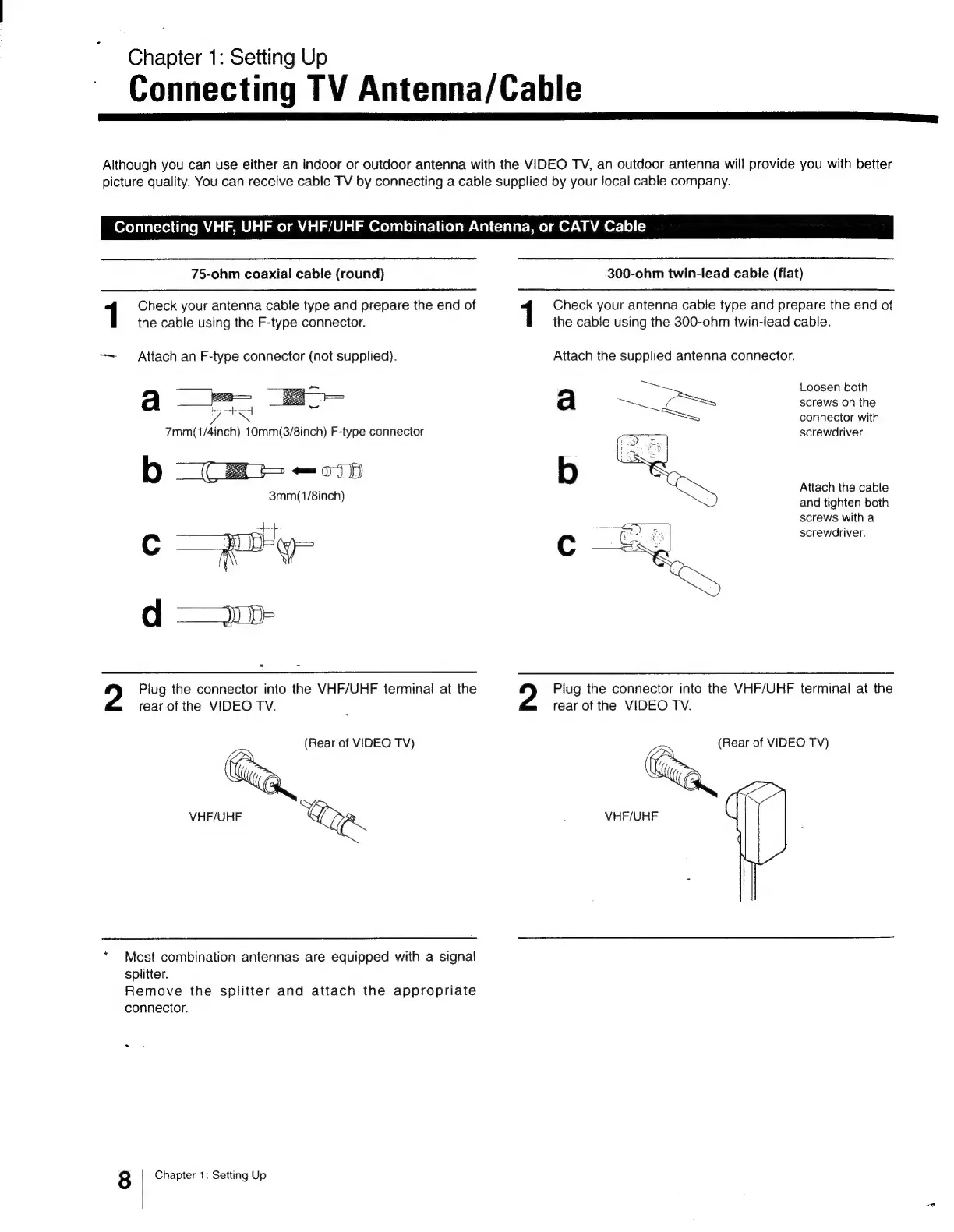
Although
you
can use
either
an
indoor
or
outdoor
antenna
with
the
VIDEO
TV,
an
outdoor
antenna
will
provide
you
with
better
picture
quality.
You
can
receive
cable
TV
by
connecting
a
cable
supplied
by
your
local
cable
company.
Connecting
VHF,
UHF
or
VHF/UHF
Combination
Antenna,
or
CATV
Cable
75-ohm
coaxial
cable
(round)
1
Check
your
antenna
cable
type
and
prepare
the
end
of
the
cable
using
the
F-type
connector.
-~
Attach
an
F-type
connector
(not
supplied).
7mm(1/4inch)
10mm(3/8inch)
F-type
connector
2
Plug
the
connector
into
the
VHF/UHF
terminal
at
the
rear
of
the
VIDEO
TV.
(Rear
of
VIDEO
TV)
VHF/UHF
a
*
Most
combination
antennas
are
equipped
with
a
signal
splitter.
Remove
the
splitter
and
attach
the
appropriate
connector.
8
Chapter
1:
Setting
Up
300-ohm
twin-lead
cable
(flat)
Check
your
antenna
cable
type
and
prepare
the
end
of
the
cable
using
the
300-ohm
twin-lead
cable.
Attach
the
supplied
antenna
connector.
a
b
fi
feu
Loosen
both
screws
on
the
connector
with
screwdriver.
Attach
the
cable
and
tighten
both
screws
with
a
screwdriver.
Piug
the
connector
into
the
VHF/UHF
terminal
at
the
rear
of
the
VIDEO
TV.
(Rear
of
VIDEO
TV)
y
VHF/UHF

Other manuals for Sony Trinitron KV-13VM30

Related product manuals