EasyManua.ls Logo

Sony Trinitron KV-13VM30 - Watching TV Programs

Sony Trinitron KV-13VM30
116 pages
Print Icon
To Next Page IconTo Next Page
To Previous Page IconTo Previous Page
Loading...
Chapter
2:
Using
Basic
VIDEO
TV
Features
~
Watching
TV
Programs
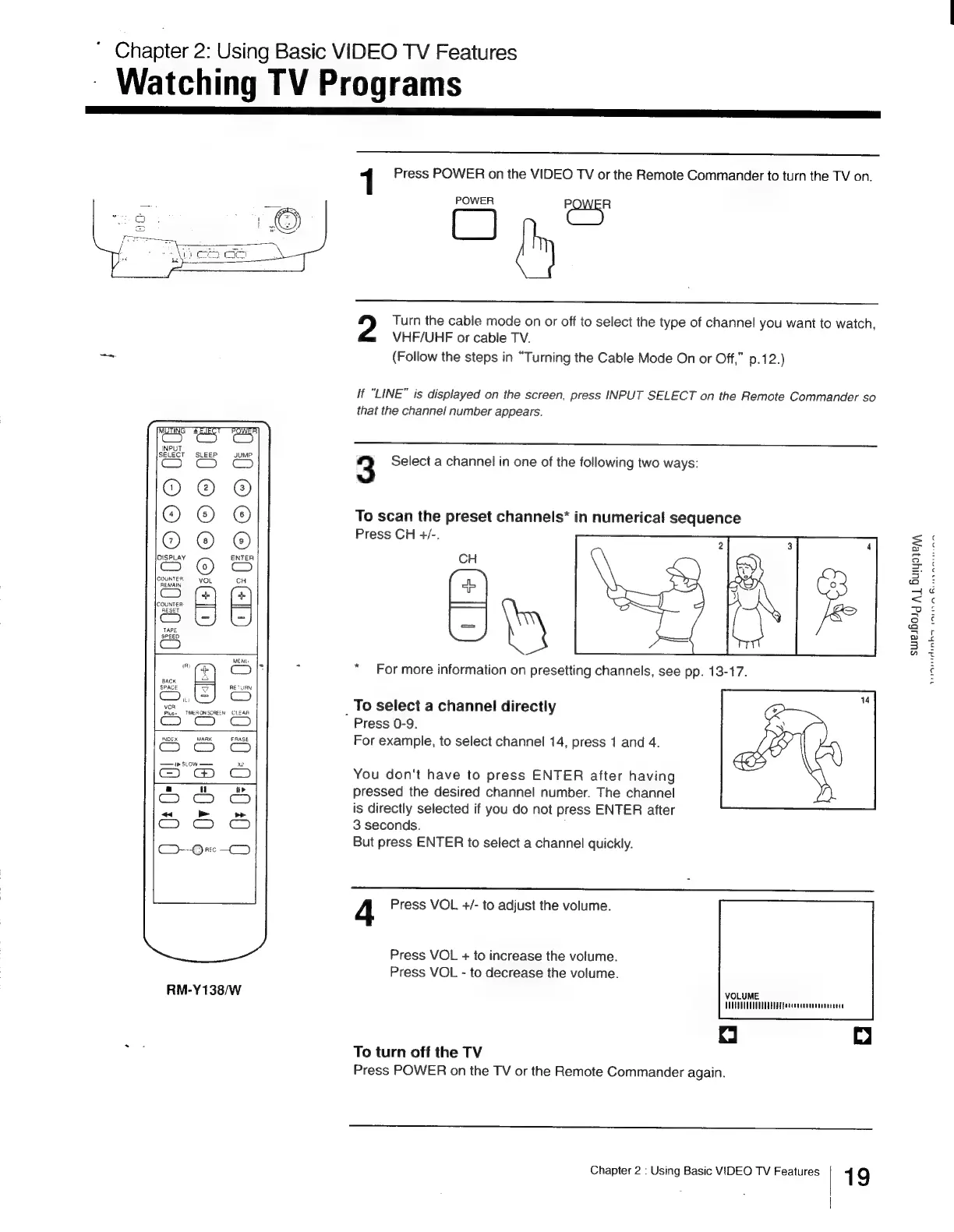
1
Press
POWER
on
the
VIDEO
TV
or
the
Remote
Commander
to
turn
the
TV
on.
POWER
Co
Turn
the
cable
mode
on
or
off
to
select the
type
of
channel
you
want
to
watch,
VHF/UHF
or
cable
TV.
_~~
(Follow
the
steps
in
“Turning
the
Cable
Mode
On
or
Off,”
p.12.)
if
“LINE”
is
displayed
on
the
screen,
press
INPUT
SELECT
on
the
Remote
Commander
so
that
the
channel
number
appears.
3
Select
a
channel
in
one
of
the
following
two
ways:
To
scan
the
preset
channels*
in
numerical
sequence
Press
CH
+/-.
HOROROME
Oe
©
(
GB
C
[+20
<
oC
1d
2
.
“For
more
information
on
presetting
channels,
see
pp.
13-17.
To
select
a
channel
directly
vcr
lus~_
TMEHONSCREEN
CLEAR
Press
0-9.
as
e&
&
For
example,
to
select
channel
14,
press
1
and
4.
Sa
You
don't
have
to
press
ENTER
after
having
Oh
b
pressed
the
desired
channel
number.
The
channel
ee
See
is
directly
selected
if
you
do
not
press
ENTER
after
C3765:
-€
3
seconds.
-Qv0
—D
But
press
ENTER
to
select
a
channel
quickly.
4
Press
VOL
+/-
to
adjust
the
volume.
Press
VOL
+
to
increase
the
volume.
Press
VOL
-
to
decrease
the
volume.
RM-Y138/W
VOLUME.
UUTEUUUUTVUOETE
AST
Patcecceocnennnetceds
| C
Press
POWER
on
the
TV
or
the
Remote
Commander
again.
~
To
turn
off
the
TV
Chapter
2
:
Using
Basic
VIDEO
TV
Features
19
swesborg
A
Buiyaier,
nF
AaniAimha
wanes

Other manuals for Sony Trinitron KV-13VM30

Related product manuals