EasyManua.ls Logo

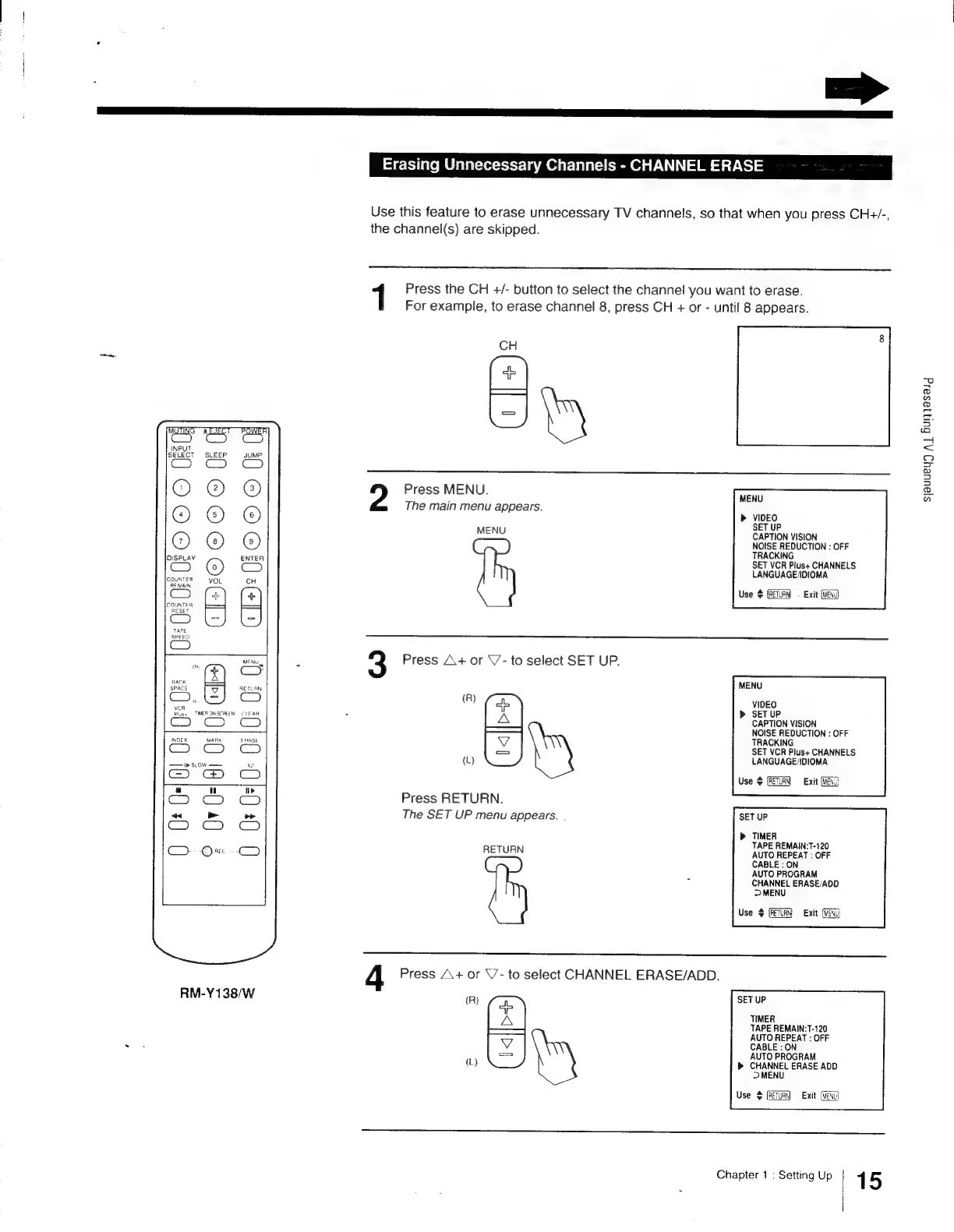
Sony Trinitron KV-13VM30 - Erasing Unnecessary Channels - CHANNEL ERASE

Sony Trinitron KV-13VM30
116 pages
Print Icon
To Next Page IconTo Next Page
To Previous Page IconTo Previous Page
Loading...
me
3D
ic
a
a
ma
m.
io}
a
OOO)
°
a
:(J
5
D
2
z
>
z
Bo
ze
BS
|
22
Fe
AF
z
use
TMERONSCREEN
CLEAR
INDEX
MARK
ERASE
—Ir
SLOW
xe
es)
a
u
tir
Cc)
~
Lal
>
G9)
1D
eG
DO
On
-
eee
=
SS
RM-Y138/W
Erasing
Unnecessary
Channels
-
CHANNEL
ERASE
Use
this
feature
to
erase
unnecessary
TV
channels,
so
that
when
you
press
CH+/-,
the
channel(s)
are
skipped.
1
Press
the
CH
+/-
button
to
select
the
channel
you
want
to
erase.
For
example,
to
erase
channel
8,
press
CH
+
or
-
until
8
appears.
CH
Shy
Press
MENU.
The
main
menu
appears.
sjauueug
A}
Buijeseid
MENU
VIDEO
SET
UP
CAPTION
VISION
NOISE
REDUCTION
:
OFF
MENU
TRACKING
SET
VCR
Plus+
CHANNELS
LANGUAGE/IOIOMA
Use
$
(RETURN
=
Exit
(MEN
3
Press
A+
or
\/-
to
select
SET
UP.
MENU
(R)
A
VIDEO
K
SETUP
CAPTION
VISION
NOISE
REDUCTION
:
OFF
TRACKING
SET
VCR
Plus+
CHANNELS
(L)
LANGUAGE/IDIOMA
Use
¢
[RETURN
Exit
(MEN
Press
RETURN.
The
SET
UP
menu
appears.
SET
UP
TIMER
TAPE
REMAIN:T-120
AUTO
REPEAT
:
OFF
CABLE
:
ON
AUTO
PROGRAM
CHANNEL
ERASE/ADD
>
MENU
Use
$
(RETURN
Exit
(WEN
RETURN
4
Press
A+
or
V’-
to
select
CHANNEL
ERASE/ADD.
(R}
zs
SET
UP
A
TIMER
TAPE
REMAIN:T-120
AUTO
REPEAT
:
OFF
CABLE
:
ON
AUTO
PROGRAM
(L)
D>
CHANNEL
ERASE
ADD
>
MENU
Use
+
Exit
(EW
Chapter
1
:
Setting
Up
|
15

Other manuals for Sony Trinitron KV-13VM30

Related product manuals