EasyManua.ls Logo

Sony Trinitron KV-13VM30 - Page 72

Sony Trinitron KV-13VM30
116 pages
Print Icon
To Next Page IconTo Next Page
To Previous Page IconTo Previous Page
Loading...
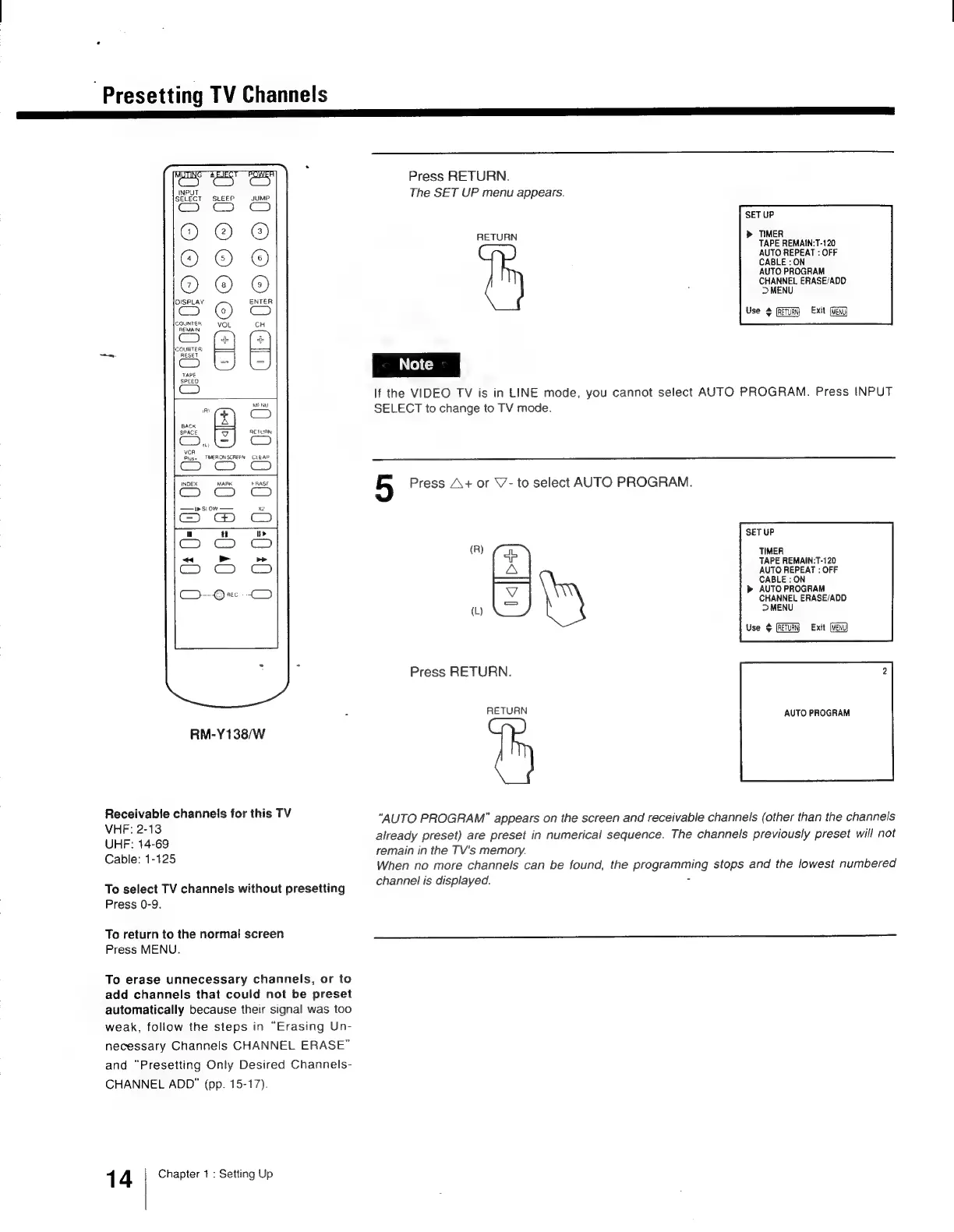
Presetting
TV
Channels
oc
|___]
Receivable
channels
for
this
TV
VHF:
2-13
UHF:
14-69
Cable:
1-125
Ss
¢
z
a
D
2
2
3
fa
a
ae
m
ES
5
zs)
2B
oS
SPACE
ES
RETURN
VCR
Pluss
TMERONSCRFEN
CLEAR
0
0
0
INDEX
MARK
ERASF
——1
siow
0:0
Sl
>>
rics
Go
O-Orx
RM-Y138/W
Press
RETURN.
The
SET
UP
menu
appears.
SET
UP
RETURN
>
TIMER
TAPE
REMAIN:T-120
AUTO
REPEAT
:
OFF
CABLE
:
ON
AUTO
PROGRAM
CHANNEL
ERASE/ADD
>
MENU
Use
#
(RETURN)
Exit
If
the
VIDEO
TV
is
in
LINE
mode,
you
cannot
select
AUTO
PROGRAM.
Press
INPUT
SELECT
to
change
to
TV
mode.
5
Press
A+
or
V-
to
select
AUTO
PROGRAM.
SET
UP
(R)
a
TIMER
TAPE
REMAIN-T-120
A
AUTO
REPEAT
:
OFF
-——
CABLE
:
ON
AUTO
PROGRAM
CHANNEL
ERASE/ADD
(L)
DMENU
Use
$
Exit
Press
RETURN.
2
RETURN
AUTO
PROGRAM
“AUTO
PROGRAM”
appears
on
the
screen
and
receivable
channels
(other
than
the
channels
already
preset)
are
preset
in
numerical
sequence.
The
channels
previously
preset
will
not
remain
in
the
TV's
memory.
When
no
more
channels
can
be
found,
the
programming
stops
and
the
lowest
numbered
To
select
TV
channels
without
presetting
Press
0-9.
To
return
to
the
normal
screen
Press
MENU.
To
erase
unnecessary
channels,
or
to
add
channels
that
could
not
be
preset
automatically
because
their
signal
was
too
weak,
follow
the
steps
in
“Erasing
Un-
necessary
Channels
CHANNEL
ERASE”
and
“Presetting
Only
Desired
Channels-
CHANNEL
ADD”
(pp.
15-17).
1
4
Chapter
1
:
Setting
Up
channel
is
displayed.
=

Other manuals for Sony Trinitron KV-13VM30

Related product manuals