EasyManua.ls Logo

Sony Trinitron KV-13VM30 - Using Closed Captions Osc. Insicinis Scituncdetaiaenneiia Acute

Sony Trinitron KV-13VM30
116 pages
Print Icon
To Next Page IconTo Next Page
To Previous Page IconTo Previous Page
Loading...
fad
3
»
Be
re
ECT
Q
a
m
m
vu
rom
=
s
a]
OTOTO
at)
Oo
J
©).©
©
[)
a
on
tong
nS
af
=
Uses
ss
4)9
=
S
7a
3
Ag
>
<
m
Zz
=I
nm
D
<
(o}
124
vcr
+
TINERONSCHEEN
CLEAR
MARK
INDEX
ERASE
i
SLOW
x2
&)
ce
a
ut
Cy
Lal
>
Gs)
"GO
G5
--O
re
—CD
ib
ner
RM-Y138/W
Using
Closed
Caption
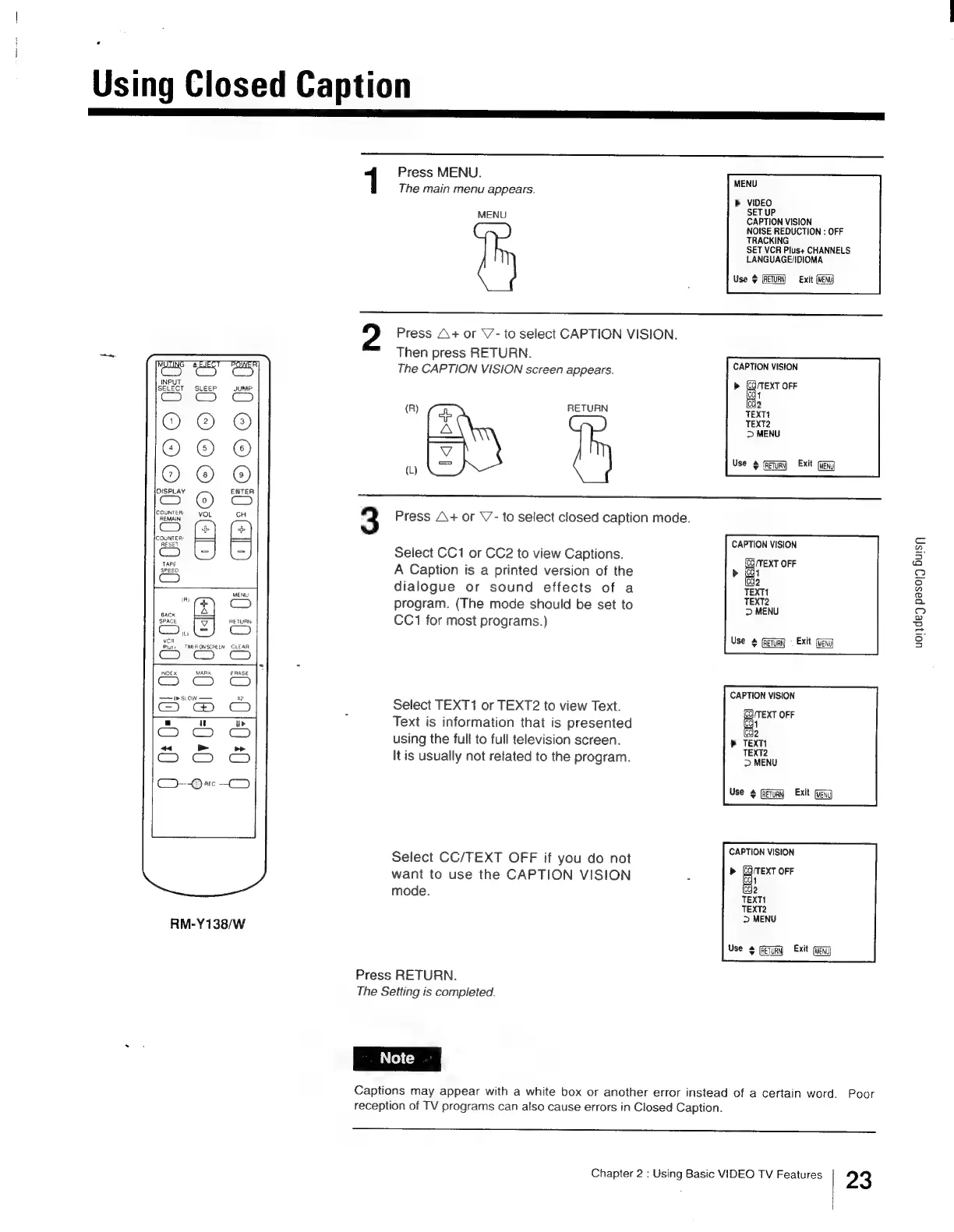
Press
MENU.
.
MENU
The
main
menu
appears.
>
VIDEO
SET
UP
CAPTION
VISION
NOISE
REDUCTION
:
OFF
TRACKING
SET
VCR
Plus+
CHANNELS
LANGUAGE/IDIOMA
MENU
Use
$
(RETURN
==
Exit
(MENU)
Press
A+
or
V7-
to
select
CAPTION
VISION.
Then
press
RETURN.
The
CAPTION
VISION
screen
appears.
CAPTION
VISION
>
Be
OFF
cg
icc
1
2
(R)
RETURN
TEXT1
TEXT2
>
MENU
w
ES
Use
4
fetum}
Exit
Geng
3
Press
A+
or
V’-
to
select
closed
caption
mode.
3
:
CAPTION
VISION
Select
CC1
or
CC2
to
view
Captions.
7 :
7
(CQ
TEXT
OFF
A
Caption
is
a
printed
version
of
the
>
(O41
:
(oda
dialogue
or
sound
effects
of
a
TEXT
program.
(The
mode
should
be
set
to
ei
CC1
for
most
programs.)
uoljdey
paso)
Buisy
Use
&
(Rerun
=
Exit
(MENU)
CAPTION
VISION
Select
TEXT1
or
TEXT2
to
view
Text.
PATE
OFE
Text
is
information
that
is
presented
et
using
the
full
to
full
television
screen.
>
TEXT!
It
is
usually
not
retated
to
the
program.
EN
Use
©
(Remy
Exit
Select
CC/TEXT
OFF
if
you
do
not
saan
ecis
want
to
use
the
CAPTION
VISION
:
Po
TEXT
mode.
iodo
TEXT1
TEXT2
>
MENU
Use
4
feu)
Exit
Geng
Press
RETURN.
The
Setting
is
completed.
Captions
may
appear
with
a
white
box
or
another
error
instead
of
a
certain
word.
Poor
reception
of
TV
programs
can
also
cause
errors
in
Closed
Caption.
Chapter
2
:
Using
Basic
VIDEO
TV
Features
23

Other manuals for Sony Trinitron KV-13VM30

Related product manuals