EasyManua.ls Logo

Sony Trinitron KV-13VM30 - Page 82

Sony Trinitron KV-13VM30
116 pages
Print Icon
To Next Page IconTo Next Page
To Previous Page IconTo Previous Page
Loading...
Chapter
3:
Using
Advanced
TV
Features
‘Using
Noise
Reduction
Function
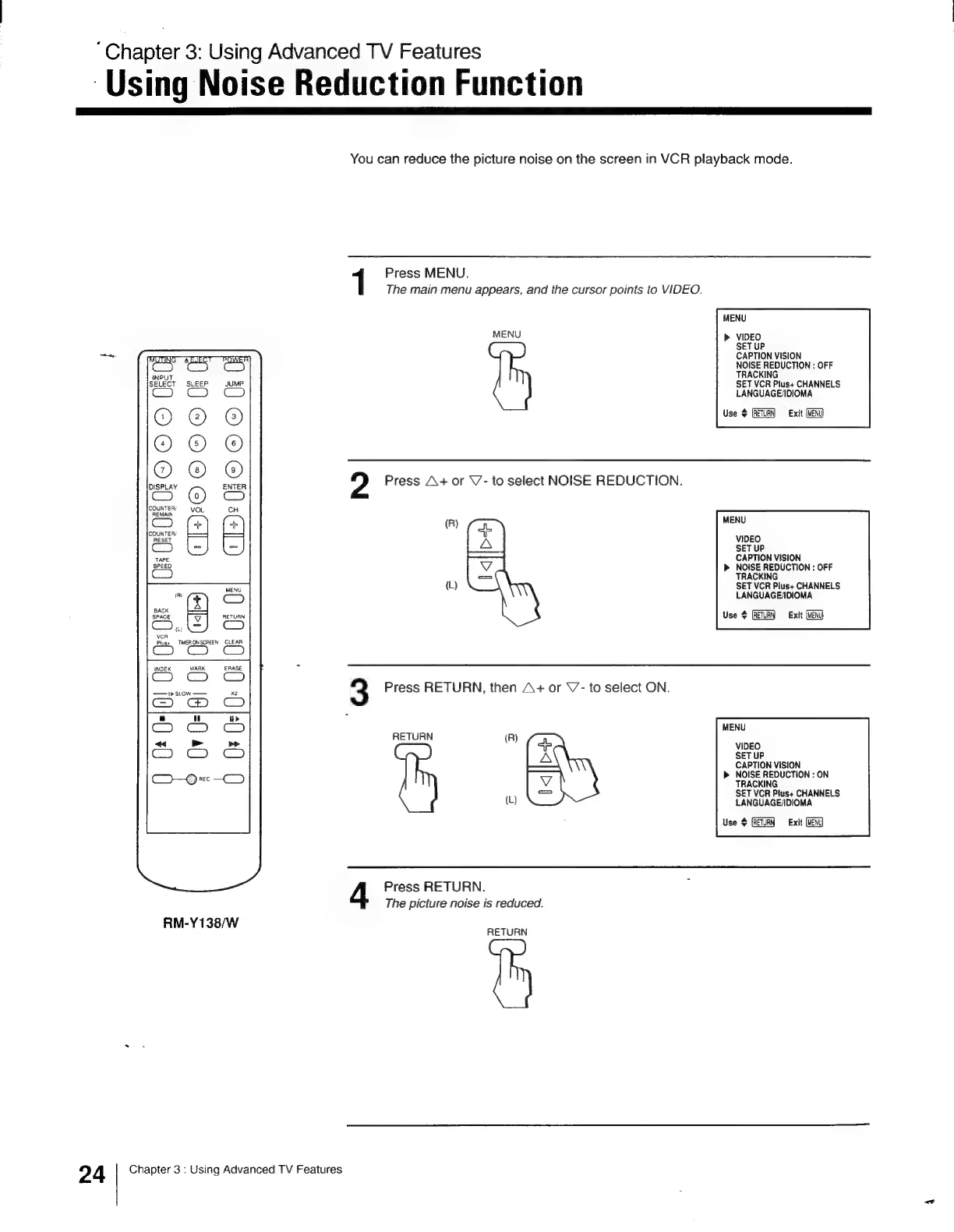
You
can
reduce
the
picture
noise
on
the
screen
in
VCR
playback
mode.
1
Press
MENU.
The
main
menu
appears,
and
the
cursor
points
to
VIDEO.
MENU
MENU
VIDEO
SET
UP
CAPTION
VISION
NOISE
REDUCTION
:
OFF
TRACKING
SET
VCR
Pius+
CHANNELS
LANGUAGE/DIOMA
Use
$
(RETURN)
«=
Exit
oe
He
O@
©
(!
2
Press
A+
or
V-
to
select
NOISE
REDUCTION.
(R)
J
MENU
A
VIDEO
SET
UP
CAPTION
VISION
NOISE
REDUCTION
:
OFF
TRACKING
(L)
SET
VCR
Plus+
CHANNELS
LANGUAGE/DIOMA
Use
$
Exit
m
Zz
s
m
a
CO
cH
J)
ay
vcA
Plus+
MERON
SCREEN
INDEX
MARK
1
SLOW
——
3
Press
RETURN,
then
A+
or
V’-
to
select
ON.
MENU
RETURN
(R)
ae
}_—\
CAPTION
VISION
NOISE
REDUCTION
:
ON
TRACKING
SET
VCR
Plus+
CHANNELS
(L)
LANGUAGE/IDIOMA
Use
¢
(RETURN
Exit
(MENU
Press
RETURN.
The
picture
noise
is
reduced.
RM-Y138/W
RETURN
24
Chapter
3
:
Using
Advanced
TV
Features

Other manuals for Sony Trinitron KV-13VM30

Related product manuals