EasyManua.ls Logo

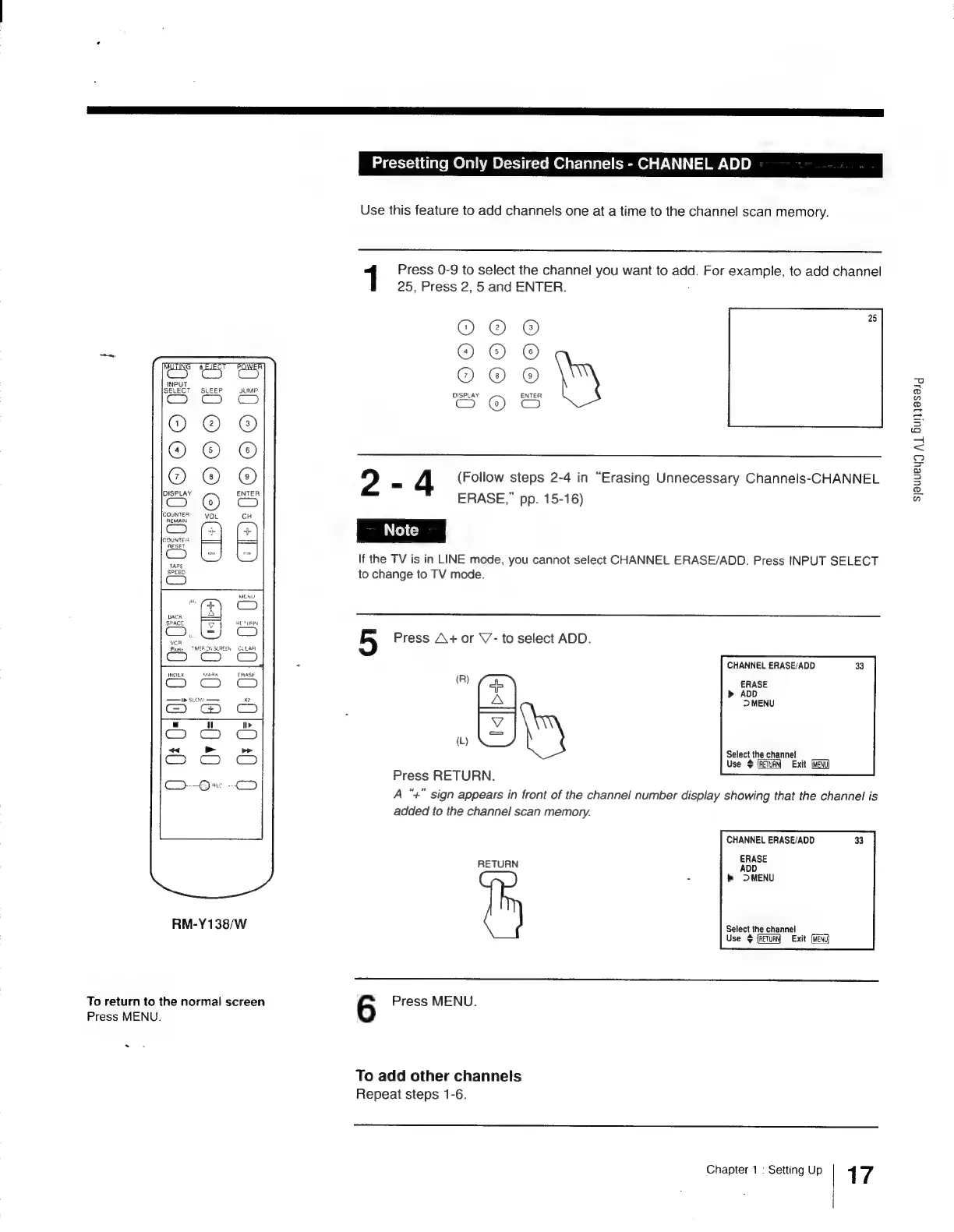
Sony Trinitron KV-13VM30 - Presetting Only Desired Channels - CHANNEL ADD

Sony Trinitron KV-13VM30
116 pages
Print Icon
To Next Page IconTo Next Page
To Previous Page IconTo Previous Page
Loading...
O66
I
C
[20
INDEX
MAAK
—r
SLOW’
——
Ce
&
RM-Y138/W
To
return
to
the
normal
screen
Press
MENU.
Presetting
Only
Desired
Channels
-
CHANNEL
ADD
Use
this
feature
to
add
channels
one
at
a
time
to
the
channel
scan
memory.
1
Press
0-9
to
select
the
channel
you
want
to
add.
For
example,
to
add
channel
25,
Press
2,
5
and
ENTER.
Or@
@
0
OO
CE
OEG)
03
OO
2
«=
4
(Follow
steps
2-4
in
“Erasing
Unnecessary
Channels-CHANNEL
ERASE,”
pp.
15-16)
If
the
TV
is
in
LINE
mode,
you
cannot
select
CHANNEL
ERASE/ADD.
Press
INPUT
SELECT
to
change
to
TV
mode.
5
Press
A+
or
\7-
to
select
ADD.
(R)
a
(L)
(=)
Press
RETURN.
A
“+”
sign
appears
in
front
of
the
channel
number
display
showing
that
the
channel
is
added
to
the
channel
scan
memory.
CHANNEL
ERASE/ADD
Select
the
channel
Use
$
(RETURN)
Exit
[MENU
CHANNEL
ERASE/ADD
ERASE
RETURN
ADD
-
OMENU
Select
the
channel
Use
¢
(RETURN
Exit
6
Press
MENU.
To
add
other
channels
Repeat
steps
1-6.
Chapter
1
:
Setting
Up
1
7
sjauueu)
Al
Bulijasaig

Other manuals for Sony Trinitron KV-13VM30

Related product manuals